Securing REST APIs is essential in modern Spring Boot applications where APIs often expose business functionalities to external systems, web apps, or mobile clients. Without proper authentication and authorization, APIs can be exploited, leading to data leaks or unauthorized access.
Spring Security provides a robust and customizable framework to protect RESTful endpoints using token-based authentication, role-based access, and stateless sessions.
Core Concepts
- Authentication: Verifies user identity using credentials such as username/password, OAuth2, or JWT.
- Authorization: Determines access to resources based on user roles or permissions.
- Token-Based Authentication: Uses JWT (JSON Web Tokens) for stateless API authentication.
- RBAC (Role-Based Access Control): Restricts access based on user roles.
- Security Filters: Intercepts incoming requests and applies security validations.
Implementation Steps
Step 1: Create Spring Boot Project
Create a new project using Spring Initializr with dependencies:
- Spring Web
- Spring Security
- Spring Data JPA
- MySQL Driver
- Lombok
- DevTools
Add external dependencies for JWT handling and JAXB in the pom.xml:
<dependency>
    <groupId>io.jsonwebtoken</groupId>
    <artifactId>jjwt</artifactId>
    <version>0.9.1</version>
</dependency>
<dependency>
    <groupId>javax.xml.bind</groupId>
    <artifactId>jaxb-api</artifactId>
    <version>2.3.1</version>
</dependency>
<dependency>
    <groupId>org.glassfish.jaxb</groupId>
    <artifactId>jaxb-runtime</artifactId>
    <version>2.3.1</version>
</dependency>
<dependency>
    <groupId>javax.activation</groupId>
    <artifactId>activation</artifactId>
    <version>1.1.1</version>
</dependency>
Project Structure:

Step 2: Configure Database
In application.properties:
spring.application.name=securing-rest-api
spring.datasource.url=jdbc:mysql://localhost:3306/blog_db
spring.datasource.username=root
spring.datasource.password=
spring.datasource.driver-class-name=com.mysql.cj.jdbc.Driver
spring.jpa.hibernate.ddl-auto=update
spring.jpa.database-platform=org.hibernate.dialect.MySQLDialect
Step 3: Create the User Entity
package org.example.securingrestfulapi.model;

import jakarta.persistence.*;
import lombok.*;

@Entity
@Data
@AllArgsConstructor
@NoArgsConstructor
public class User {
    @Id
    @GeneratedValue(strategy = GenerationType.IDENTITY)
    private Long id;
    private String username;
    private String password;
}
Step 4: Authentication Request DTO
package org.example.securingrestfulapi.model;

import lombok.*;

@Data
@AllArgsConstructor
@NoArgsConstructor
public class AuthenticationRequest {
    private String username;
    private String password;
}
Step 5: User Repository
package org.example.securingrestfulapi.repository;

import org.example.securingrestfulapi.model.User;
import org.springframework.data.jpa.repository.JpaRepository;


public interface UserRepository extends JpaRepository<User, Long> {
    User findByUsername(String username);
}
Step 6: Create CustomUserDetailsService
Implements UserDetailsService to load users from the database.
package org.example.securingrestfulapi.service;

import org.example.securingrestfulapi.model.User;
import org.example.securingrestfulapi.repository.UserRepository;
import org.springframework.beans.factory.annotation.Autowired;
import org.springframework.security.core.userdetails.*;
import org.springframework.stereotype.Service;
import java.util.ArrayList;

@Service
public class CustomUserDetailsService implements UserDetailsService {

    @Autowired
    private UserRepository repository;

    @Override
    public UserDetails loadUserByUsername(String username) throws UsernameNotFoundException {
        User user = repository.findByUsername(username);
        if (user == null)
            throw new UsernameNotFoundException("User not found");
        return new org.springframework.security.core.userdetails.User(user.getUsername(), user.getPassword(), new ArrayList<>());
    }
}
Step 7: Create JwtUtil class
Handles token generation, validation, and extraction.
package org.example.securingrestfulapi.util;

import io.jsonwebtoken.*;
import org.springframework.security.core.userdetails.UserDetails;
import org.springframework.stereotype.Service;
import java.util.*;
import java.util.function.Function;

@Service
public class JwtUtil {

    private String SECRET_KEY = "secret";

    public String extractUsername(String token) {
        return extractClaim(token, Claims::getSubject);
    }

    public Date extractExpiration(String token) {
        return extractClaim(token, Claims::getExpiration);
    }

    public <T> T extractClaim(String token, Function<Claims, T> claimsResolver) {
        final Claims claims = Jwts.parser().setSigningKey(SECRET_KEY).parseClaimsJws(token).getBody();
        return claimsResolver.apply(claims);
    }

    private Boolean isTokenExpired(String token) {
        return extractExpiration(token).before(new Date());
    }

    public String generateToken(UserDetails userDetails) {
        return Jwts.builder().setSubject(userDetails.getUsername())
                .setIssuedAt(new Date(System.currentTimeMillis()))
                .setExpiration(new Date(System.currentTimeMillis() + 1000 * 60 * 60 * 10))
                .signWith(SignatureAlgorithm.HS256, SECRET_KEY).compact();
    }

    public Boolean validateToken(String token, UserDetails userDetails) {
        return (extractUsername(token).equals(userDetails.getUsername()) && !isTokenExpired(token));
    }
}
Step 8: JWT Request Filter
Intercepts requests and validates JWT tokens.
package org.example.securingrestfulapi.config;

import jakarta.servlet.*;
import jakarta.servlet.http.*;
import org.example.securingrestfulapi.service.CustomUserDetailsService;
import org.example.securingrestfulapi.util.JwtUtil;
import org.springframework.beans.factory.annotation.Autowired;
import org.springframework.security.authentication.UsernamePasswordAuthenticationToken;
import org.springframework.security.core.context.SecurityContextHolder;
import org.springframework.security.core.userdetails.UserDetails;
import org.springframework.security.web.authentication.WebAuthenticationDetailsSource;
import org.springframework.stereotype.Component;
import org.springframework.web.filter.OncePerRequestFilter;
import java.io.IOException;

@Component
public class JwtRequestFilter extends OncePerRequestFilter {

    @Autowired
    private JwtUtil jwtUtil;
    @Autowired
    private CustomUserDetailsService userDetailsService;

    @Override
    protected void doFilterInternal(HttpServletRequest request, HttpServletResponse response, FilterChain chain)
            throws ServletException, IOException {

        final String header = request.getHeader("Authorization");
        String username = null;
        String token = null;

        if (header != null && header.startsWith("Bearer ")) {
            token = header.substring(7);
            username = jwtUtil.extractUsername(token);
        }

        if (username != null && SecurityContextHolder.getContext().getAuthentication() == null) {
            UserDetails userDetails = userDetailsService.loadUserByUsername(username);
            if (jwtUtil.validateToken(token, userDetails)) {
                UsernamePasswordAuthenticationToken authToken =
                        new UsernamePasswordAuthenticationToken(userDetails, null, userDetails.getAuthorities());
                authToken.setDetails(new WebAuthenticationDetailsSource().buildDetails(request));
                SecurityContextHolder.getContext().setAuthentication(authToken);
            }
        }
        chain.doFilter(request, response);
    }
}
Step 9: Security Configuration
Configures authentication, endpoints, and stateless sessions.
package org.example.securingrestfulapi.config;

import org.example.securingrestfulapi.service.CustomUserDetailsService;
import org.springframework.beans.factory.annotation.Autowired;
import org.springframework.context.annotation.*;
import org.springframework.security.authentication.*;
import org.springframework.security.config.annotation.method.configuration.EnableGlobalMethodSecurity;
import org.springframework.security.config.annotation.web.builders.HttpSecurity;
import org.springframework.security.config.annotation.web.configuration.EnableWebSecurity;
import org.springframework.security.config.http.SessionCreationPolicy;
import org.springframework.security.crypto.bcrypt.BCryptPasswordEncoder;
import org.springframework.security.crypto.password.PasswordEncoder;
import org.springframework.security.web.*;
import org.springframework.security.web.authentication.UsernamePasswordAuthenticationFilter;

@Configuration
@EnableWebSecurity
@EnableGlobalMethodSecurity(prePostEnabled = true)
public class SecurityConfig {

    @Autowired
    private JwtRequestFilter jwtRequestFilter;

    @Bean
    public PasswordEncoder passwordEncoder() {
        return new BCryptPasswordEncoder();
    }

    @Bean
    public AuthenticationManager authenticationManager(AuthenticationConfiguration configuration) throws Exception {
        return configuration.getAuthenticationManager();
    }

    @Bean
    public SecurityFilterChain filterChain(HttpSecurity http) throws Exception {
        http.csrf().disable()
                .authorizeHttpRequests(auth -> auth
                        .requestMatchers("/api/register", "/api/login").permitAll()
                        .anyRequest().authenticated())
                .sessionManagement(session -> session.sessionCreationPolicy(SessionCreationPolicy.STATELESS));

        http.addFilterBefore(jwtRequestFilter, UsernamePasswordAuthenticationFilter.class);
        return http.build();
    }
}
Step 10: Create AuthController
Handles user registration, login, and testing secured endpoints.
package org.example.securingrestfulapi.controller;

import org.example.securingrestfulapi.model.*;
import org.example.securingrestfulapi.repository.UserRepository;
import org.example.securingrestfulapi.service.CustomUserDetailsService;
import org.example.securingrestfulapi.util.JwtUtil;
import org.springframework.beans.factory.annotation.Autowired;
import org.springframework.security.authentication.*;
import org.springframework.security.core.userdetails.UserDetails;
import org.springframework.security.crypto.password.PasswordEncoder;
import org.springframework.web.bind.annotation.*;

@RestController
@RequestMapping("/api")
public class AuthController {

    @Autowired
    private AuthenticationManager authenticationManager;
    @Autowired
    private CustomUserDetailsService userDetailsService;
    @Autowired
    private UserRepository repository;
    @Autowired
    private PasswordEncoder encoder;
    @Autowired
    private JwtUtil jwtUtil;

    @PostMapping("/register")
    public String registerUser(@RequestBody User user) {
        user.setPassword(encoder.encode(user.getPassword()));
        repository.save(user);
        return "User registered successfully";
    }

    @PostMapping("/login")
    public String loginUser(@RequestBody AuthenticationRequest request) {
        authenticationManager.authenticate(new UsernamePasswordAuthenticationToken(request.getUsername(), request.getPassword()));
        UserDetails userDetails = userDetailsService.loadUserByUsername(request.getUsername());
        return jwtUtil.generateToken(userDetails);
    }

    @GetMapping("/hello")
    public String hello() {
        return "Hello, Secure World!";
    }
}
Step 11: Main class
package org.example.securingrestfulapi;

import org.springframework.boot.SpringApplication;
import org.springframework.boot.autoconfigure.SpringBootApplication;

@SpringBootApplication
public class SecuringRestApiApplication {
    public static void main(String[] args) {
        SpringApplication.run(SecuringRestApiApplication.class, args);
    }
}
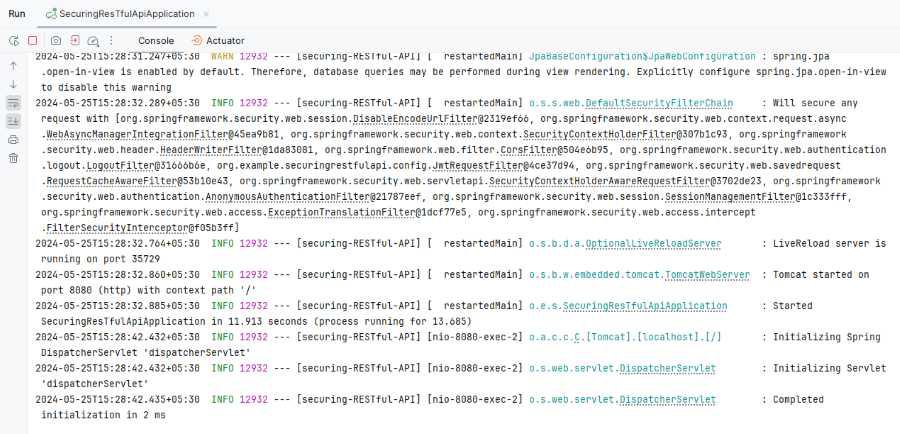
Step 12: Run the application
After completing the project, run it as spring boot application. Application will start at port 8080.
Step 13: Testing the Application
Registration Endpoint:
http://localhost:8080/api/register
Output:

Login Endpoint:
http://localhost:8080/api/login
Output:

Secured Endpoint:
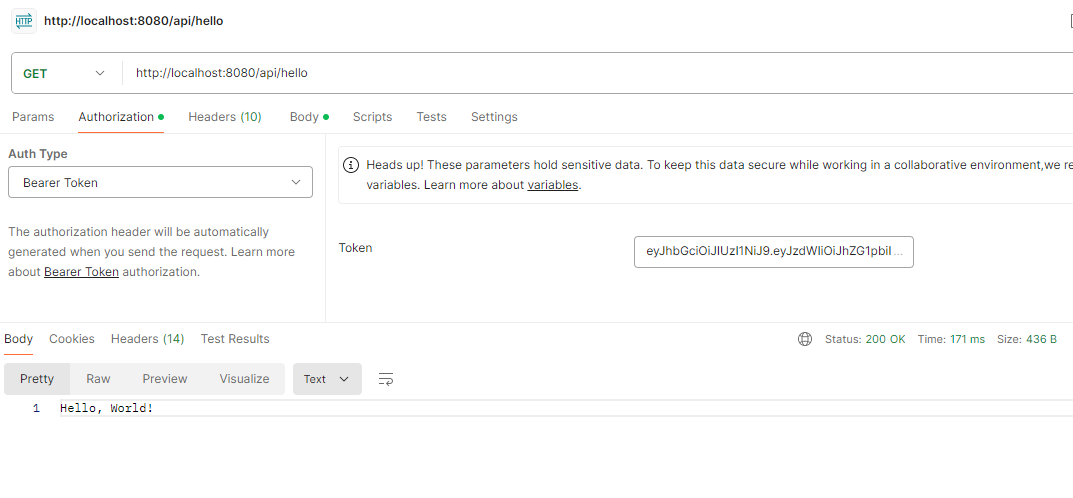
http://localhost:8080/api/hello
Add the token in the request header:
Authorization: Bearer <JWT_TOKEN>
Output: