
Testing abstract classes in Java can be challenging due to their incomplete nature. They cannot be instantiated directly. Abstract classes are often used as the blueprint for the other classes. They can include abstract methods, which lack implementations, as well as concrete methods that are fully implemented. Testing their behavior ensures that subclasses align with the specified contract.
In this article, we will learn different ways to test the abstract class using JUnit, with suitable examples, code snippets, and outputs of the Maven project.
Prerequisites:
- Basic understanding of Java and JUnit.
- Unit 5 for writing and executing tests.
- Maven for building dependency management.
- JDK and IntelliJ IDEA installed in your system.
Abstract Class
In Java, an abstract class is a type of class that cannot be directly instantiated and is designed to be inherited by other classes. It can contain both:
- Abstract Methods: Methods declared without implementation, requiring subclasses to provide their concrete implementations.
- Concrete Methods: Methods with defined implementations that can be directly used by subclasses.
Abstract classes are ideal for situations where you want to provide a common base with default behavior for multiple related classes while ensuring specific methods are implemented in subclasses.
Why Can’t We Instantiate Abstract Classes Directly?
Since abstract classes can have methods without implementation, creating an instance directly would lead to unimplemented behavior, which could result in runtime errors. Java prevents this by making abstract classes non-instantiable.
Purpose of Testing Abstract Classes
When working with the abstract class, we typically want to test:
- Concrete Methods: Even though the class itself cannot be instantiated, it may contain the methods with logic that should be verified for correctness.
- Contracts Defined by Abstract Methods: It ensures that when subclasses implement abstract methods.
For example, if the abstract class defines the template method pattern, it may provide the sequence of method calls with some methods abstract. Testing ensures that the intended sequence is respected when a subclass is created.
Project Implementation to Test an Abstract Class With JUnit
In this example, we will set up a project to test an abstract class Vehicle using JUnit. This will include file structure, code implementations, and explanations.
Step 1: Create a New Maven Project
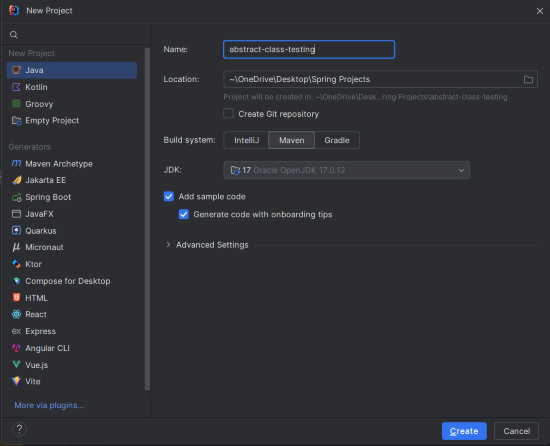
In IntelliJ IDEA, create a new Maven project with the following settings:
- Name:
abstract-class-testing - Build System: Maven
Click on the Create button.
Project Structure
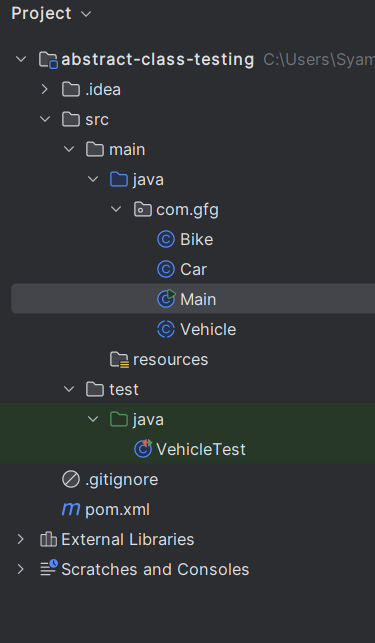
After the project creation done, set the file structure as shown in the below image:
Step 2: Add the JUnit dependencies to pom.xml
Open the pom.xml file and add the below JUnit dependencies.
<?xml version="1.0" encoding="UTF-8"?>
<project xmlns="https://maven.apache.org/POM/4.0.0"
         xmlns:xsi="https://www.w3.org/2001/XMLSchema-instance"
         xsi:schemaLocation="https://maven.apache.org/POM/4.0.0 https://maven.apache.org/xsd/maven-4.0.0.xsd">
    <modelVersion>4.0.0</modelVersion>

    <groupId>com.gfg</groupId>
    <artifactId>abstract-class-testing</artifactId>
    <version>1.0-SNAPSHOT</version>

    <properties>
        <maven.compiler.source>17</maven.compiler.source>
        <maven.compiler.target>17</maven.compiler.target>
        <project.build.sourceEncoding>UTF-8</project.build.sourceEncoding>
    </properties>
    <dependencies>
        <!-- JUnit 5 dependency for testing -->
        <dependency>
            <groupId>org.junit.jupiter</groupId>
            <artifactId>junit-jupiter</artifactId>
            <version>5.9.1</version>
            <scope>test</scope>
        </dependency>
    </dependencies>

    <build>
        <plugins>
            <plugin>
                <groupId>org.apache.maven.plugins</groupId>
                <artifactId>maven-surefire-plugin</artifactId>
                <version>2.22.2</version>
            </plugin>
        </plugins>
    </build>
</project>
Step 3: Define Vehicle.java (Abstract Class)
Create an abstract class Vehicle, which contains both an abstract and a concrete method.
package com.example;

public abstract class Vehicle {
    private String name;

    public Vehicle(String name) {
        this.name = name;
    }

    public String getName() {
        return name;
    }

    public abstract int getNumberOfWheels();

    // Concrete method that provides common behavior
    public String start() {
        return "Vehicle " + name + " started";
    }
}
Explantation:
Vehiclecontains an abstract methodgetNumberOfWheels()and a concrete methodstart().- It has a
nameattribute and a constructor that initializes it. getNumberOfWheels()must be implemented by any subclass.start()is a concrete method that returns a message indicating that the vehicle has started.
Step 4: Define Car.java (Concrete Subclass)
Create a Car class that extends Vehicle and provides the implementation for getNumberOfWheels().
package com.example;

public class Car extends Vehicle {

    public Car(String name) {
        super(name);
    }

    @Override
    public int getNumberOfWheels() {
        return 4;
    }
}
Explanation:
- Car extends Vehicle and provides the implementation for getNumberOfWheels() that returns 4.
- It inherits the start() method from the Vehicle class.
- Car represents the vehicle with 4 wheels.
Step 5: Define Bike.java (Concrete Subclass)
Similarly, create a Bike class that extends Vehicle and implements getNumberOfWheels().
package com.example;

public class Bike extends Vehicle {

    public Bike(String name) {
        super(name);
    }

    @Override
    public int getNumberOfWheels() {
        return 2;
    }
}
Explanation:
- Bike extends Vehicle and provides the implementation for getNumberOfWheels() that returns 2.
- It inherits the start() method from the Vehicle class.
- Bike represents the vehicle with 2 wheels.
Step 6: Main Class (For Direct Testing)
The main class demonstrates the usage of Vehicle, Car, and Bike.
package com.example;

public class Main {
    public static void main(String[] args) {
        Vehicle car = new Car("Honda");
        Vehicle bike = new Bike("Yamaha");

        System.out.println(car.start());
        System.out.println("Car has " + car.getNumberOfWheels() + " wheels.");

        System.out.println(bike.start());
        System.out.println("Bike has " + bike.getNumberOfWheels() + " wheels.");
    }
}
Step 7: VehicleTest.java (JUnit Test Class)
Create a JUnit test class to verify the behavior of the Vehicle abstract class and its subclasses.
package com.example;

import org.junit.jupiter.api.Test;
import static org.junit.jupiter.api.Assertions.*;

public class VehicleTest {

    @Test
    public void testCarStartMethod() {
        Vehicle car = new Car("Honda");
        assertEquals("Vehicle Honda started", car.start());
    }

    @Test
    public void testBikeStartMethod() {
        Vehicle bike = new Bike("Yamaha");
        assertEquals("Vehicle Yamaha started", bike.start());
    }

    @Test
    public void testCarNumberOfWheels() {
        Vehicle car = new Car("Honda");
        assertEquals(4, car.getNumberOfWheels());
    }

    @Test
    public void testBikeNumberOfWheels() {
        Vehicle bike = new Bike("Yamaha");
        assertEquals(2, bike.getNumberOfWheels());
    }
}
Explanation:
testCarStartMethod()
- Purpose: This test verifies that the start() method inherited by the Car class works as the expected. It checks whether the start() method returns the correct message for the vehicle name "Honda".
- Expected Behavior: The method should be return the "Vehicle Honda started" when called on the Car instance.
testBikeStartMethod()
- Purpose: This test checks the behavior of the start() method when called on the Bike instance. It ensures that start() method works consistently across the different subclasses.
- Expected Behavior: The method should be return "Vehicle Yamaha started" when called on the Bike instance.
testCarNumberOfWheels()
- Purpose: This test ensures that the Car class correctly implements the getNumberOfWheels() method and returning the expected value of 4.
- Expected Behavior: The method should return 4, as the cars typically have four wheels.
testBikeNumberOfWheels()
- Purpose: This test verifies that the Bike class implements the getNumberOfWheels() method correctly and returns the value 2.
- Expected Behavior: The method should return 2, as the bikes generally have two wheels.
testAnonymousClassImplementation()
- Purpose: This test uses the anonymous class to directly implement the abstract Vehicle class without creating the formal subclass. It tests both the start() and getNumberOfWheels() methods.
- Expected Behavior:
- The start() method should return "Vehicle Anonymous started", demonstrating that the anonymous class inherits and uses the abstract class's concrete method.
- The getNumberOfWheels() method should return 3 and simulating the tricycle with three wheels.
Step 8: Run the Application
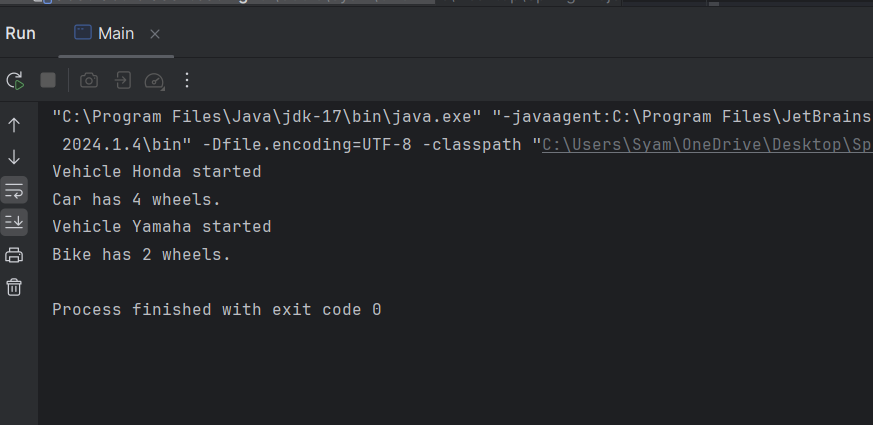
After the project completed, run the project, and it will display the below output in console.
Step 9: Testing the Application
Now, we will run the test suites using the below maven command:
mvn testWe should see the following test results:
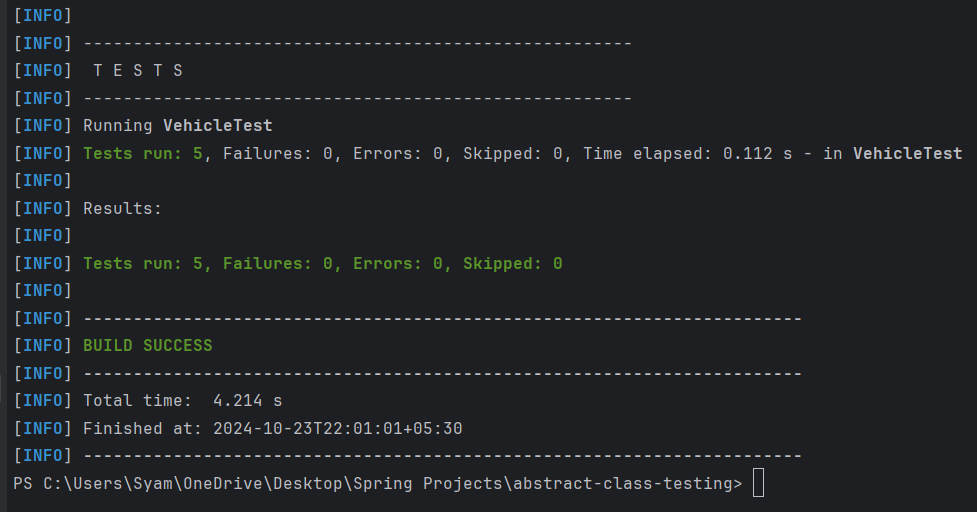
This output confirms that all the tests passed successfully, verifying that both the abstract class Vehicle and its subclasses are functioning as expected.
Explanation of Test Output
- Tests Run: 5 tests were executed, one for each of the test methods defined in the VehicleTest.
- Failures and Errors: All tests are passed successfully (Failures: 0, Errors: 0), meaning that all the expected behavior was correctly implemented and verified.
- Time Elapsed: The total time taken to run all the tests is minimal, it is indicating that the test suite runs efficiently.
Significance of the Output
- No Failures: The output confirms that the vehicle abstract class and its subclasses (Car and Bike) behaves as expected. The start() method works correctly for all the classes, and the getNumberOfWheels() method returns the right values for the each subclass.
- Anonymous Class Testing: The successful execution of the anonymous class test shows that we can directly the test abstract methods by creating the temporary implementations, providing flexibility in the testing.