
In Java, comparing two lists for equality typically checks both the content and the order of the elements using the equals() method. There are many cases where the order of the elements does not matter, and we only want to ensure that both lists contain the same elements, regardless of their order.
This article provides various methods to assert the equality of two lists while ignoring their order by focusing on the logic and code implementation required for such comparisons.
Prerequisites:
- Basic knowledge of the Java and JUnit Framework.
- Understanding of the Lists and Collections in Java.
- Maven for building dependency management.
- JDK and IntelliJ IDEA installed in your system.
List Equality and Order Ignorance
By default, Java's equals() method for lists checks both the elements and their order. For example, comparing [1, 2, 3] with [3, 2, 1] using equals() would return false because the order is different, even though the elements are the same. In situations where we want to treat these lists as equal (ignoring their order), we need a custom way to verify their equality.
The main challenges lie in ensuring:
- Both lists have the same size.
- Each element in one list appears the same number of times in the other.
- The comparison should handle duplicates properly, as simply converting the lists to a
Setwould lose information about duplicate occurrences.
To achieve this, we explore four different approaches:
- Using
Collections.sort(): This method sorts both lists in ascending order and then checks for equality using theequals()method. This approach is straightforward but has limitations, such as modifying the original lists and requiring that the elements in the list are comparable. - Using
containsAll()Method: This method checks if each list contains all the elements of the other. It is more flexible than sorting, as it does not modify the original lists, but can be less efficient, especially for larger lists due to its higher time complexity. - Using
Setfor Comparison: This method converts both lists to sets and compares them usingequals(). It is an efficient way to check for equality when there are no duplicate elements in the lists. However, it can fail to recognize differences when lists contain duplicates since sets do not preserve the frequency of the elements. - Using
Collections.frequency()Method: This method checks the frequency of each element in both lists and ensures that each element appears the same number of times in both. It is the most comprehensive approach for handling lists with duplicate elements, but it can be slower due to repeated frequency checks.
Example Project: Assert Two Lists for Equality Ignoring Order in Java
Create the example project that demonstrates the different methods for asserting the equality of the two lists while ignoring their order.
Step 1: Create a New Maven Project
Create a new Maven Project using IntelliJ IDEA. Choose the following options:
- Name:
ListEquality-Checker - Build System: Maven
Click on the Create button.

Project Structure
Once the project is created, the file structure should look like the following:

Step 2: Add the JUnit Dependencies to pom.xml
Open the pom.xml file and add the following JUnit 5 dependencies into the Maven project.
<?xml version="1.0" encoding="UTF-8"?>
<project xmlns="https://maven.apache.org/POM/4.0.0"
         xmlns:xsi="https://www.w3.org/2001/XMLSchema-instance"
         xsi:schemaLocation="https://maven.apache.org/POM/4.0.0 https://maven.apache.org/xsd/maven-4.0.0.xsd">
    <modelVersion>4.0.0</modelVersion>

    <groupId>com.gfg</groupId>
    <artifactId>ListEquality-Checker</artifactId>
    <version>1.0-SNAPSHOT</version>

    <properties>
        <maven.compiler.source>17</maven.compiler.source>
        <maven.compiler.target>17</maven.compiler.target>
        <project.build.sourceEncoding>UTF-8</project.build.sourceEncoding>
    </properties>

    <dependencies>
        <!-- JUnit 5 for testing -->
        <dependency>
            <groupId>org.junit.jupiter</groupId>
            <artifactId>junit-jupiter</artifactId>
            <version>5.9.3</version>
            <scope>test</scope>
        </dependency>
    </dependencies>

</project>
Step 3: Create the ListEquality Class
Create the ListEquality.java file. This class contains the different methods to compare two lists while ignoring their order.
package com.gfg;

import java.util.*;

// Class to compare two lists for equality ignoring order
public class ListEquality {

    // Using Collections.sort()
    public static boolean areListsEqualUsingSort(List<Integer> list1, List<Integer> list2) {
        // Check for null lists
        if (list1 == null || list2 == null) {
            return false; // Return false if either list is null
        }
        // Create copies of the lists
        List<Integer> sortedList1 = new ArrayList<>(list1);
        List<Integer> sortedList2 = new ArrayList<>(list2);
        // Sort the lists
        Collections.sort(sortedList1);
        Collections.sort(sortedList2);
        // Check for equality
        return sortedList1.equals(sortedList2);
    }

    // Using containsAll()
    public static boolean areListsEqualUsingContainsAll(List<Integer> list1, List<Integer> list2) {
        // Check if sizes are equal and if both lists contain all elements of each other
        return list1.size() == list2.size() && list1.containsAll(list2) && list2.containsAll(list1);
    }

    // Using Set comparison
    public static boolean areListsEqualUsingSet(List<Integer> list1, List<Integer> list2) {
        // Compare the two lists as sets (ignoring duplicates)
        return new HashSet<>(list1).equals(new HashSet<>(list2));
    }

    // Using Collections.frequency()
    public static boolean areListsEqualUsingFrequency(List<Integer> list1, List<Integer> list2) {
        // Check if sizes are equal
        if (list1.size() != list2.size()) {
            return false; // Return false if sizes are different
        }
        // Check frequency of each element
        for (Integer item : list1) {
            if (Collections.frequency(list1, item) != Collections.frequency(list2, item)) {
                return false; // Return false if frequencies don't match
            }
        }
        return true; // Return true if all frequencies match
    }
}
- This class contains methods for comparing two lists while ignoring the order of their elements.
- Methods:
areListsEqualUsingSort: Sorts both lists and compares them.areListsEqualUsingContainsAll: Checks if both lists contain all elements of each other.areListsEqualUsingSet: Compares the lists as sets, ignoring duplicates.areListsEqualUsingFrequency: Checks if each element appears with the same frequency in both lists.
Step 4: Create ListEqualityApplication.java
This is the entry point of the project, which tests the methods manually.
package com.gfg;

import java.util.ArrayList;
import java.util.Arrays;
import java.util.List;

public class ListEqualityApplication {
    public static void main(String[] args) {
        // Sample lists for testing
        List<Integer> list1 = Arrays.asList(1, 2, 3, 2);
        List<Integer> list2 = Arrays.asList(2, 3, 1, 2);

        // Test the methods and print results
        System.out.println("Using sort: " +
                ListEquality.areListsEqualUsingSort(new ArrayList<>(list1), new ArrayList<>(list2)));
        System.out.println("Using containsAll: " +
                ListEquality.areListsEqualUsingContainsAll(list1, list2));
        System.out.println("Using set: " +
                ListEquality.areListsEqualUsingSet(list1, list2));
        System.out.println("Using frequency: " +
                ListEquality.areListsEqualUsingFrequency(list1, list2));
    }
}
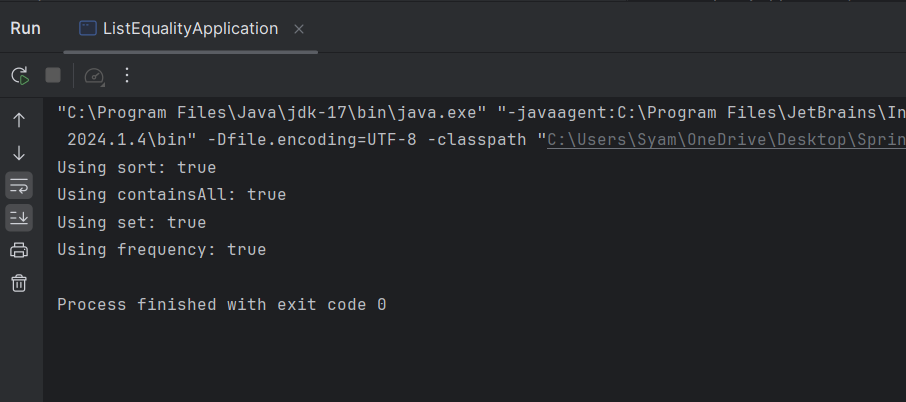
- This class serves as the main application to test the various methods for asserting list equality.
- It creates sample lists, invokes the comparison methods, and prints the results.
Step 5: Create ListEqualityTest.java
This class contains the JUnit tests to validate the functionality of the ListEquality methods.
import com.gfg.ListEquality;
import org.junit.jupiter.api.Test;
import java.util.*;
import static org.junit.jupiter.api.Assertions.*;

public class ListEqualityTest {

    // Test method for areListsEqualUsingSort
    @Test
    public void testAreListsEqualUsingSort() {
        // Same elements in different order
        assertTrue(ListEquality.areListsEqualUsingSort(Arrays.asList(1, 2, 3, 4), Arrays.asList(4, 3, 2, 1)));
        // Different elements
        assertFalse(ListEquality.areListsEqualUsingSort(Arrays.asList(1, 2, 2), Arrays.asList(2, 1)));
    }

    // Test method for areListsEqualUsingContainsAll
    @Test
    public void testAreListsEqualUsingContainsAll() {
        assertTrue(ListEquality.areListsEqualUsingContainsAll(Arrays.asList(1, 2, 2), Arrays.asList(2, 1, 2)));
    }

    // Test method for areListsEqualUsingSet
    @Test
    public void testAreListsEqualUsingSet() {
        // Same elements with duplicates
        assertTrue(ListEquality.areListsEqualUsingSet(Arrays.asList(1, 2, 2), Arrays.asList(2, 1, 2)));
        // Different elements
        assertFalse(ListEquality.areListsEqualUsingSet(Arrays.asList(1, 1, 2), Arrays.asList(1, 2)));
    }

    // Test method for areListsEqualUsingFrequency
    @Test
    public void testAreListsEqualUsingFrequency() {
        // Same elements with same frequency
        assertTrue(ListEquality.areListsEqualUsingFrequency(Arrays.asList(1, 2, 2), Arrays.asList(2, 1, 2)));
        // Different frequency
        assertFalse(ListEquality.areListsEqualUsingFrequency(Arrays.asList(1, 2, 3), Arrays.asList(1, 3, 4)));
    }
}
- This class contains unit tests for each method in the
ListEqualityclass. - Tests:
testAreListsEqualUsingSort: Tests the sorting method with both passing and failing cases.testAreListsEqualUsingContainsAll: Tests thecontainsAllmethod.testAreListsEqualUsingSet: Tests the set comparison method.testAreListsEqualUsingFrequency: Tests the frequency counting method.
Step 6: Run the Application
Once the project is completed, we will run the application, and it will display the below output:
Step 7: Run the Tests
To run the tests, execute the following command in the terminal:
mvn testOutput:

This example project provides a structured approach to solve the problem of comparing the lists while ignoring order.