

By Lisa Tagliaferri and Alex Garnett
Not using Ubuntu 22.04?
Choose a different version or distribution.
Introduction
Jupyter Notebook offers a command shell for interactive computing as a web application. The tool can be used with several languages, including Python, Julia, R, Haskell, and Ruby. It is often used for working with data, statistical modeling, and machine learning.
This tutorial will walk you through setting up Jupyter Notebook to run either locally or from an Ubuntu 22.04 server, as well as teach you how to connect to and use the notebook. Jupyter notebooks (or simply notebooks) are documents produced by the Jupyter Notebook app which contain both computer code and rich text elements (paragraph, equations, figures, links, etc.) which aid in presenting and sharing reproducible research.
By the end of this guide, you will be able to run Python 3 code using Jupyter Notebook running on a local machine or remote server.
Prerequisites
To follow this tutorial, you will need a Python 3 programming environment and the Python venv module, either
- on your local machine, or
- on an Ubuntu server.
All the commands in this tutorial should be run as a non-root user. If root access is required for the command, it will be preceded by sudo. Initial Server Setup with Ubuntu 22.04 explains how to add users and give them sudo access.
Step 1 — Installing Jupyter Notebook
In this section we will install Jupyter Notebook with pip.
Activate the Python 3 programming environment you would like to install Jupyter Notebook into. In our example, we’ll install it into my_env, so we will ensure we’re in that environment’s directory and activate it like so:
- cd ~/environments
- . my_env/bin/activate
Next, we can ensure that pip is upgraded to the most recent version:
- pip install --upgrade pip
Now we can install Jupyter Notebook with the following command:
- pip install jupyter
At this point Jupyter Notebook is installed into the current programming environment.
The next optional step is for those connecting a server installation of the web interface using SSH tunnelling.
Step 2 (Optional) — Using SSH Tunneling to Connect to a Server Installation
If you installed Jupyter Notebook on a remote server, you will need to connect to the Jupyter Notebook web interface using SSH tunneling. Jupyter Notebook runs its browser interface on a specific port on your remote server (such as :8888, :8889 etc.), which is not exposed to the broader web by default. SSH tunneling enables you to securely connect to remote server ports, which you can then access using a local web browser.
Note that these instructions are designed to be run from a local terminal window, i.e., not the one with which you’ve connected to the server.
SSH Tunneling
If you are using Windows, you’ll need to install a version of OpenSSH in order to be able to ssh from a terminal. If you prefer to work in PowerShell, you can follow Microsoft’s documentation to add OpenSSH to PowerShell. If you would rather have a full Linux environment available, you can set up WSL, the Windows Subsystem for Linux, which will include ssh by default. Finally, as a lightweight third option, you can install Git for Windows, which provides a native Windows bash terminal environment that includes the ssh command. Each of these are well-supported and whichever you decide to use will come down to preference.
If you are using a Mac or Linux, you will already have the ssh command available in your terminal.
The steps for creating an SSH tunnel are similar to the How to Connect to Droplets with SSH guide except there are additional parameters added in the ssh command. This subsection will outline the additional parameters needed in the ssh command to tunnel successfully.
SSH tunneling can be done by running the following SSH command in a new local terminal window:
- ssh -L 8888:localhost:8888your_server_username@your_server_ip
The ssh command opens an SSH connection, but -L specifies that the given port on the local (client) host is to be forwarded to the given host and port on the remote side (server). This means that whatever is running on the second port number (e.g. 8888) on the server will appear on the first port number (e.g. 8888) on your local computer.
If you receive a message that port 8888 is unavailable, you can change it to another arbitrary port number below 65535. Port 8888 has no significant meaning but is often used for demos like this.
server_username is your username (e.g. sammy) on the server which you created and your_server_ip is the IP address of your server.
For example, for the username sammy and the server address your_server_ip, the command would be:
- ssh -L 8888:localhost:8888sammy@your_server_ip
If no error is displayed after running the ssh -L command, you can move into your programming environment and run Jupyter Notebook:
- jupyter notebook
You’ll receive output with a URL. From a web browser on your local machine, open the Jupyter Notebook web interface with the URL that starts with http://localhost:8888. Ensure that the token number is included, or enter the token number string when prompted at http://localhost:8888.
Step 3 — Running Jupyter Notebook
With Jupyter Notebook installed, you can run it in your terminal. To do so, execute the following command:
- jupyter notebook
A log of the activities of the Jupyter Notebook will be printed to the terminal. When you run Jupyter Notebook, it runs on a specific port number. The first notebook you are running will usually run on port 8888. To check the specific port number Jupyter Notebook is running on, refer to the output of the command used to start it:
Output[I NotebookApp] Serving notebooks from local directory: /home/sammy
[I NotebookApp] 0 active kernels
[I NotebookApp] The Jupyter Notebook is running at: http://localhost:8888/
[I NotebookApp] Use Control-C to stop this server and shut down all kernels (twice to skip confirmation).
...
If you are running Jupyter Notebook on a local computer (not on a server), your default browser should have opened the Jupyter Notebook web app. If not, or if you close the window, you can navigate to the URL provided in the output, or navigate to localhost:8888 to connect.
Whenever you would like to stop the Jupyter Notebook process, press Ctrl+C, type Y when prompted, and then hit Enter to confirm.
You’ll receive the following output:
Output[C 12:32:23.792 NotebookApp] Shutdown confirmed
[I 12:32:23.794 NotebookApp] Shutting down kernels
Jupyter Notebook is now no longer running.
Step 4 — Using Jupyter Notebook
This section goes over the basics of using Jupyter Notebook. If you don’t currently have Jupyter Notebook running, start it with the jupyter notebook command.
You should now be connected to it using a web browser. Jupyter Notebook is very powerful and has many features. This section will outline a few of the basic features to get you started using the notebook. Jupyter Notebook will show all of the files and folders in the directory it is run from, so when you’re working on a project make sure to start it from the project directory.
To create a new notebook file, select New > Python 3 from the top right pull-down menu:
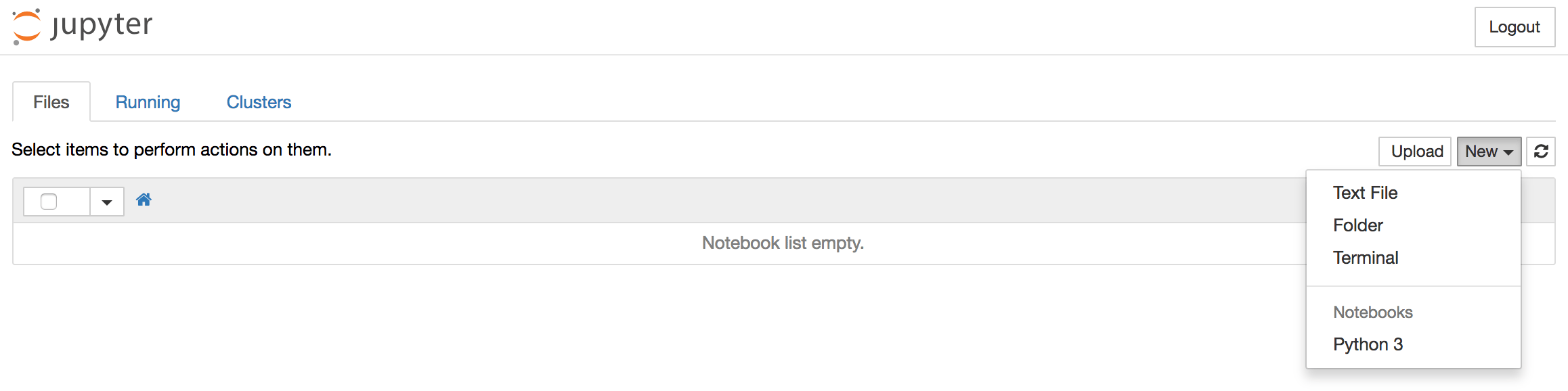
This will open a notebook. We can now run Python code in the cell or change the cell to markdown. For example, change the first cell to accept Markdown by clicking Cell > Cell Type > Markdown from the top navigation bar. We can now write notes using Markdown and even include equations written in LaTeX by putting them between the $$ symbols. For example, type the following into the cell after changing it to markdown:
# Simple Equation

Let us now implement the following equation:
$$ y = x^2$$

where $x = 2$
To turn the markdown into rich text, press Ctrl+Enter, and the following should be the results:
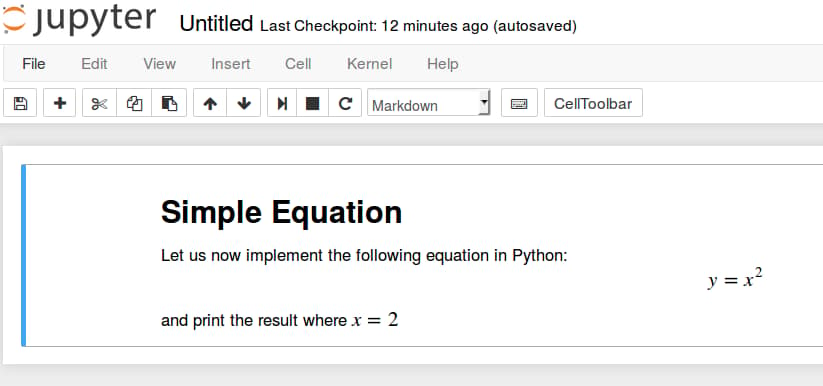
You can use the markdown cells to make notes and document your code. Let’s implement that simple equation and print the result. Click on the top cell, then press Alt+Enter to add a cell below it. Enter the following code in the new cell.
x = 2
y = x**2
print(y)
To run the code, press Ctrl+Enter. You’ll receive the following results:
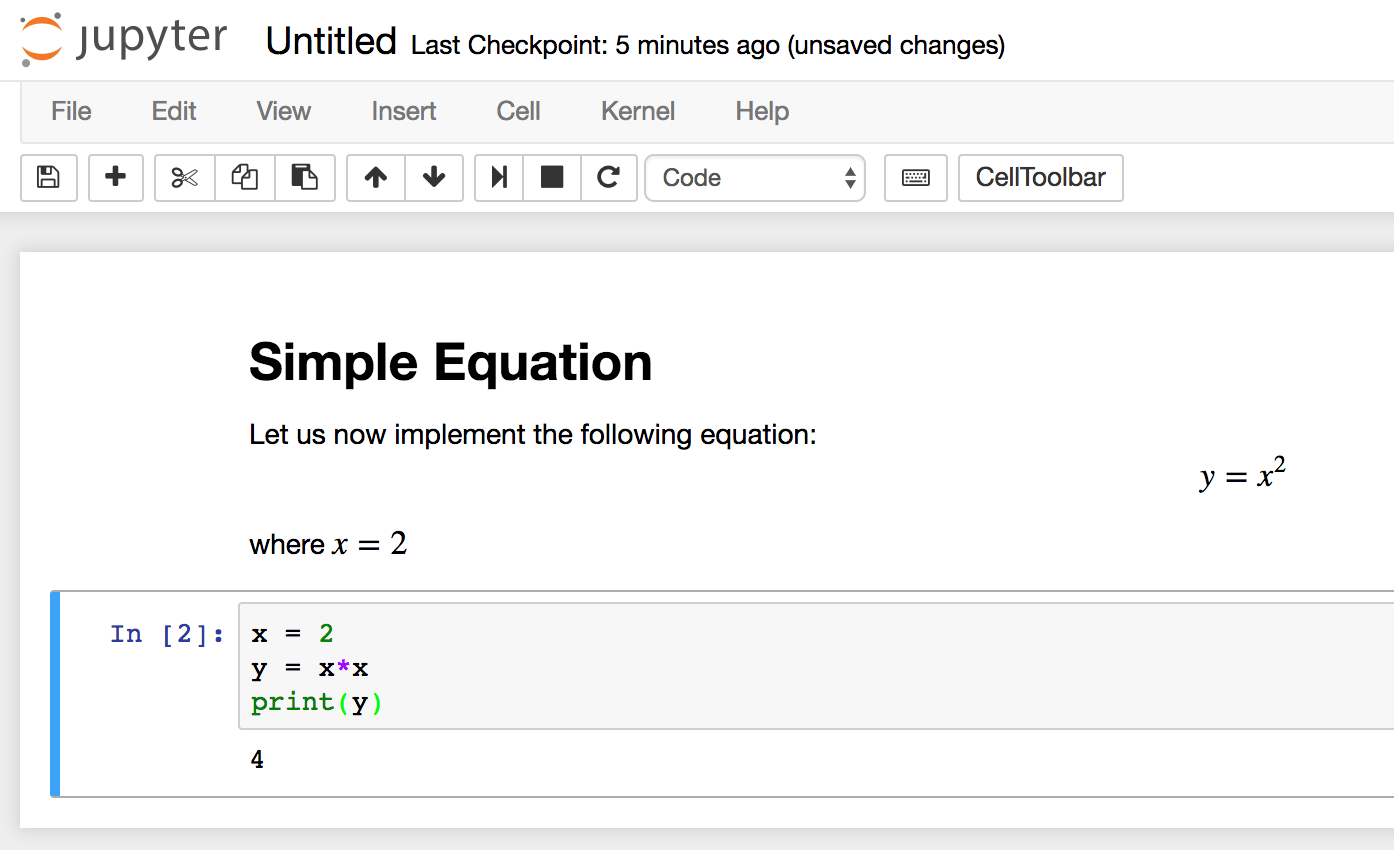
You now have the ability to import modules and use the notebook as you would with any other Python development environment!
To shut down the Jupyter notebook server-side, return to the terminal window that you started it from and press Ctrl+C. This is a standard shortcut for ending terminal processes and Jupyter will prompt you to save before quitting.
Conclusion
Congratulations! You should now be able to write reproducible Python code and notes in Markdown using Jupyter Notebook. To get a quick tour of Jupyter Notebook from within the interface, select Help > User Interface Tour from the top navigation menu to learn more.
From here, you may be interested to read our series on Time Series Visualization and Forecasting.
Thanks for learning with the DigitalOcean Community. Check out our offerings for compute, storage, networking, and managed databases.
About the author(s)
Community and Developer Education expert. Former Senior Manager, Community at DigitalOcean. Focused on topics including Ubuntu 22.04, Ubuntu 20.04, Python, Django, and more.
Former Senior DevOps Technical Writer at DigitalOcean. Expertise in topics including Ubuntu 22.04, Linux, Rocky Linux, Debian 11, and more.
Still looking for an answer?
 This work is licensed under a Creative Commons Attribution-NonCommercial- ShareAlike 4.0 International License.
Become a contributor for community
Get paid to write technical tutorials and select a tech-focused charity to receive a matching donation.

DigitalOcean Documentation
Full documentation for every DigitalOcean product.

Resources for startups and AI-native businesses
The Wave has everything you need to know about building a business, from raising funding to marketing your product.
The developer cloud
Scale up as you grow — whether you're running one virtual machine or ten thousand.

Start building today
From GPU-powered inference and Kubernetes to managed databases and storage, get everything you need to build, scale, and deploy intelligent applications.



