Magento 2 Hreflang Tags Extension by Magefan

Magento 2 Hreflang Tags is a solution that helps you add and manage alternate hreflang tags for your Magento 2 store pages directly from the admin panel. Magefan Hreflang Tags extenision automatically adds hreflang tags to Magento products and category pages and allows you to connect multilingual and regional versions of products, categories, and CMS pages. This helps search engines understand your store structure and show the right page to the right audience.
If you run a multi-language website, this extension improves your SEO and prevents duplicate content issues between localised pages. Make it easier for search engines to direct customers to the correct store view and deliver a better shopping experience across all languages and regions.
Compatibility: Magento 2.3.0 - 2.4.x (CE, EE, ECE, B2B)


TL;DR: Magefan Hreflang Tags Extension for Magento 2 helps you add accurate hreflang tags across multilingual Magento websites. It clearly defines which language or regional version of a page to show to users, prevents duplicate content issues between localized stores, and improves your store’s visibility in Google.
Hreflang tags are small snippets of code used to mark different language versions of the same content. Thus, if your Magento store has English, German, and French versions of the same product page, hreflang tags help Google understand which version to show to users based on their language or location.
For example, hreflang tags of a product page can be added as follows:
<link rel="alternate" hreflang="en" href="https://example.com/product.html" />
<link rel="alternate" hreflang="de" href="https://example.com/de/product.html" />
<link rel="alternate" hreflang="fr" href="https://example.com/fr/product.html" />
<link rel="alternate" hreflang="x-default" href="https://example.com/fr/product.html" />
Hreflang tags benefit SEO by helping search engines understand which language or regional version of a page should appear for each user, so people land on the most relevant content in search results. This improves international visibility, increases click-through rates, and creates a smoother user experience.
Managing hreflang tags in Magento manually can quickly become difficult, especially if you run multiple store views, languages, or regional domains. This increases the possibility of adding hreflang tags incorrectly or missing them entirely, which results in indexing issues.
Without proper hreflang implementation:
- Search engines may index the wrong language version
- Merchants get duplicate content between localized stores
- Store pages have lower visibility in international search results
Magento doesn’t provide built-in tools for effective hreflang management. Fortunately, the Magefan Magento 2 Hreflang Tags extension has a solution. It automates the process by generating and placing alternate hreflang tags automatically.
Besides, it offers a handy admin panel interface to add hreflang tags manually without any code editing. This helps search engines understand your site structure, improves visibility in international search, and ensures customers land on the correct version of your pages.
- Add hreflang tags automatically to product and category pages
- Add hreflang tags manually from the admin panel
- Include hreflang URLs in the XML sitemap
- Disable hreflang tags on NOINDEX pages
- Add hreflang tags for different language variants
- Organize different websites into separate locale groups
- Add x-default hreflang tag
When managing a multilingual store, you translate your pages into multiple languages, creating separate versions of the same content. Without proper calls for search engines, they don’t know which version to show in search results and often treat such pages as duplicates.
The Magefan Magento 2 Hreflang Tags extension solves this issue. It helps you add hreflang tags automatically and define different language versions of the same page. This improves your visibility in localized search and lets customers reach the correct version of your page right from the start.
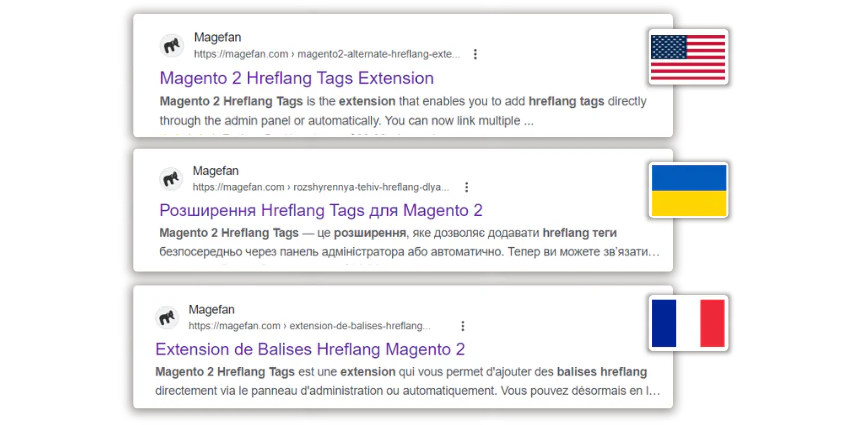
You certainly have your hands full with running your multi-language Magento store. Add manual hreflang tag management on top of that, and your store operation turns into pure chaos. That’s why you need a reliable tool to help you out.
This Magento 2 Hreflang Tags extension generates hreflang tags automatically for product and category pages. There are no complicated setups or integrations. Just enable the extension, and it will do the rest.
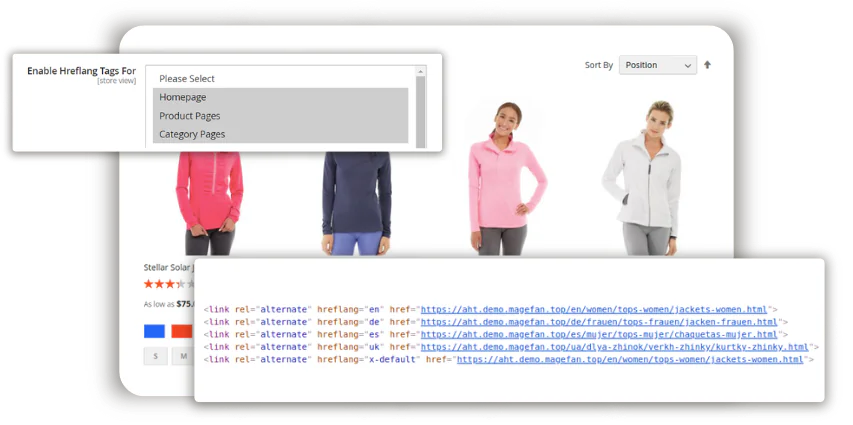
At this point, you may ask: What happens with pages that have different IDs, unlike products and categories? The Hreflang Tags Extension for Magento 2 covers this use case as well.
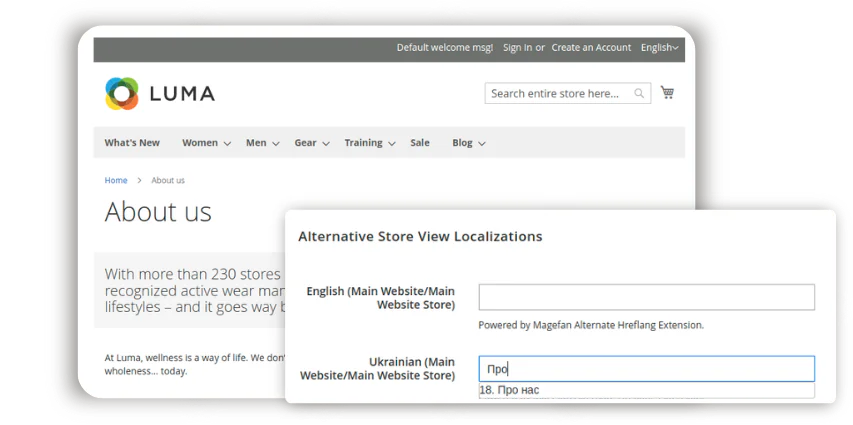
You can easily add hreflang tags via the admin panel by specifying the alternative version of a specific page. Again, no complex configurations here. Just set up the necessary hreflangs using a convenient interface, and rest assured that the extension populates them properly.
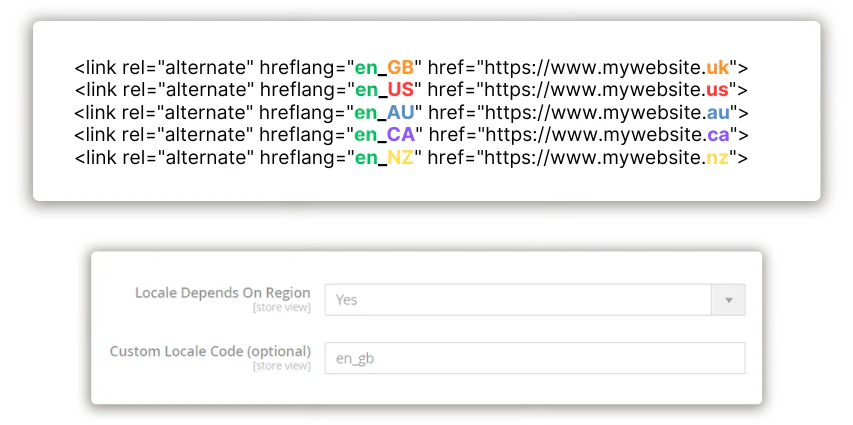
Managing a multilingual store is one thing. Having different language variants that target different regions is when it becomes complicated. For example, you may have French for France and Canada, or AU/GB/US English. What do you do in this case?
This Magento 2 Hreflang Tags extension allows you to specify locale codes and define clearly which regions each store view targets. This way, you avoid content duplication issues between the languages you manage and appear in more targeted results for different regions.
Magento handles complex setups, so you may manage not one, but a few multilingual websites within the same installation. When it comes to hreflang tags, each website should have its own set of tags, which makes the configuration more complicated.
However, the Magefan Hreflang Tags Extension for Magento 2 has an easy solution. It allows you to assign your websites to different locale groups using the admin panel settings. This way, hreflang tags aren’t cross-added between the websites, but stay in the assigned locale group.
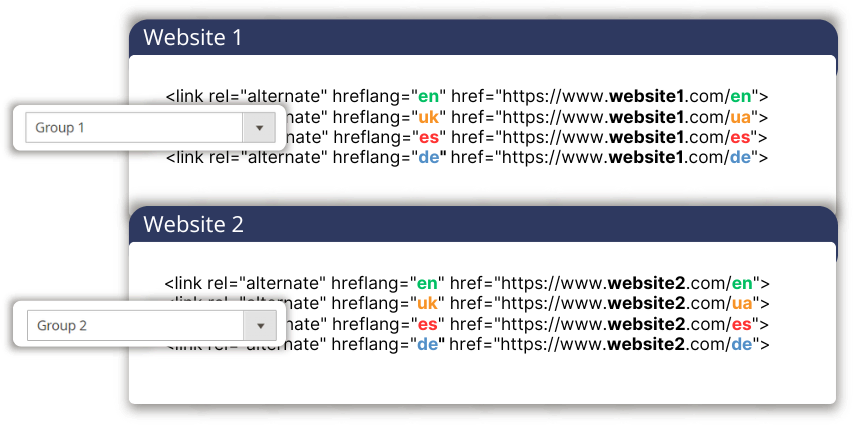
With the Magento 2 Hreflang Extension, you will easily generate hreflang tags for different pages. Yet, you can maximize your efforts even more.
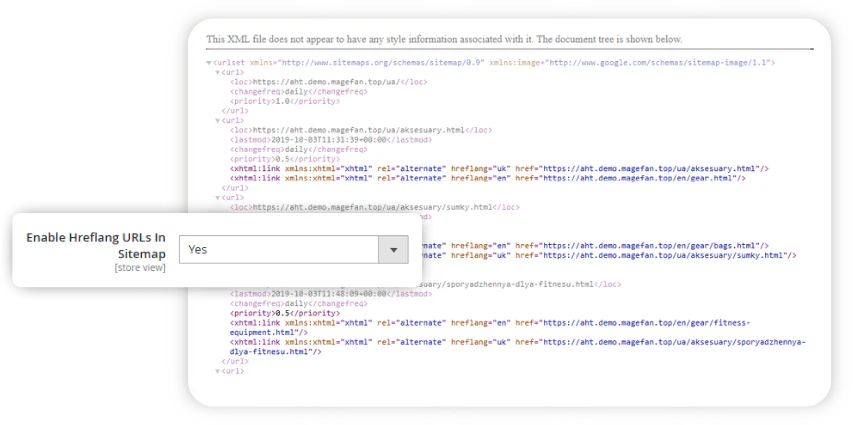
You may also include the hreflang tags in the XML sitemap to tell Google about the localized pages and get them indexed faster. There are no complex settings here. All you have to do is enable one option in the extension configuration, and you’ll be all set.
The Magento 2 Hreflang Tags Extension by Magefan automatically adds hreflang tags to Magento pages so search engines know which language or regional version of a page to display to users. It allows you to manage hreflang tags in the admin panel without any coding.
Hreflang tags help search engines serve the right page to the right audience, improve international rankings, reduce duplicate content confusion, and create a better shopping experience for customers worldwide.
Will this extension work on my installation, which has multiple languages, but they are not just store views, but separate websites?
Magefan Magento 2 Hreflang Tags Extension will work if you have separate websites for separate languages. If you manage a few multilingual websites within one installation and don’t want to mix up their hreflang tags, the extension supports such a setup, too.
Try out our open demo and if you like our extension please give us some star on Github ★
| Storefront Demo | Admin Panel Demo |

|

|
| view | view |
If you have any issues, please contact us then if you still need help, open a bug report in GitHub's issue tracker.
Please contact us to get a quote https://magefan.com/contact
The code is licensed under EULA.
Magento Extensions by Magefan
- Magento SEO
- Magento 2 Rich Snippets
- Magento 2 LLMs TXT Generator
- Magento 2 HTML Sitemap
- Magento 2 XML Sitemap
- Magento 2 Twitter Cards
- Magento Open Graph Tags
- Magento Google Tag Manager
- Magento 2 Google Analytics 4
- Magento Google Shopping Feed
- Magento Google Customer Reviews
- Magento 2 Google Indexing
- Magento 2 Google Page Speed Optimizer
- Magento 2 WebP Images
- Magento Full Page Cache Extension
- Magento 2 Lazy Load Images
- Magento 2 Defer JavaScript
- Magento 2 Dynamic Category
- Magento 2 Size Chart
- Magento 2 Security Extension
- Magento 2 Admin Action Log
- Magento Extended Product Grid
- Magento 2 Product Tabs
- Magento 2 Product Widget
- Magento 2 Email Attachments
- Magento 2 Admin View
- Magento 2 Email Notifications
- Magento 2 Login As Customer
- Magento 2 Facebook Pixel
- Magento TikTok Pixel
- Magento 2 Dynamic Blocks and Pages
- Magento 2 Cookie Consent
- Magento 2 Base Price
- Magento 2 Price History
- Magento 2 Mautic Extension
- Magento 2 YouTube Video
- Magento 2 Currency Switcher
- Magento 2 Language Switcher
- Magento 2 Store Switcher
- Magento 2 Translation Extension
- Magento Zero Downtime Deployment
- Magento 2 Cron Schedule
- Magento 2 CLI Extension
- Magento 2 Conflict Detector
Shopify Apps by Magefan
- Shopify Login As Customer
- Shopify Blog
- Shopify Persistent Cart
- Shopify Size Chart
- Shopify Google Indexer
- Shopify Product Feeds
- Shopify Server GTM & GA4