`; document.body.appendChild(el); return el; } const bubble = ensureBubble(); const elH = bubble.querySelector("#tt-title"); const elB = bubble.querySelector("#tt-body"); const elClose = bubble.querySelector(".tt-close"); // ---------------- Parse [[term|heading|body]] anywhere ---------------- const TOKEN_RE = /\[\[([^|\]]+)\|([^|\]]+)\|([^\]]+)\]\]/g; const BLOCK_SKIP = new Set(["SCRIPT","STYLE","NOSCRIPT","TEXTAREA","INPUT","SELECT","CODE","PRE","TEMPLATE","IFRAME"]); function shouldSkipTextNode(n){ let el = n.parentElement; while (el){ if (BLOCK_SKIP.has(el.tagName) || el.isContentEditable) return true; el = el.parentElement; } return false; } const walker = document.createTreeWalker(document.body, NodeFilter.SHOW_TEXT); const textNodes = []; while (walker.nextNode()){ const n = walker.currentNode; if (!n.nodeValue || shouldSkipTextNode(n)) continue; if (TOKEN_RE.test(n.nodeValue)) textNodes.push(n); TOKEN_RE.lastIndex = 0; } textNodes.forEach(node => { const frag = document.createDocumentFragment(); const insideLink = !!node.parentElement.closest("a"); let text = node.nodeValue, last = 0; TOKEN_RE.lastIndex = 0; let m; while ((m = TOKEN_RE.exec(text))){ if (m.index > last) frag.appendChild(document.createTextNode(text.slice(last, m.index))); const term=m[1].trim(), heading=m[2].trim(), body=m[3].trim(); const t = insideLink ? document.createElement("span") : document.createElement("button"); if (insideLink){ t.setAttribute("role","button"); t.setAttribute("tabindex","0"); } else { t.type="button"; } t.className="tt-trigger"; t.textContent=term; t.setAttribute("data-tt-h", heading); t.setAttribute("data-tt-b", body); t.setAttribute("aria-haspopup","dialog"); t.setAttribute("aria-expanded","false"); frag.appendChild(t); last = TOKEN_RE.lastIndex; } if (last = 2) return el; el = el.parentElement; } // Fallback: nearest non-inline container el = trigger.parentElement || document.body; while (el && el !== document.body){ const d = getComputedStyle(el).display; if (d !== "inline" && d !== "contents") return el; el = el.parentElement; } return document.body; } // Utility: child of `ancestor` that contains `target` (direct child) function directChildContaining(ancestor, target){ for (const ch of ancestor.children){ if (ch === target || ch.contains(target)) return ch; } return null; } function getElementTarget(e) { // If target is already an Element, use it if (e.target instanceof Element) return e.target; // Otherwise, walk the composed/path for the first Element const path = (typeof e.composedPath === 'function') ? e.composedPath() : []; for (const n of path) if (n instanceof Element) return n; return null; } // ---------------- Dim everything except the trigger branch (sibling branches only) ---------------- function dimAllOtherBranches(container, trigger){ undim(); // clear previous const dimEls = []; const wrappedTexts = []; const pathEls = []; // Build ELEMENT-only path [container -> ... -> trigger] const path = []; for (let el = trigger; el && el !== container; el = el.parentElement) path.push(el); path.push(container); path.reverse(); // At each ancestor level, find the *direct* child that leads to the trigger for (let i = 0; i { if (node.nodeType !== 3) return; // text only if (!node.nodeValue || !node.nodeValue.trim()) return; // If this text node sits inside branchChild, skip if (branchChild && branchChild.contains && branchChild.contains(node)) return; const span = document.createElement("span"); span.style.transition = `opacity ${DIM_EASE_MS}ms ease`; span.style.opacity = String(DIM_OPACITY); span.textContent = node.nodeValue; node.parentNode.replaceChild(span, node); wrappedTexts.push(span); }); // Keep a reference to the path elements (so we can explicitly restore opacity if needed) if (anc && anc.nodeType === 1) pathEls.push(anc); } // Hard-guard: explicitly set opacity:1 on the entire path to neutralize any inherited fade pathEls.forEach(el => { el.style.opacity = "1"; }); dimCtx = { container, dimEls, wrappedTexts, pathEls }; } function undim(){ if (!dimCtx) return; const { dimEls, wrappedTexts, pathEls } = dimCtx; // Animate back dimEls.forEach(el => { el.style.transition = `opacity ${DIM_EASE_MS}ms ease`; el.style.opacity = "1"; // remove inline style after the animation so we don't override site CSS setTimeout(() => { if (el) el.style.opacity = ""; }, DIM_EASE_MS + 50); }); wrappedTexts.forEach(span => { span.style.transition = `opacity ${DIM_EASE_MS}ms ease`; span.style.opacity = "1"; span.addEventListener("transitionend", () => { if (!span.parentNode) return; span.parentNode.replaceChild(document.createTextNode(span.textContent || ""), span); }, { once:true }); }); // Clear hard-guard on path pathEls.forEach(el => { if (el) el.style.opacity = ""; }); dimCtx = null; } // ---------------- Positioning (centered, edge-aware, flip) ---------------- function clamp(v,min,max){ return Math.max(min,Math.min(max,v)); } function measureBubbleForPlacement(){ const wasOpen = bubble.classList.contains("is-open"); if (!wasOpen){ bubble.style.visibility="hidden"; bubble.classList.add("is-open"); } const rect = bubble.getBoundingClientRect(); if (!wasOpen){ bubble.classList.remove("is-open"); bubble.style.visibility=""; } return { w: rect.width, h: rect.height }; } function placeAnchored(trigger){ const vw=innerWidth, vh=innerHeight; const r = trigger.getBoundingClientRect(); const { w, h } = measureBubbleForPlacement(); let left = r.left + (r.width/2) - (w/2); left = clamp(left, EDGE_PADDING, Math.max(EDGE_PADDING, vw - EDGE_PADDING - w)); const topBelow = r.bottom + OFFSET_Y; const spaceBelow = vh - topBelow - EDGE_PADDING; const placeBelow = spaceBelow >= h; let top = placeBelow ? topBelow : (r.top - h - OFFSET_Y); top = clamp(top, EDGE_PADDING, Math.max(EDGE_PADDING, vh - EDGE_PADDING - h)); bubble.style.left = left + "px"; bubble.style.top = top + "px"; const br = bubble.getBoundingClientRect(); if (br.bottom > vh - EDGE_PADDING){ bubble.style.maxHeight = (vh - 2*EDGE_PADDING) + "px"; bubble.style.overflowY = "auto"; } else { bubble.style.maxHeight = "none"; bubble.style.overflowY = "visible"; } } // ---------------- Open / Close (place → fade/scale) ---------------- function animateIn(){ bubble.style.transition = "none"; bubble.style.opacity = "0"; bubble.style.transform = "scale(0.95)"; void bubble.offsetWidth; bubble.style.transition = "opacity .18s ease, transform .18s ease"; bubble.style.opacity = "1"; bubble.style.transform = "scale(1)"; } function animateOut(done){ bubble.style.transition = "opacity .16s ease, transform .16s ease"; bubble.style.opacity = "0"; bubble.style.transform = "scale(0.95)"; const end = () => { bubble.removeEventListener("transitionend", end); done && done(); }; bubble.addEventListener("transitionend", end); setTimeout(end, 260); } function openFromTrigger(trigger){ if (current && current !== trigger) forceClose(); current = trigger; trigger.setAttribute("aria-expanded","true"); elH.textContent = trigger.getAttribute("data-tt-h") || ""; elB.textContent = trigger.getAttribute("data-tt-b") || ""; bubble.classList.add("is-open"); bubble.setAttribute("aria-hidden","false"); placeAnchored(trigger); animateIn(); const container = findTextContainer(trigger); dimAllOtherBranches(container, trigger); hoverCount = 0; cancelCloseTimer(); } function forceClose(){ if (!current) return; bubble.classList.remove("is-open"); bubble.setAttribute("aria-hidden","true"); current.setAttribute("aria-expanded","false"); current = null; undim(); hoverCount = 0; cancelCloseTimer(); } function closeWithAnim(){ if (!current) return; const t = current; animateOut(() => { bubble.classList.remove("is-open"); bubble.setAttribute("aria-hidden","true"); t.setAttribute("aria-expanded","false"); current = null; undim(); }); } function scheduleClose(){ cancelCloseTimer(); closeTimer = setTimeout(() => { if (hoverCount { if (isCoarse()) return; const target = getElementTarget(e); if (!target) return; const t = target.closest(".tt-trigger"); if (!t) return; onZoneEnter(); if (!current || current !== t) openFromTrigger(t); }; const handleLeave = (e) => { if (isCoarse()) return; const target = getElementTarget(e); if (!target) return; const t = target.closest(".tt-trigger"); if (!t) return; onZoneLeave(); }; document.addEventListener("pointerenter", handleEnter, true); document.addEventListener("mouseenter", handleEnter, true); document.addEventListener("pointerleave", handleLeave, true); document.addEventListener("mouseleave", handleLeave, true); // ---------------- Keyboard ---------------- document.addEventListener("focusin", (e) => { if (!e.target) return; const t = e.target.closest(".tt-trigger"); if (t) openFromTrigger(t); }); document.addEventListener("focusout", (e) => { if (!e.target) return; const t = e.target.closest(".tt-trigger"); if (t && current === t) closeWithAnim(); }); // ---------------- Mobile / coarse ---------------- document.addEventListener("pointerdown", (e) => { if (!isCoarse()) return; const t = e.target.closest(".tt-trigger"); if (!t) return; e.preventDefault(); e.stopPropagation(); if (current === t && bubble.classList.contains("is-open")) { closeWithAnim(); return; } openFromTrigger(t); }, true); document.addEventListener("click", (e) => { if (!isCoarse()) return; if (!bubble.classList.contains("is-open")) return; const inBubble = !!e.target.closest(".tt-bubble"); const onTrigger = !!e.target.closest(".tt-trigger"); if (!inBubble && !onTrigger) closeWithAnim(); }, true); // Close button + ESC elClose.addEventListener("click", closeWithAnim); document.addEventListener("keydown", (e) => { if (e.key === "Escape") closeWithAnim(); }); // Reposition on resize/scroll while open const reposition = () => { if (!current) return; placeAnchored(current); }; addEventListener("resize", reposition, { passive: true }); addEventListener("scroll", reposition, { passive: true }); });

Introducing routines in Claude Code

Define repeatable routines that work your backlog, review your PRs, and respond to events in the cloud.

  • Category
  • Product
    Claude Code
  • Date
    April 14, 2026
  • Reading time
    5
    min
  • Share
    Copy link
    https://claude.com/blog/introducing-routines-in-claude-code

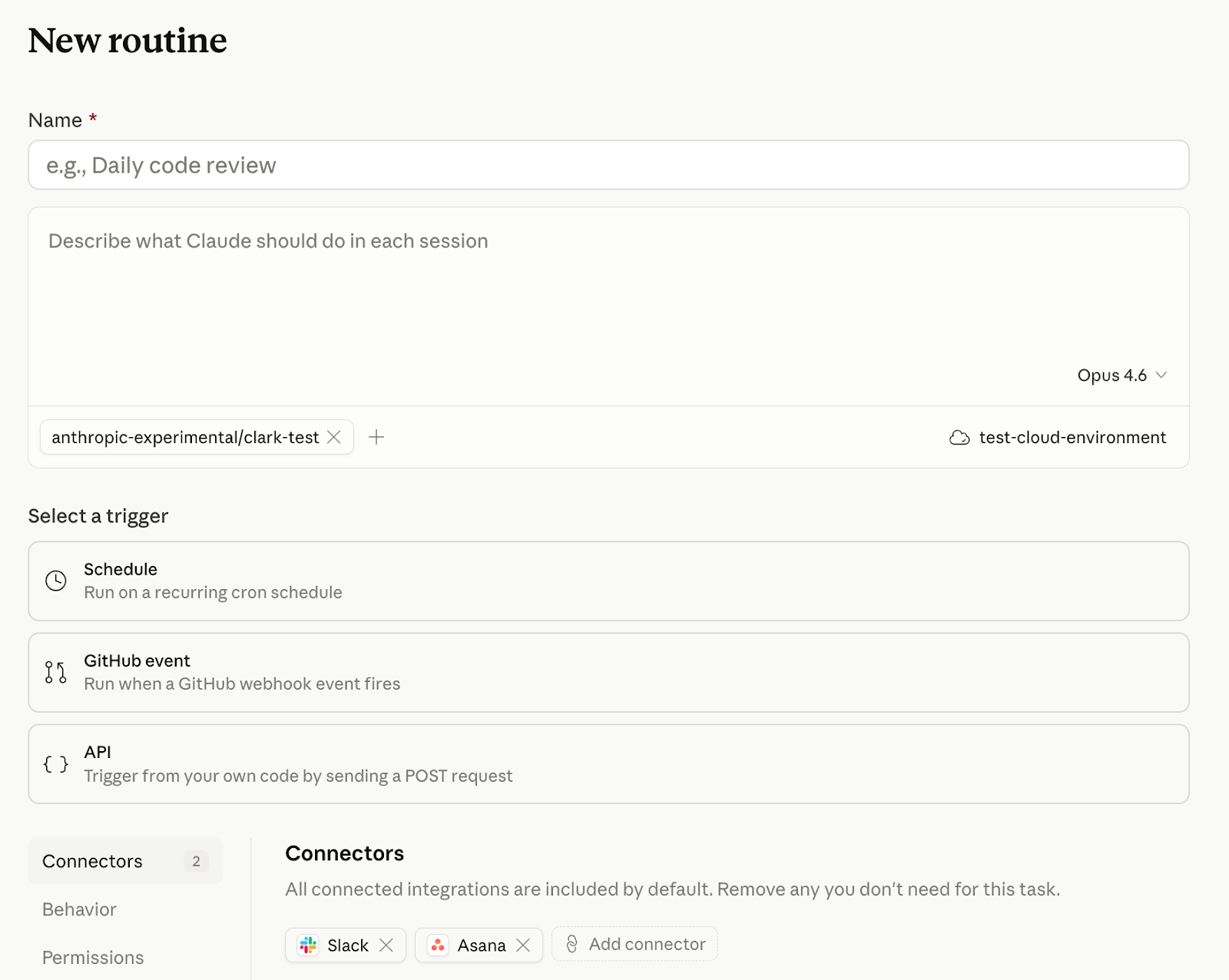
Today, we're introducing routines in Claude Code in research preview. A routine is a Claude Code automation you configure once — including a prompt, repo, and connectors — and then run on a schedule, from an API call, or in response to an event. Routines run on Claude Code’s web infrastructure, so nothing depends on your laptop being open.

Developers already use Claude Code to automate the software development cycle, but until now, they've managed cron jobs, infrastructure, and additional tooling like MCP servers themselves. Routines ship with access to your repos and your connectors, so you can package up automations and set them to run on a schedule or trigger.
How it works

Scheduled routines

Give Claude Code a prompt and a cadence (hourly, nightly, or weekly) and it runs on that schedule:

Every night at 2am: pull the top bug from Linear, attempt a fix, and open a draft PR.

If you're using /schedule in the CLI, those tasks are now scheduled routines. 

API routines

You can also configure routines to be triggered by API calls. Every routine gets its own endpoint and auth token. POST a message, get back a session URL. Wire Claude Code into your alerting, your deploy hooks, your internal tools—anywhere you can make an HTTP request:

Read the alert payload, find the owning service, and post a triage summary to #oncall with a proposed first step.

Webhook routines, starting with GitHub

Subscribe a routine to automatically kick off in response to GitHub repository events. Claude will create a new session for every PR matching your filters and run your routine.

Please flag PRs that touch the /auth-provider module. Any changes to this module need to be summarized and posted to #auth-changes.

Claude opens one session per PR and will continue to feed updates from that PR to the session, so it can address follow-ups like comments and CI failures.

We plan to expand webhook-based routines to trigger from more event sources in the future.

What teams are building

A few common patterns have emerged for early users creating routines:

Scheduled routines

  • Backlog management: triage new issues nightly, label, assign, and post a summary to Slack
  • Docs drift: scan merged PRs weekly, flag docs that reference changed APIs, and open update PRs

API routines

  • Deploy verification: your CD pipeline posts after each deploy, Claude runs smoke checks against the new build, scans error logs for regressions, and posts a go/no-go to the release channel
  • Alert triage: point Datadog at the routine's endpoint, Claude pulls the trace, correlates it with recent deployments, and has a draft fix waiting before on-call opens the page
  • Feedback resolution: a docs feedback widget or internal dashboard posts the report, Claude opens a session against the repo with the issue in context, and drafts the change

GitHub routines

  • Library port: every PR merged to a Python SDK triggers a routine that ports the change to the parallel Go SDK, and opens a matching PR
  • Bespoke code review: on PR opened, run your team's own checklist across security and performance, leaving inline comments before a human reviewer looks

Getting started

Routines are available today for Claude Code users on Pro, Max, Team, and Enterprise plans with Claude Code on the web enabled. Head to claude.ai/code to create your first routine, or type /schedule in the CLI.

Routines draw down subscription usage limits in the same way as interactive sessions. In addition, routines have daily limits: Pro users can run up to 5 routines per day, Max users can run up to 15 routines per day, and Team and Enterprise users can run up to 25 routines per day. You can run extra routines beyond these limits with extra usage. See the docs for more information.

No items found.
Prev
0/5
Next
eBook

FAQ

No items found.
Or read the documentation
Try Claude Code
Developer docs

Transform how your organization operates with Claude

See pricing
Contact sales

Get the developer newsletter

Product updates, how-tos, community spotlights, and more. Delivered monthly to your inbox.

Subscribe

Please provide your email address if you'd like to receive our monthly developer newsletter. You can unsubscribe at any time.

Thank you! You’re subscribed.
Sorry, there was a problem with your submission, please try again later.
Claude Code
Coding
Work
Productivity
Agents