Bits from Bill

Technology thoughts leaking from the brain of "Bill Pytlovany"

Sunday, December 30, 2007

Give One Get One While You Can

Unless a change is announced you only have one more day to Give One to Get One.

“The Give One Get One (“G1G1”) initiative ends on December 31, 2007. In connection with your payment of US$399 to OLPC Foundation, OLPC Foundation will provide you with one XO laptop, and a second XO laptop will be given by OLPC Foundation to a child in one of the least developed countries in the developing world. “

The OLPC Foundation created the G1G1 program to seed interested U.S. XO laptop buyers and supporters. It was a good decision. Originally, this program was due to end in November but its popularity allowed it to be extended under December 31st.

Will it be extended again? I can’t say but if you’d like to participate I wouldn’t risk it. This is a non-profit foundation so if it is extended it won’t be for the sake of profit. If anything I could see the OLPC Foundation making laptops available to prevent a black market in XO laptops that might prevent them from getting to the kids. Already, we’re seeing scumbags trying to sell XO laptops on eBay at inflated prices.

So if you have $400 cash left over after the holidays you have an opportunity to do something good and be a part of a growing community of new XO laptop users.

Just go to http://laptopgiving.org/en/give-one-get-one.php but don’t wait long.

Labels: ,

Share on Facebook


Saturday, December 22, 2007

New Activities and Games at XOActivity.com

Over the last week my new XO laptops have monopolized much of my time and postings here at Bits From Bill. I realize that not everyone is interested in the OLPC XO Laptop so I’ve created a new site called XO Activity. If you are interested in learning more I’ll be documenting my adventures and sharing what I learn.

My first new post today will help XO user find new games and other XO Activities.

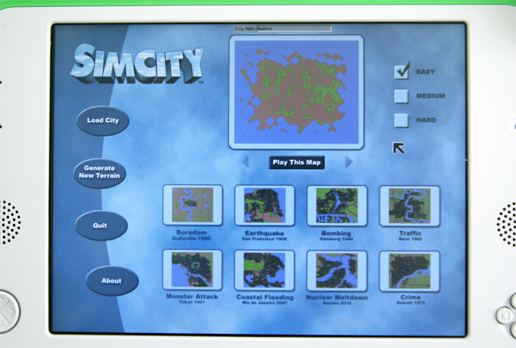
The Sims, now available on your XO Laptop
SimCity.xo is available free at http://wiki.laptop.org/go/Activities


Thank you for your patience. Next week I’ll be back posting about auto updates, spyware, adware, spam and ranting about other more useful technical information.

Labels: , , , ,

Share on Facebook


Friday, December 21, 2007

OLPC XO Laptop: Getting Started

My new XO Laptop is proving to be very controversial. People seem to either love it or hate it. If you’ve never heard of it you’re not alone but you’ll be hearing more. If you’re sick of me writing about it I promise to cover other topics soon.

The target audience for this laptop is not the typical computer geek but we’re all giving one to get one so we can play and learn more. Almost everything about this laptop is new and the excitement I feel is reminiscent of my old Commodore days.

The user interface for the XO is called “Sugar”.


  • Instead of programs or applications, the XO Laptop has “Activities”. Most Activities are designed to be used in a share mode.

  • Instead of a Desktop you’ll be “Home” when the laptop starts. Your Home lets you switch between Activies. Like the computers I grew up with, only one Activity will run at a time.

  • Your Local network of friends is called your “Group”. In a classroom environment you’ll see your classmates and can create a buddy list and/or participate in a group bulletin board.

  • The more familiar “Neighborhood” will show your available Networks.
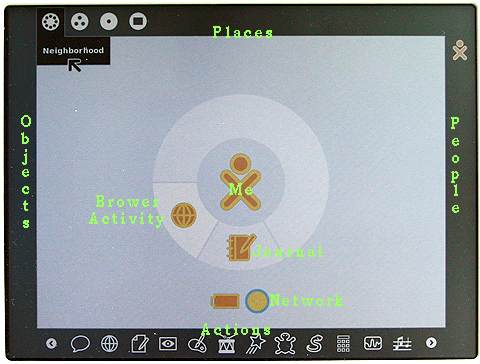
The main User Interface of the XO Laptop using Sugar.
Home mode with Frame visible
Green text was added

Along the top the Places you can access are Neighborhood, Group, Home, and Activity. When you move the cursor into any “hot” corners, the “Frame” will appear and provide an interface to “zoom” to your Places, People, Objects and the “Activity” launcher. Move the cursor back off the frame and it will disappear.

Toggle the Sugar Frame using this keyThere’s also a Frame key in the upper right corner to toggle it back and forth.


Most data items in your Activities may be stored in the XO clipboard as an Object. Multiple objects can be stored in the clipboard and hey will be displayed on the left side of the screen.
On the right side of the screen you’ll see other People you can share with on the Mesh network.

While many user interface elements are completely new you’ll find some familiar computer concepts.

For instance, Delete and Backspace have been combined into “Erase” which operates like the traditional backspace.
Clipboard concepts like Select All and Cut,Copy,Paste are available and so are the familiar shortcut keys of Ctrl+A,X,C,V.
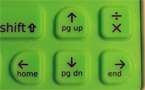
Use the Function key to access Home, End, Page Up, Page DownYou’ll want to know how to use Home, End, Page Up and Down. Hold down the function key and press the arrow key. Like legacy computers holding down the shift will select the text.


For a full description of all the keys Click Here

For all the Linux fans out there with good eyesight here’s what you’re looking for. You can access the Linux command line. by holding down Ctrl+Alt+Fn and press 1. When asked for a Login name, type “root”. To return to the Sugar User Interface hold down Ctrl+Alt+Fn and press 3.

Labels: , , ,

Share on Facebook


Tuesday, December 18, 2007

OLPC Evaluation Guide - First Impressions

I’ve been getting a lot of questions about my new OLPC so I expect to write a lot about my experience with this new XO Laptop. I doubt I’ll be the only one writing about this unique device.


OLPC Evaluation Guide


Rule 1: Forget everything you already know.
The target user for this laptop are kids who have never been exposed to a computer before. You’ll need to look at using this computer as if you’ve never used Windows, Mac or even a C64 before.
That means forget about double clicking by tapping on the touch pad. The position of OK and Cancel buttons won’t match the Windows interface. You shouldn’t expect File/Edit drop down menus. Instead of Save, you’ll “Keep” your data and access it from your journal. Forget any concept of a folder based file system.


Rule 2: Forget about the price
In theory, the kids won’t ever know the market value of the OLPC laptop. It was supposed to be the $100 laptop but that price will have to wait. If you Give One to Get One, you are making a donation. Don’t expect your OLPC laptop to be anything more than a conversation piece or toy.


Rules 3: Take your Time
I had thought I could spend a couple days to evaluate the OLPC. I was really wrong. I keep learning more and more and there’s no way I can do justice to this machine until I spend at least a month with it. Nobody should publish any review for this laptop until at least next year.


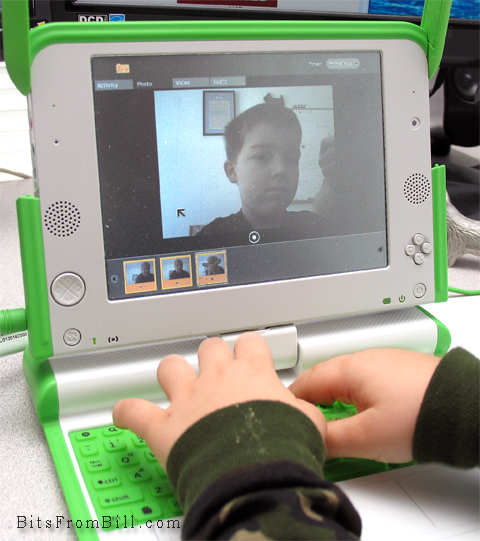
Tristan taking his photo with the OLPC
Tristan playing with the photo/video/audio application.


OLPC First Impression


My first impression was disappointment but that’s already starting to change. The interface is different which is ok and expected. Unfortunately, it’s fragmented. It tries to be different but still tries to teach computer skills. I think there’s always been a gap between academia and real world. What sounds good in some white paper may not convert well to a real product(::cough:: Ada). Profit is sometimes the best motivation in the creation of great products.


Earlier this month John C. Dvorak wrote an article suggesting it might be better to just give $200 worth of food. John was just being a cranky greek and I still disagree. Giving this laptop is an investment and while risky it’s worth a shot. It’s not like it could hurt America’s image any more than the Bush Admistration has already done.


What I Like

  • The browser doesn’t suck: It’s quick enough and while limited, it supports Flash, Javascript, PDF files and Cookies(Yea that can be a good thing)

  • Applications are plentiful: It even includes a number of programming examples for kids to learn how to create their own programs.

  • Size: It’s small for kids hands.

  • Networking: It took a little practice but it now always finds my WiFi network and searches for any available Mesh networks.

What I don’t Like

  • No power crank: I thought this was the whole point.

  • Durability: I expected it to be a little more ruggedized.

  • Bugs: I’ve had my share of reboots and mouse weirdness. I can’t say if it’s hard,soft or firmware related.

  • No Popups: Some web apps actually use pop ups.

  • Sound quality: The quality is similiar to my old C64 but the speaker isn’t as good. Seems like MOS Technology’s SID chip could gotten cheaply.

One thing for sure, there is a huge need for some instruction books along with tips and tricks. I have to wonder if David Pogue is already working on “OLPC: The Missing Manual”.

Update: I spoke with David and we won't be seeing a book from him but Edward Cherlin directed me to OLPC help available at http://wiki.laptop.org/go/OLPC_Publications. Edward also was kind enough to address my dislikes in the comments section below.

Labels: , , , ,

Share on Facebook


Saturday, December 15, 2007

Playing with my OLPC Laptop

I received an early gift from Santa today and it looks like I’ll be snowed in all weekend so I’ll have plenty of time to play. It doesn’t come with manuals but after a little exploring I’m now connected to my WiFi network and surfing my favorite web sites.

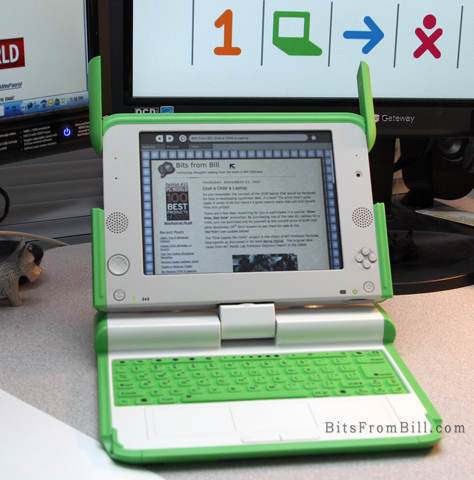
My new Give One, Get One OLPC Laptop

OLPC stands for “One Laptop Per Child” and this is my half of the “Give One, Get One” program from the makers of this unique device. You may also hear it called the XO Laptop.


I really didn’t expect to receive my laptop so soon. Perhaps the folks trying to get out all the Nintendo Wii’s for Christmas could take a lesson from the OLPC Foundation. I have a 2nd laptop coming so I can play with the wireless mesh network which is integrated into the machine and ideal for classroom usage. As a developer I’m looking forward to creating something useful to do my part.

I’ll be writing more but for now I just wanted to let folks know they’re real and they really work. If you participated in this program hopefully yours may be arriving soon. My only problem so far is, I keep trying to tap on the touch pad to select which isn’t supported. You have to click the left button.

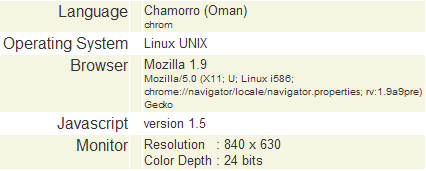
I also took note of my Blog stats to see how accessing web sites is recorded.

How the OLPC appears when it visits a web site.
Web stats from an OLPC laptop

The Give One, Get One program is curently available but is scheduled to end on December 31st. The price of the laptop is $200 so your total donation is $400 plus tax. If you’d like to know more go to http://www.laptopgiving.org


Labels: , , ,

Share on Facebook