Aquileo | Recent changes to Project WMS for heavy industrieshttps://sourceforge.net/p/wms-engitex/2026-06-30T10:26:24.946000ZRecent changes to Project WMS for heavy industriesAquileo | Customizations modified by ENGITEX2026-06-30T10:26:24.946000Z2026-06-30T10:26:24.946000ZENGITEXhttps://sourceforge.net/u/engitex/https://sourceforge.netbc0d1f08aaabb6bd2117f5427dde1b5ff4a9c38b<div class="markdown_content"><pre>--- v14
+++ v15
@@ -7,6 +7,7 @@
2. Task distribution policy between yard workers. In basic setting the tasks are distributed uniformly to ensure that all workers do similar amounts of work.
3. Hardware involvement (cranes, elevators, etc.) policy. From our observations the most natural way to define whether the task requires hardware assistance is to estimate the weight of the loaded/unloaded products.
4. Search policy in **SEARCH** window can be cusotmized:* (a)* only a full match with the typed phrase is shown (e.g. "VR-2 0.5mm"),* (b)* type names containing searched phrase are shown (e.g. "0.5mm"),* (c)* types' properties are also searched for the phrase.
+5. Naming conventions for racks and storehouses: there are a few preset naming conventions for cells in racks/storehouses such as A00, A01, A02, ...; A00, A10, A20, ...; etc. However a custom class with naming convention can be added.
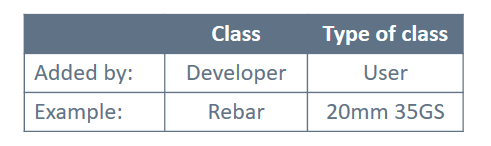
Furthermore there are certain things in the software that can be modified via source code (i.e. by the developer) and, vice versa, things that are modifiable by user:
</pre>
</div>Aquileo | Customizations modified by ENGITEX2026-06-18T06:20:29.738000Z2026-06-18T06:20:29.738000ZENGITEXhttps://sourceforge.net/u/engitex/https://sourceforge.netb3eca564487684c5ec4cc5513faf182edeccb87a<div class="markdown_content"><pre>--- v13
+++ v14
@@ -6,7 +6,7 @@
2. Task distribution policy between yard workers. In basic setting the tasks are distributed uniformly to ensure that all workers do similar amounts of work.
3. Hardware involvement (cranes, elevators, etc.) policy. From our observations the most natural way to define whether the task requires hardware assistance is to estimate the weight of the loaded/unloaded products.
-4. Search policy in SEARCH window can be cusotmized:* (a)* only a full match with the typed phrase is shown (e.g. "VR-2 0.5mm"),* (b)* type names containing searched phrase are shown (e.g. "0.5mm"),* (c)* types' properties are also searched for the phrase.
+4. Search policy in **SEARCH** window can be cusotmized:* (a)* only a full match with the typed phrase is shown (e.g. "VR-2 0.5mm"),* (b)* type names containing searched phrase are shown (e.g. "0.5mm"),* (c)* types' properties are also searched for the phrase.
Furthermore there are certain things in the software that can be modified via source code (i.e. by the developer) and, vice versa, things that are modifiable by user:

</pre>
</div>Aquileo | Customizations modified by ENGITEX2026-06-18T06:20:09.725000Z2026-06-18T06:20:09.725000ZENGITEXhttps://sourceforge.net/u/engitex/https://sourceforge.net947fda708f3798c8af832b85255388cb881ddeed<div class="markdown_content"><pre>--- v12
+++ v13
@@ -6,6 +6,7 @@

2. Task distribution policy between yard workers. In basic setting the tasks are distributed uniformly to ensure that all workers do similar amounts of work.
3. Hardware involvement (cranes, elevators, etc.) policy. From our observations the most natural way to define whether the task requires hardware assistance is to estimate the weight of the loaded/unloaded products.
+4. Search policy in SEARCH window can be cusotmized:* (a)* only a full match with the typed phrase is shown (e.g. "VR-2 0.5mm"),* (b)* type names containing searched phrase are shown (e.g. "0.5mm"),* (c)* types' properties are also searched for the phrase.
Furthermore there are certain things in the software that can be modified via source code (i.e. by the developer) and, vice versa, things that are modifiable by user:

</pre>
</div>Aquileo | Customizations modified by ENGITEX2026-05-05T21:22:08.571000Z2026-05-05T21:22:08.571000ZENGITEXhttps://sourceforge.net/u/engitex/https://sourceforge.net9eddb8d443d58bc8436ac3124ddede039ccca23d<div class="markdown_content"><pre>--- v11
+++ v12
@@ -7,7 +7,7 @@
2. Task distribution policy between yard workers. In basic setting the tasks are distributed uniformly to ensure that all workers do similar amounts of work.
3. Hardware involvement (cranes, elevators, etc.) policy. From our observations the most natural way to define whether the task requires hardware assistance is to estimate the weight of the loaded/unloaded products.
-Furthermore there are ceratain things in the software that can be modified via source code (i.e. by the developer) and, vice versa, things that are modifiable by user:
+Furthermore there are certain things in the software that can be modified via source code (i.e. by the developer) and, vice versa, things that are modifiable by user:

When adding a new product type, its corresponding properties must be entered in the **Properties** field:
</pre>
</div>Aquileo | Workflow modified by ENGITEX2026-01-07T11:06:38.432000Z2026-01-07T11:06:38.432000ZENGITEXhttps://sourceforge.net/u/engitex/https://sourceforge.net038ff88175b3f72e1bbdfdb0607c88990b4f1720<div class="markdown_content"><pre>--- v7
+++ v8
@@ -22,3 +22,10 @@
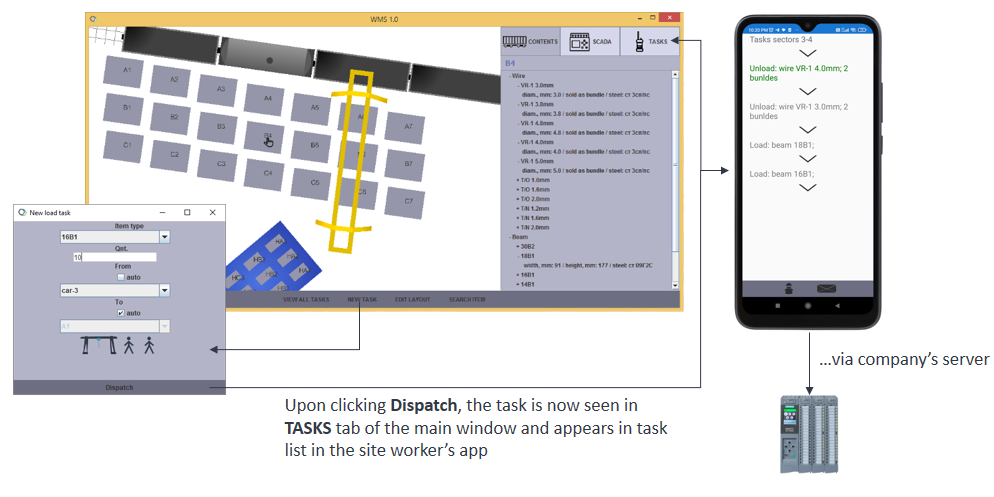
Upon clicking **DISPATCH**, the task creation window will close and the task will be seen in the **TASKS** tab of the main window. The task will be also shown as new in the yard worker's app. Each worker only sees tasks dispatched to him. Then the worker initiates task status updates in the app and these updates are sent to the server in real-time.
+
+### New type
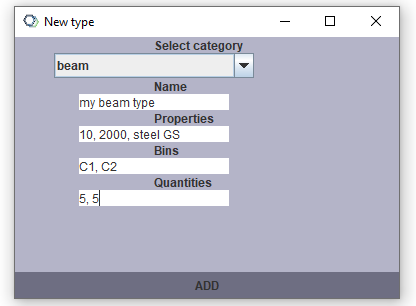
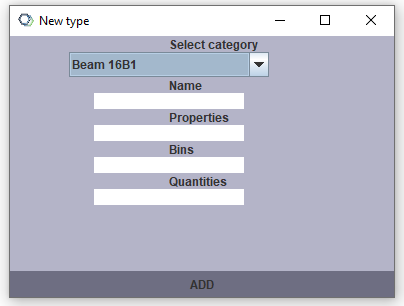
+As mentioned in [Customizations], it is up to the user to add particular types of a given class/category to the WMS. In the demo version there are several steel products classes (wire, beam, rebar, ...) that have been used by our first customer.
+To add a new type of e.g. beam class, its name, properties, locations and quantities (initial stock) must be provided.
+
+
+After the new type has been added, it can be selected in the **New task** window.
</pre>
</div>Aquileo | Customizations modified by ENGITEX2026-01-07T10:53:37.590000Z2026-01-07T10:53:37.590000ZENGITEXhttps://sourceforge.net/u/engitex/https://sourceforge.net5a4e5a6134d7b745aa67805c257ea766d13e5817<div class="markdown_content"><pre>--- v10
+++ v11
@@ -13,8 +13,9 @@
When adding a new product type, its corresponding properties must be entered in the **Properties** field:

Properties are separated by a comma (',') and the number of properties is fixed for each product class (e.g. beam, rail, rebar...).
+For the beam class we currently have 3 properties: width (int), height (int) and steel type.
The initial inventory is entered in **Bins** and **Quantities** fields, e.g.:
-A1, A4, A5
-10, 4, 2
+C1, C2
+5, 5
Finally, the database used "behind the doors" by the WMS is also subject to customizations - see [Databases].
</pre>
</div>Aquileo | Customizations modified by ENGITEX2026-01-07T10:52:04.984000Z2026-01-07T10:52:04.984000ZENGITEXhttps://sourceforge.net/u/engitex/https://sourceforge.netdff6f2a6c71e99de45b8b99f3d24fd63b77541bc<div class="markdown_content"><pre>--- v9
+++ v10
@@ -11,7 +11,7 @@

When adding a new product type, its corresponding properties must be entered in the **Properties** field:
-
+
Properties are separated by a comma (',') and the number of properties is fixed for each product class (e.g. beam, rail, rebar...).
The initial inventory is entered in **Bins** and **Quantities** fields, e.g.:
A1, A4, A5
</pre>
</div>Aquileo | Workflow modified by ENGITEX2026-01-06T22:38:00.322000Z2026-01-06T22:38:00.322000ZENGITEXhttps://sourceforge.net/u/engitex/https://sourceforge.net950d07d72954f3ee612d610be3b02cf706fdfcb3<div class="markdown_content"><pre>--- v6
+++ v7
@@ -3,6 +3,13 @@
### User management
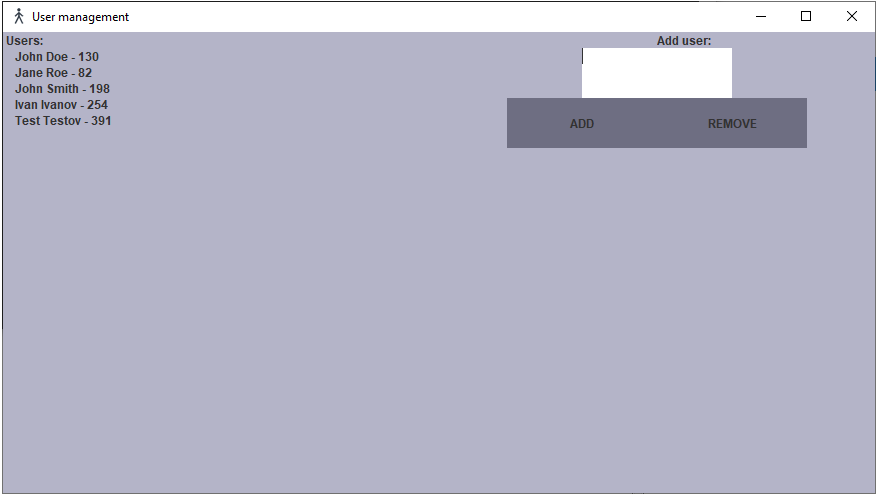
A new yard worker can be added to the user database in the user management app. The name is entered in the text box on the right. The program automatically assigns a unique ID to the new worker which will be shown next to his name in the workers' list on the left. To remove a worker simply type his ID and click **REMOVE**.
+
+Since there is no specific task distribution policy in the demo version, the task are distributed "uniformly", i.e.:
+1st task created in the desktop app is dispatched to user id130
+2nd task - to id82
+3rd task - to id198
+4th task - to id254
+...
### New task
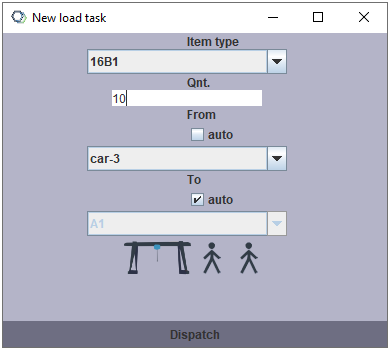
The new task creation window offers automatic **From** bin selection. If this option is not checked, the manager must choose one of the bins in the drop-down menu.
</pre>
</div>Aquileo | Home modified by ENGITEX2026-01-06T22:37:28.655000Z2026-01-06T22:37:28.655000ZENGITEXhttps://sourceforge.net/u/engitex/https://sourceforge.neta1bce4cbc99522d1882ebdc6d05676525bb54e07<div class="markdown_content"><pre>--- v19
+++ v20
@@ -17,7 +17,7 @@
The purpose of the demo version is to give a feeling of the GUIs and show the task dispatching logic. Other limitations of the demo are listed here: [Demo version].
Check the [Customizations] page for the list of the main customizable settings that have to be set on a case-by-case basis.
-Check the [Databases] page to see remarks on database interface.
+Check the [Databases] page to see remarks on database interface.
The software is 100% "on-premises", no cloud-based servers are involved. For better reliability and security, the software can be used with LAN instead of internet.
@@ -39,9 +39,4 @@
To run the main app:
`java org.engitex.WMS.WMS`
-Since there is no custom task distribution policy in the demo version, the task are distributed "uniformly", i.e.:
-1st task created in the desktop app is dispatched to user id130
-2nd task - to id82
-3rd task - to id198
-4th task - to id254
-...
+See [Workflow] page for more.
</pre>
</div>Aquileo | Workflow modified by ENGITEX2026-01-06T22:36:10.398000Z2026-01-06T22:36:10.398000ZENGITEXhttps://sourceforge.net/u/engitex/https://sourceforge.netcf9100b4e94c136d9c2d8f83eeaba5d2874cda3e<div class="markdown_content"><pre>--- v5
+++ v6
@@ -10,7 +10,7 @@
Due to layout module being "chopped off" in the demo version, the dropdown menu only shows a few dummy bin names.

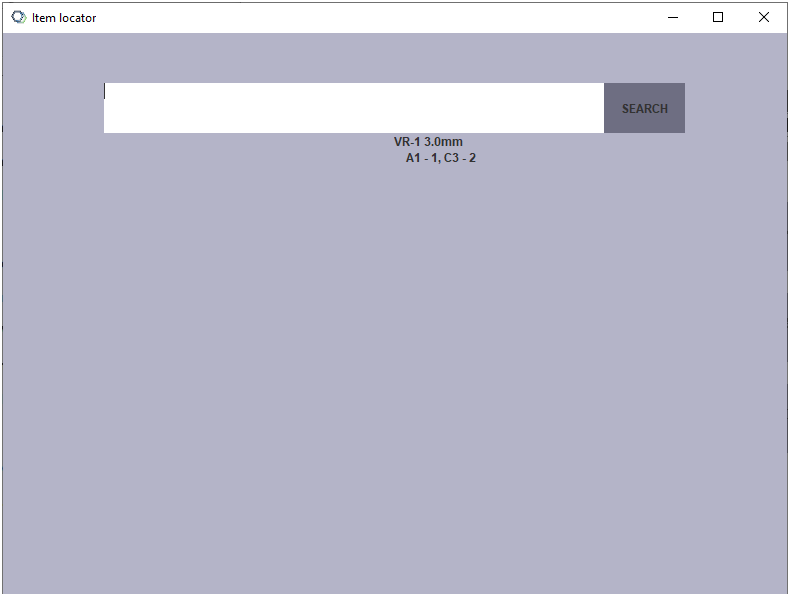
-A user might have **Item locator** window open at the same time to see where the item is currently stored and stored quantities. Below on the screenshot VR-1 3.0mm wire is located in bins A1 and C3.
+A user might have **Item locator** window open at the same time to see where the item is currently stored and stored quantities. On the screenshot VR-1 3.0mm wire is located in bins A1 and C3.
Upon clicking **DISPATCH**, the task creation window will close and the task will be seen in the **TASKS** tab of the main window. The task will be also shown as new in the yard worker's app. Each worker only sees tasks dispatched to him. Then the worker initiates task status updates in the app and these updates are sent to the server in real-time.
</pre>
</div>