Aquileo | Recent changes to Project Jasper Protocol Simulatorhttps://sourceforge.net/p/jaspersimulator/Recent changes to Project Jasper Protocol SimulatorenThu, 18 Dec 2014 14:10:19 -0000Aquileo | Home modified by Ken Turnerhttps://sourceforge.net/p/jaspersimulator/wiki/Home/<div class="markdown_content"><pre>--- v7
+++ v8
@@ -1,20 +1,12 @@
+
+
# JASPER (Java Simulation of Protocols for Education and Research) #
This communications protocol simulator provides:
* the capability for interactively and graphically simulating a wide variety of communications protocols
* a framework for creating new protocol simulations
-* pre-defined simulations of various well-known protocols:
- * ABP (Alternating Bit Protocol)
- * ABRA (Abracadabra Protocol)
- * BOOTP (Boot Protocol)
- * HTTP (HyperText Transfer Protocol)
- * IP (Internet Protocol)
- * SMTP (Simple Mail Transfer Protocol)
- * SWP (Sliding Window Protocol, 3 and 5 column layout)
- * TCP (Transmission Control Protocol)
- * TFTP (Trivial File Transfer Protocol)
- * UDP (User Datagram Protocol)
+* pre-defined simulations of various well-known protocols
The simulator is written in Java, and so can be used on many platforms with a web browser (subject to applet security) and/or a Java environment.
</pre>
</div>Ken TurnerThu, 18 Dec 2014 14:10:19 -0000https://sourceforge.net2dbda0f5f7d76c749d05e419890f4296ae4c58dfAquileo | Home modified by Ken Turnerhttps://sourceforge.net/p/jaspersimulator/wiki/Home/<div class="markdown_content"><pre>--- v6
+++ v7
@@ -18,4 +18,4 @@
The simulator is written in Java, and so can be used on many platforms with a web browser (subject to applet security) and/or a Java environment.
-Detailed documentation can be found on the [project webpage](http://jaspersimulator.sourceforge.net/).
+Detailed documentation can be found on the [project web page](http://jaspersimulator.sourceforge.net/).
</pre>
</div>Ken TurnerThu, 18 Dec 2014 14:09:04 -0000https://sourceforge.net957ce13bacf6473518e1f138f5d53674f65877d2Aquileo | Home modified by Ken Turnerhttps://sourceforge.net/p/jaspersimulator/wiki/Home/<div class="markdown_content"><pre>--- v5
+++ v6
@@ -18,4 +18,4 @@
The simulator is written in Java, and so can be used on many platforms with a web browser (subject to applet security) and/or a Java environment.
-Detailed documentation can be found on the [project home page](http://jaspersimulator.sourceforge.net/).
+Detailed documentation can be found on the [project webpage](http://jaspersimulator.sourceforge.net/).
</pre>
</div>Ken TurnerThu, 18 Dec 2014 14:08:46 -0000https://sourceforge.net74cff37182bc1739c837510bd4ad5c688543cb79Aquileo | Home modified by Ken Turnerhttps://sourceforge.net/p/jaspersimulator/wiki/Home/<div class="markdown_content"><pre>--- v4
+++ v5
@@ -1,6 +1,6 @@
# JASPER (Java Simulation of Protocols for Education and Research) #
-This protocol simulator provides:
+This communications protocol simulator provides:
* the capability for interactively and graphically simulating a wide variety of communications protocols
* a framework for creating new protocol simulations
</pre>
</div>Ken TurnerThu, 18 Dec 2014 14:03:38 -0000https://sourceforge.net3e47904d6f415474349d3c307ef0dc9f4c3b773dAquileo | Home modified by Ken Turnerhttps://sourceforge.net/p/jaspersimulator/wiki/Home/<div class="markdown_content"><pre>--- v3
+++ v4
@@ -1,8 +1,4 @@
# JASPER (Java Simulation of Protocols for Education and Research) #
-
-(See also the [Serbo-Croat translation](http://science.webhostinggeeks.com/jasper-java-simulacija) of this page by Anja Skrba.)
-
-## Description ##
This protocol simulator provides:
@@ -20,107 +16,6 @@
* TFTP (Trivial File Transfer Protocol)
* UDP (User Datagram Protocol)
-The simulator is written in Java, and so can be used on many platforms with a web browser (subject to applet security) and/or a Java environment. To compile or extend the simulator requires a Java development environment such as the Oracle JDK. To run simulations requires a Java runtime environment such as the Oracle JRE. The code has been pre-built using JDK 1.8. However, it should compile and run using JRE 1.5 onwards.
+The simulator is written in Java, and so can be used on many platforms with a web browser (subject to applet security) and/or a Java environment.
-## Installation ##
-
-The simulator is provided as a Zip archive. The simulator unpacks to a directory (folder) called jasper-N.N according to version number. The distribution contains:
-
-
-
-
-
-
-
-
-
-
-
-<table border="1"><tr><th align="left">File/Directory</th><th align="left">Content</th></tr><tr><td>build.bat, clean.bat</td><td>MS DOS batch scripts to manage the code</td></tr><tr><td>build.xml</td><td>Ant build file to manage the code</td></tr><tr><td>docs</td><td>basic documentation</td></tr><tr><td>html</td><td> directory for web pages and simulator JAR archive</td></tr><tr><td>source</td><td>directories for Java code (protocol, simulator, support)</td></tr></table>
-
-## Simulation as an Applet ##
-
-The simulator can be used on the downloaded files by pointing a web browser at .../jasper/html (or possibly .../jasper/html/index.html). This assumes you renamed the distribution folder as jasper. This will bring up the main page, with general instructions and a list of protocols that can be simulated. Your web browser will need to be configured to run Java applets and (ideally) JavaScript. However, in view of increasing restrictions on Java in browsers this may not be allowed. Alternatively, use an applet viewer on the files (though the JavaScript to set protocol parameters will not work).
-
-Most simulations are in three-column format: two protocol entities (sender/receiver or A/B) and a communications medium (link or network). A few simulations add the sending and receiving users (applications) in outer columns. This format is useful for showing that what the user sees; typically this is only part of what is happening in the protocol.
-
-In a web browser, select an action by clicking on the list at the bottom right of the diagram. Actions are things like a user sending a data message or the medium delivering a protocol message. You are completely in control of the simulation. For example you may decide when to send messages, whether to acknowledge messages, and whether to deliver or lose messages in the medium. Since the simulation does not run in real-time, a timeout is possible as soon as a message has been sent.
-
-The last action in the diagram is shown in red. Various protocol comments may also be noted in green the diagram, e.g. that a timeout occurred or that a message was ignored.
-
-If you make a mistake, or just want to backtrack in the simulation, then click Undo. You can undo as many steps as you like, right up to the beginning of the simulation. Clicking on Redo will perform again the last undone step. Clear will restart the simulation with the current protocol parameters. If you click on Run the simulator will run automatically, making random choices for you. If you are not sure what to experiment with, this is an easy way of seeing the protocol in action. While this is happening, the Run button changes to Stop. Click on Stop to return the simulator to user control. You can continue at this point as if you had made all the automatic choices yourself.
-
-The Print, Load and Save buttons are disabled since the simulations are running as applets. If you wish hard copy of the simulation, position the scroll bar in the simulation pane at an interesting point and print out the whole web page.
-
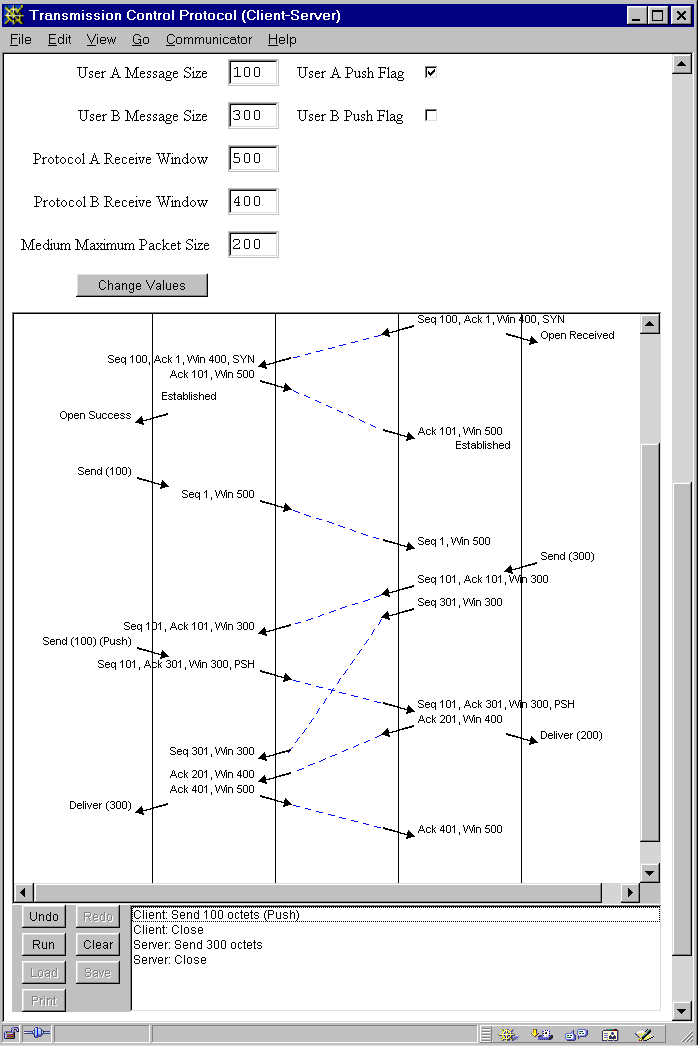
-Some simulations have associated protocol parameters. To change the defaults that are shown, enter new values and click Change Values. In some cases, this will force the simulation to restart. The following is a screen-shot of the TCP simulation, showing the protocol parameters and the main simulation controls.
-
-
-
-## Simulation as an Application ##
-
-Running a protocol simulation as an application gives access to the Print, Load and Save buttons.
-
-Print produces a hard copy of the whole simulation scenario. Note that individual pages cannot be selected for printing. The width of the printout is determined by the width of the on-screen window. Constants winWidth and winHeight in ProtocolSimulator define the initial window size. Constant maxHeight in TimeSequenceDiagram defines the vertical size of printed pages. The current sizes are appropriate for A4 paper. If necessary, change them for (say) US letter.
-
-Load loads a simulation scenario file (with a name ending in .scn); this must be for the same protocol as you are currently simulating. It replaces the current simulation scenario (if any). Save saves the current simulation as a scenario file (with a name ending in .scn). If you are adventurous, you can create and edit your own scenarios using a text editor.
-
-When the simulator is run as an application, a mandatory protocol name follows the main simulator class. Protocol parameters may then be given if required; protocols have defaults for these. Assume that the simulator has been built and is to be started from the top level of Jasper. The following will run TCP in client-server mode, with message window sizes other than the default:
-
- java -cp html/ProtocolSimulator.jar simulator.ProtocolSimulator TCP/cs windowSizeA=500 windowSizeB=300
-
-## Development ##
-
-The complete source of the simulator is provided. (Most files are likely to have Unix End-Of-Line.) The code should preferably be rebuilt using the Ant build.xml build file. ant -p will print help information about build targets. ant simulator will rebuild ProtocolSimulator.jar in the html directory. ant clean will remove all compiled class files and backup files, but preserving the JAR file. ant spotless will remove even this.
-
-If you do not have Ant but are using MS DOS/Windows, you can instead use the batch files build.bat and clean.bat. These perform the basic tasks of creating the simulator JAR file and tidying up build files.
-
-To modify an existing protocol simulation or to write a new one will need a knowledge of the simulation framework. See the article An Interactive Visual Protocol Simulator for details of this and an extended example of how to develop a simulation. Once the framework is understood, a simple simulation can be developed in a day; complex protocols could take a week or two to develop.
-
-Suppose that you want to develop a new simulation of the protocol EXP ('Example Protocol'). You would need to write EXP.java to instantiate the various entities in the protocol. For a simple protocol, you would then write EXPSender.java and EXPReceiver.java to define the behaviour of a sending or receiving protocol entity. More complex protocols could involve defining separate entities to handle the service interface and the protocol entity. It might also be necessary to define the formats of protocol messages and a variation on the underlying Medium to match these.
-
-Bear in mind that much of the development work was undertaken by students, so the level of comments in the code is somewhat limited in places. The ABP simulation is the simplest of the protocols and is a good place to start. The TFTP simulation is the best commented and best explained of the protocols. It illustrates nearly all the key points in simulation development.
-
-## Licence ##
-
-This program is free software. You can redistribute it and/or modify it under the terms of the GNU General Public License as published by the Free Software Foundation - either version 3 of the License, or (at your option) any later version.
-
-This program is distributed in the hope that it will be useful but without any warranty, without even the implied warranty of merchantability or fitness for a particular purpose. See the GNU General Public License for more details.
-
-## Acknowledgements ##
-
-The protocol simulator was developed by [Computing Science and Mathematics](http://www.cs.stir.ac.uk/) at the [University of Stirling](http://www.stir.ac.uk/). Iain A. Robin undertook most of the development for his Master's project under Ken Turner's supervision. Paul Johnson and Kenneth A. Whyte contributed to the development of some of the simulations for their Master's projects. Dr. P. J. B. King, Heriot-Watt University, provided helpful ideas and suggestions.
-
-## History ##
-
-** Version 1.0: Private internal version, Iain Robin, 1st September 1999 **
-
-** Version 1.1: Private internal version, Ken Turner, 22nd December 2000 **
-
-** Version 1.2: Private internal version, Ken Turner, 5th March 2001 **
-
-** Version 1.3: First public release, Ken Turner 6th June 2001 **
-
-** Version 1.4: General updating, Ken Turner, 9th March 2006 **
-
-* HTML files updated to be XHTML-compliant.
-* Source updated for JDK 1.5, and Swing graphics used. Note that JDK 1.5 or later is now required to re-compile the source or to run the code.
-* Top-level directory structure revised to have source, build and docs directories.
-* Makefile replaced by Ant build file. Only build and clean batch files retained. (Thanks to Dr. P. J. B. King, Heriot-Watt University, for contributing to this.)
-* Blank lines ignored in scenario files.
-* ABP and SWP3 medium control is now offered through a parameter (delivery/loss, delivery only, automatic). It would be possible in principle use this with other protocols, but makes sense in only some cases. (Thanks to Dr. P. J. B. King, Heriot-Watt University, for contributing to this.)
-* SMTP protocol messages have been slightly renamed for consistency with the RFC.
-* TCP Default window size restored on restart. Acknowledgements now sent on receipt of data, and not when receiving window becomes full. Some complex changes caused by this. Data pending delivery now sent to user prior to Closed. Open while still Closing now leads to Closed when fully closed rather than immediately. Duplicate SYN plus ACK now cancels any retransmissions while Established.
-
-** Version 1.5: Extensions for new protocols, Ken Turner, 11th February 2011 **
-
-* The major new work has been addition of new simulations (CSMA/CD, Multicast, Multiplexing, Protocol Stack, TCP Slow Start).
-* More comments, particularly JavaDoc, have been added to many files (which have also been reformatted).
-* More thorough checks of values have been added to the JavaScript in HTML files. In addition, the HTML files have been revised and reformatted.
-* The TimeSequenceDiagram class has been modified. Vertical space is now added before a DELIVER protocol event, and also before a COMMENT (even if it is not the first). A TRAVERSE protocol event has been added to deal with the situation that a dashed arrow crosses multiple columns. A corresponding TraverseTransmission class has been added.
-* The Medium class has been extended with two isEmpty methods: one to check if the medium is completely empty of messages, and one to check if the medium is empty of messages from a particular source.
-* All TCP classes have been extended to support the slow-start variant (TCP/ss). In addition, some problems with TCP have been corrected (obscure situations in which the protocol did not recover when trying to close). The TIME_WAIT state is now used to cope with these situations, including more abrupt termination when FIN is received in unusual situations.
-* A Protocol can now now implement the methods getRandNumbers and setRandomNumbers (by default these do nothing useful). If these methods are implemented, a list of the random numbers is appended to the scenario header line when the scenario is saved, and is restored when the scenario is loaded. This is for protocols such as CSMA that generate their own random numbers (as opposed to media that do so as per previous releases). The header line is now in a format such as "Jasper CSMA 0.3,0.01,0.891". If no random numbers are present following the protocol type (as is the case with previous scenario files) then no action is taken.
-
-** Version 1.6: Distribution via SourceForge, Ken Turner, 18th December 2014 **
-
-* The simulator has been packaged and made available via SourceForge.
+Detailed documentation can be found on the [project home page](http://jaspersimulator.sourceforge.net/).
</pre>
</div>Ken TurnerThu, 18 Dec 2014 14:03:03 -0000https://sourceforge.net213f31e220a069016c731140c6256c3fc5a5c05bAquileo | Home modified by Ken Turnerhttps://sourceforge.net/p/jaspersimulator/wiki/Home/<div class="markdown_content"><pre>--- v2
+++ v3
@@ -86,8 +86,6 @@
This program is distributed in the hope that it will be useful but without any warranty, without even the implied warranty of merchantability or fitness for a particular purpose. See the GNU General Public License for more details.
-You may re-distribute this software provided you preserve this README file. Bug reports should be sent to Ken Turner, who would also appreciate receiving any corrections or code for new protocols.
-
## Acknowledgements ##
The protocol simulator was developed by [Computing Science and Mathematics](http://www.cs.stir.ac.uk/) at the [University of Stirling](http://www.stir.ac.uk/). Iain A. Robin undertook most of the development for his Master's project under Ken Turner's supervision. Paul Johnson and Kenneth A. Whyte contributed to the development of some of the simulations for their Master's projects. Dr. P. J. B. King, Heriot-Watt University, provided helpful ideas and suggestions.
@@ -115,7 +113,7 @@
** Version 1.5: Extensions for new protocols, Ken Turner, 11th February 2011 **
-* The major new work has been addition of new simulations (CSMA/CD, Multicast, Multiplexing, Protocol Stack, TCP Slow Start). As this work was undertaken under contract for Pearson Education, it is not publically available. However, other improvements made in this version are publically available.
+* The major new work has been addition of new simulations (CSMA/CD, Multicast, Multiplexing, Protocol Stack, TCP Slow Start).
* More comments, particularly JavaDoc, have been added to many files (which have also been reformatted).
* More thorough checks of values have been added to the JavaScript in HTML files. In addition, the HTML files have been revised and reformatted.
* The TimeSequenceDiagram class has been modified. Vertical space is now added before a DELIVER protocol event, and also before a COMMENT (even if it is not the first). A TRAVERSE protocol event has been added to deal with the situation that a dashed arrow crosses multiple columns. A corresponding TraverseTransmission class has been added.
@@ -125,4 +123,4 @@
** Version 1.6: Distribution via SourceForge, Ken Turner, 18th December 2014 **
-* The simulator have been packaged and made available via SourceForge.
+* The simulator has been packaged and made available via SourceForge.
</pre>
</div>Ken TurnerThu, 18 Dec 2014 13:07:21 -0000https://sourceforge.net48f724b4adc8d8361db743eefd2e4349a723d476Aquileo | Home modified by Ken Turnerhttps://sourceforge.net/p/jaspersimulator/wiki/Home/<div class="markdown_content"><pre>--- v1
+++ v2
@@ -1,8 +1,128 @@
-Welcome to your wiki!
+# JASPER (Java Simulation of Protocols for Education and Research) #
-This is the default page, edit it as you see fit. To add a new page simply reference it within brackets, e.g.: [SamplePage].
+(See also the [Serbo-Croat translation](http://science.webhostinggeeks.com/jasper-java-simulacija) of this page by Anja Skrba.)
-The wiki uses [Markdown](/p/jaspersimulator/wiki/markdown_syntax/) syntax.
+## Description ##
-[[members limit=20]]
-[[download_button]]
+This protocol simulator provides:
+
+* the capability for interactively and graphically simulating a wide variety of communications protocols
+* a framework for creating new protocol simulations
+* pre-defined simulations of various well-known protocols:
+ * ABP (Alternating Bit Protocol)
+ * ABRA (Abracadabra Protocol)
+ * BOOTP (Boot Protocol)
+ * HTTP (HyperText Transfer Protocol)
+ * IP (Internet Protocol)
+ * SMTP (Simple Mail Transfer Protocol)
+ * SWP (Sliding Window Protocol, 3 and 5 column layout)
+ * TCP (Transmission Control Protocol)
+ * TFTP (Trivial File Transfer Protocol)
+ * UDP (User Datagram Protocol)
+
+The simulator is written in Java, and so can be used on many platforms with a web browser (subject to applet security) and/or a Java environment. To compile or extend the simulator requires a Java development environment such as the Oracle JDK. To run simulations requires a Java runtime environment such as the Oracle JRE. The code has been pre-built using JDK 1.8. However, it should compile and run using JRE 1.5 onwards.
+
+## Installation ##
+
+The simulator is provided as a Zip archive. The simulator unpacks to a directory (folder) called jasper-N.N according to version number. The distribution contains:
+
+
+
+
+
+
+
+
+
+
+
+<table border="1"><tr><th align="left">File/Directory</th><th align="left">Content</th></tr><tr><td>build.bat, clean.bat</td><td>MS DOS batch scripts to manage the code</td></tr><tr><td>build.xml</td><td>Ant build file to manage the code</td></tr><tr><td>docs</td><td>basic documentation</td></tr><tr><td>html</td><td> directory for web pages and simulator JAR archive</td></tr><tr><td>source</td><td>directories for Java code (protocol, simulator, support)</td></tr></table>
+
+## Simulation as an Applet ##
+
+The simulator can be used on the downloaded files by pointing a web browser at .../jasper/html (or possibly .../jasper/html/index.html). This assumes you renamed the distribution folder as jasper. This will bring up the main page, with general instructions and a list of protocols that can be simulated. Your web browser will need to be configured to run Java applets and (ideally) JavaScript. However, in view of increasing restrictions on Java in browsers this may not be allowed. Alternatively, use an applet viewer on the files (though the JavaScript to set protocol parameters will not work).
+
+Most simulations are in three-column format: two protocol entities (sender/receiver or A/B) and a communications medium (link or network). A few simulations add the sending and receiving users (applications) in outer columns. This format is useful for showing that what the user sees; typically this is only part of what is happening in the protocol.
+
+In a web browser, select an action by clicking on the list at the bottom right of the diagram. Actions are things like a user sending a data message or the medium delivering a protocol message. You are completely in control of the simulation. For example you may decide when to send messages, whether to acknowledge messages, and whether to deliver or lose messages in the medium. Since the simulation does not run in real-time, a timeout is possible as soon as a message has been sent.
+
+The last action in the diagram is shown in red. Various protocol comments may also be noted in green the diagram, e.g. that a timeout occurred or that a message was ignored.
+
+If you make a mistake, or just want to backtrack in the simulation, then click Undo. You can undo as many steps as you like, right up to the beginning of the simulation. Clicking on Redo will perform again the last undone step. Clear will restart the simulation with the current protocol parameters. If you click on Run the simulator will run automatically, making random choices for you. If you are not sure what to experiment with, this is an easy way of seeing the protocol in action. While this is happening, the Run button changes to Stop. Click on Stop to return the simulator to user control. You can continue at this point as if you had made all the automatic choices yourself.
+
+The Print, Load and Save buttons are disabled since the simulations are running as applets. If you wish hard copy of the simulation, position the scroll bar in the simulation pane at an interesting point and print out the whole web page.
+
+Some simulations have associated protocol parameters. To change the defaults that are shown, enter new values and click Change Values. In some cases, this will force the simulation to restart. The following is a screen-shot of the TCP simulation, showing the protocol parameters and the main simulation controls.
+
+
+
+## Simulation as an Application ##
+
+Running a protocol simulation as an application gives access to the Print, Load and Save buttons.
+
+Print produces a hard copy of the whole simulation scenario. Note that individual pages cannot be selected for printing. The width of the printout is determined by the width of the on-screen window. Constants winWidth and winHeight in ProtocolSimulator define the initial window size. Constant maxHeight in TimeSequenceDiagram defines the vertical size of printed pages. The current sizes are appropriate for A4 paper. If necessary, change them for (say) US letter.
+
+Load loads a simulation scenario file (with a name ending in .scn); this must be for the same protocol as you are currently simulating. It replaces the current simulation scenario (if any). Save saves the current simulation as a scenario file (with a name ending in .scn). If you are adventurous, you can create and edit your own scenarios using a text editor.
+
+When the simulator is run as an application, a mandatory protocol name follows the main simulator class. Protocol parameters may then be given if required; protocols have defaults for these. Assume that the simulator has been built and is to be started from the top level of Jasper. The following will run TCP in client-server mode, with message window sizes other than the default:
+
+ java -cp html/ProtocolSimulator.jar simulator.ProtocolSimulator TCP/cs windowSizeA=500 windowSizeB=300
+
+## Development ##
+
+The complete source of the simulator is provided. (Most files are likely to have Unix End-Of-Line.) The code should preferably be rebuilt using the Ant build.xml build file. ant -p will print help information about build targets. ant simulator will rebuild ProtocolSimulator.jar in the html directory. ant clean will remove all compiled class files and backup files, but preserving the JAR file. ant spotless will remove even this.
+
+If you do not have Ant but are using MS DOS/Windows, you can instead use the batch files build.bat and clean.bat. These perform the basic tasks of creating the simulator JAR file and tidying up build files.
+
+To modify an existing protocol simulation or to write a new one will need a knowledge of the simulation framework. See the article An Interactive Visual Protocol Simulator for details of this and an extended example of how to develop a simulation. Once the framework is understood, a simple simulation can be developed in a day; complex protocols could take a week or two to develop.
+
+Suppose that you want to develop a new simulation of the protocol EXP ('Example Protocol'). You would need to write EXP.java to instantiate the various entities in the protocol. For a simple protocol, you would then write EXPSender.java and EXPReceiver.java to define the behaviour of a sending or receiving protocol entity. More complex protocols could involve defining separate entities to handle the service interface and the protocol entity. It might also be necessary to define the formats of protocol messages and a variation on the underlying Medium to match these.
+
+Bear in mind that much of the development work was undertaken by students, so the level of comments in the code is somewhat limited in places. The ABP simulation is the simplest of the protocols and is a good place to start. The TFTP simulation is the best commented and best explained of the protocols. It illustrates nearly all the key points in simulation development.
+
+## Licence ##
+
+This program is free software. You can redistribute it and/or modify it under the terms of the GNU General Public License as published by the Free Software Foundation - either version 3 of the License, or (at your option) any later version.
+
+This program is distributed in the hope that it will be useful but without any warranty, without even the implied warranty of merchantability or fitness for a particular purpose. See the GNU General Public License for more details.
+
+You may re-distribute this software provided you preserve this README file. Bug reports should be sent to Ken Turner, who would also appreciate receiving any corrections or code for new protocols.
+
+## Acknowledgements ##
+
+The protocol simulator was developed by [Computing Science and Mathematics](http://www.cs.stir.ac.uk/) at the [University of Stirling](http://www.stir.ac.uk/). Iain A. Robin undertook most of the development for his Master's project under Ken Turner's supervision. Paul Johnson and Kenneth A. Whyte contributed to the development of some of the simulations for their Master's projects. Dr. P. J. B. King, Heriot-Watt University, provided helpful ideas and suggestions.
+
+## History ##
+
+** Version 1.0: Private internal version, Iain Robin, 1st September 1999 **
+
+** Version 1.1: Private internal version, Ken Turner, 22nd December 2000 **
+
+** Version 1.2: Private internal version, Ken Turner, 5th March 2001 **
+
+** Version 1.3: First public release, Ken Turner 6th June 2001 **
+
+** Version 1.4: General updating, Ken Turner, 9th March 2006 **
+
+* HTML files updated to be XHTML-compliant.
+* Source updated for JDK 1.5, and Swing graphics used. Note that JDK 1.5 or later is now required to re-compile the source or to run the code.
+* Top-level directory structure revised to have source, build and docs directories.
+* Makefile replaced by Ant build file. Only build and clean batch files retained. (Thanks to Dr. P. J. B. King, Heriot-Watt University, for contributing to this.)
+* Blank lines ignored in scenario files.
+* ABP and SWP3 medium control is now offered through a parameter (delivery/loss, delivery only, automatic). It would be possible in principle use this with other protocols, but makes sense in only some cases. (Thanks to Dr. P. J. B. King, Heriot-Watt University, for contributing to this.)
+* SMTP protocol messages have been slightly renamed for consistency with the RFC.
+* TCP Default window size restored on restart. Acknowledgements now sent on receipt of data, and not when receiving window becomes full. Some complex changes caused by this. Data pending delivery now sent to user prior to Closed. Open while still Closing now leads to Closed when fully closed rather than immediately. Duplicate SYN plus ACK now cancels any retransmissions while Established.
+
+** Version 1.5: Extensions for new protocols, Ken Turner, 11th February 2011 **
+
+* The major new work has been addition of new simulations (CSMA/CD, Multicast, Multiplexing, Protocol Stack, TCP Slow Start). As this work was undertaken under contract for Pearson Education, it is not publically available. However, other improvements made in this version are publically available.
+* More comments, particularly JavaDoc, have been added to many files (which have also been reformatted).
+* More thorough checks of values have been added to the JavaScript in HTML files. In addition, the HTML files have been revised and reformatted.
+* The TimeSequenceDiagram class has been modified. Vertical space is now added before a DELIVER protocol event, and also before a COMMENT (even if it is not the first). A TRAVERSE protocol event has been added to deal with the situation that a dashed arrow crosses multiple columns. A corresponding TraverseTransmission class has been added.
+* The Medium class has been extended with two isEmpty methods: one to check if the medium is completely empty of messages, and one to check if the medium is empty of messages from a particular source.
+* All TCP classes have been extended to support the slow-start variant (TCP/ss). In addition, some problems with TCP have been corrected (obscure situations in which the protocol did not recover when trying to close). The TIME_WAIT state is now used to cope with these situations, including more abrupt termination when FIN is received in unusual situations.
+* A Protocol can now now implement the methods getRandNumbers and setRandomNumbers (by default these do nothing useful). If these methods are implemented, a list of the random numbers is appended to the scenario header line when the scenario is saved, and is restored when the scenario is loaded. This is for protocols such as CSMA that generate their own random numbers (as opposed to media that do so as per previous releases). The header line is now in a format such as "Jasper CSMA 0.3,0.01,0.891". If no random numbers are present following the protocol type (as is the case with previous scenario files) then no action is taken.
+
+** Version 1.6: Distribution via SourceForge, Ken Turner, 18th December 2014 **
+
+* The simulator have been packaged and made available via SourceForge.
</pre>
</div>Ken TurnerThu, 18 Dec 2014 13:01:31 -0000https://sourceforge.net2f6776cbfe64e6631008afd660b77f48dab20ac6Aquileo | Discussion for Home pagehttps://sourceforge.net/p/jaspersimulator/wiki/Home/<div class="markdown_content"><h1 id="jasper-java-simulation-of-protocols-for-education-and-research">JASPER (Java Simulation of Protocols for Education and Research)</h1>
<p>(See also the <a class="" href="http://science.webhostinggeeks.com/jasper-java-simulacija" rel="nofollow">Serbo-Croat translation</a> of this page by Anja Skrba.)</p>
<h2 id="description">Description</h2>
<p>This protocol simulator provides:</p>
<ul>
<li>the capability for interactively and graphically simulating a wide variety of communications protocols</li>
<li>a framework for creating new protocol simulations</li>
<li>pre-defined simulations of various well-known protocols:<ul>
<li>ABP (Alternating Bit Protocol)</li>
<li>ABRA (Abracadabra Protocol)</li>
<li>BOOTP (Boot Protocol)</li>
<li>HTTP (HyperText Transfer Protocol)</li>
<li>IP (Internet Protocol)</li>
<li>SMTP (Simple Mail Transfer Protocol)</li>
<li>SWP (Sliding Window Protocol, 3 and 5 column layout)</li>
<li>TCP (Transmission Control Protocol)</li>
<li>TFTP (Trivial File Transfer Protocol)</li>
<li>UDP (User Datagram Protocol)</li>
</ul>
</li>
</ul>
<p>The simulator is written in Java, and so can be used on many platforms with a web browser (subject to applet security) and/or a Java environment. To compile or extend the simulator requires a Java development environment such as the Oracle JDK. To run simulations requires a Java runtime environment such as the Oracle JRE. The code has been pre-built using JDK 1.8. However, it should compile and run using JRE 1.5 onwards.</p>
<h2 id="installation">Installation</h2>
<p>The simulator is provided as a Zip archive. The simulator unpacks to a directory (folder) called jasper-N.N according to version number. The distribution contains:</p>
<table border="1">
<tr><th align="left">File/Directory</th><th align="left">Content</th></tr>
<tr><td>build.bat, clean.bat</td><td>MS DOS batch scripts to manage the code</td></tr>
<tr><td>build.xml</td><td>Ant build file to manage the code</td></tr>
<tr><td>docs</td><td>basic documentation</td></tr>
<tr><td>html</td><td> directory for web pages and simulator JAR archive</td></tr>
<tr><td>source</td><td>directories for Java code (protocol, simulator, support)</td></tr>
</table>
<h2 id="simulation-as-an-applet">Simulation as an Applet</h2>
<p>The simulator can be used on the downloaded files by pointing a web browser at .../jasper/html (or possibly .../jasper/html/index.html). This assumes you renamed the distribution folder as jasper. This will bring up the main page, with general instructions and a list of protocols that can be simulated. Your web browser will need to be configured to run Java applets and (ideally) JavaScript. However, in view of increasing restrictions on Java in browsers this may not be allowed. Alternatively, use an applet viewer on the files (though the JavaScript to set protocol parameters will not work).</p>
<p>Most simulations are in three-column format: two protocol entities (sender/receiver or A/B) and a communications medium (link or network). A few simulations add the sending and receiving users (applications) in outer columns. This format is useful for showing that what the user sees; typically this is only part of what is happening in the protocol.</p>
<p>In a web browser, select an action by clicking on the list at the bottom right of the diagram. Actions are things like a user sending a data message or the medium delivering a protocol message. You are completely in control of the simulation. For example you may decide when to send messages, whether to acknowledge messages, and whether to deliver or lose messages in the medium. Since the simulation does not run in real-time, a timeout is possible as soon as a message has been sent.</p>
<p>The last action in the diagram is shown in red. Various protocol comments may also be noted in green the diagram, e.g. that a timeout occurred or that a message was ignored.</p>
<p>If you make a mistake, or just want to backtrack in the simulation, then click Undo. You can undo as many steps as you like, right up to the beginning of the simulation. Clicking on Redo will perform again the last undone step. Clear will restart the simulation with the current protocol parameters. If you click on Run the simulator will run automatically, making random choices for you. If you are not sure what to experiment with, this is an easy way of seeing the protocol in action. While this is happening, the Run button changes to Stop. Click on Stop to return the simulator to user control. You can continue at this point as if you had made all the automatic choices yourself.</p>
<p>The Print, Load and Save buttons are disabled since the simulations are running as applets. If you wish hard copy of the simulation, position the scroll bar in the simulation pane at an interesting point and print out the whole web page.</p>
<p>Some simulations have associated protocol parameters. To change the defaults that are shown, enter new values and click Change Values. In some cases, this will force the simulation to restart. The following is a screen-shot of the TCP simulation, showing the protocol parameters and the main simulation controls.</p>
<p><img alt="Example TCP Simulation" src="https://a.fsdn.com/con/app/proj/jaspersimulator/screenshots/tcp-simulation.gif" rel="nofollow" /></p>
<h2 id="simulation-as-an-application">Simulation as an Application</h2>
<p>Running a protocol simulation as an application gives access to the Print, Load and Save buttons.</p>
<p>Print produces a hard copy of the whole simulation scenario. Note that individual pages cannot be selected for printing. The width of the printout is determined by the width of the on-screen window. Constants winWidth and winHeight in ProtocolSimulator define the initial window size. Constant maxHeight in TimeSequenceDiagram defines the vertical size of printed pages. The current sizes are appropriate for A4 paper. If necessary, change them for (say) US letter.</p>
<p>Load loads a simulation scenario file (with a name ending in .scn); this must be for the same protocol as you are currently simulating. It replaces the current simulation scenario (if any). Save saves the current simulation as a scenario file (with a name ending in .scn). If you are adventurous, you can create and edit your own scenarios using a text editor.</p>
<p>When the simulator is run as an application, a mandatory protocol name follows the main simulator class. Protocol parameters may then be given if required; protocols have defaults for these. Assume that the simulator has been built and is to be started from the top level of Jasper. The following will run TCP in client-server mode, with message window sizes other than the default:</p>
<p>java -cp html/ProtocolSimulator.jar simulator.ProtocolSimulator TCP/cs windowSizeA=500 windowSizeB=300</p>
<h2 id="development">Development</h2>
<p>The complete source of the simulator is provided. (Most files are likely to have Unix End-Of-Line.) The code should preferably be rebuilt using the Ant build.xml build file. ant -p will print help information about build targets. ant simulator will rebuild ProtocolSimulator.jar in the html directory. ant clean will remove all compiled class files and backup files, but preserving the JAR file. ant spotless will remove even this.</p>
<p>If you do not have Ant but are using MS DOS/Windows, you can instead use the batch files build.bat and clean.bat. These perform the basic tasks of creating the simulator JAR file and tidying up build files.</p>
<p>To modify an existing protocol simulation or to write a new one will need a knowledge of the simulation framework. See the article An Interactive Visual Protocol Simulator for details of this and an extended example of how to develop a simulation. Once the framework is understood, a simple simulation can be developed in a day; complex protocols could take a week or two to develop.</p>
<p>Suppose that you want to develop a new simulation of the protocol EXP ('Example Protocol'). You would need to write EXP.java to instantiate the various entities in the protocol. For a simple protocol, you would then write EXPSender.java and EXPReceiver.java to define the behaviour of a sending or receiving protocol entity. More complex protocols could involve defining separate entities to handle the service interface and the protocol entity. It might also be necessary to define the formats of protocol messages and a variation on the underlying Medium to match these.</p>
<p>Bear in mind that much of the development work was undertaken by students, so the level of comments in the code is somewhat limited in places. The ABP simulation is the simplest of the protocols and is a good place to start. The TFTP simulation is the best commented and best explained of the protocols. It illustrates nearly all the key points in simulation development.</p>
<h2 id="licence">Licence</h2>
<p>This program is free software. You can redistribute it and/or modify it under the terms of the GNU General Public License as published by the Free Software Foundation - either version 3 of the License, or (at your option) any later version.</p>
<p>This program is distributed in the hope that it will be useful but without any warranty, without even the implied warranty of merchantability or fitness for a particular purpose. See the GNU General Public License for more details.</p>
<p>You may re-distribute this software provided you preserve this README file. Bug reports should be sent to Ken Turner, who would also appreciate receiving any corrections or code for new protocols.</p>
<h2 id="acknowledgements">Acknowledgements</h2>
<p>The protocol simulator was developed by <a class="" href="http://www.cs.stir.ac.uk" rel="nofollow">Computing Science and Mathematics</a> at the <a class="" href="http://www.stir.ac.uk" rel="nofollow">University of Stirling</a>. Iain A. Robin undertook most of the development for his Master's project under Ken Turner's supervision. Paul Johnson and Kenneth A. Whyte contributed to the development of some of the simulations for their Master's projects. Dr. P. J. B. King, Heriot-Watt University, provided helpful ideas and suggestions.</p>
<h2 id="history">History</h2>
<p><strong> Version 1.0: Private internal version, Iain Robin, 1st September 1999 </strong></p>
<p><strong> Version 1.1: Private internal version, Ken Turner, 22nd December 2000 </strong></p>
<p><strong> Version 1.2: Private internal version, Ken Turner, 5th March 2001 </strong></p>
<p><strong> Version 1.3: First public release, Ken Turner 6th June 2001 </strong></p>
<p><strong> Version 1.4: General updating, Ken Turner, 9th March 2006 </strong></p>
<ul>
<li>HTML files updated to be XHTML-compliant.</li>
<li>Source updated for JDK 1.5, and Swing graphics used. Note that JDK 1.5 or later is now required to re-compile the source or to run the code.</li>
<li>Top-level directory structure revised to have source, build and docs directories.</li>
<li>Makefile replaced by Ant build file. Only build and clean batch files retained. (Thanks to Dr. P. J. B. King, Heriot-Watt University, for contributing to this.)</li>
<li>Blank lines ignored in scenario files.</li>
<li>ABP and SWP3 medium control is now offered through a parameter (delivery/loss, delivery only, automatic). It would be possible in principle use this with other protocols, but makes sense in only some cases. (Thanks to Dr. P. J. B. King, Heriot-Watt University, for contributing to this.)</li>
<li>SMTP protocol messages have been slightly renamed for consistency with the RFC.</li>
<li>TCP Default window size restored on restart. Acknowledgements now sent on receipt of data, and not when receiving window becomes full. Some complex changes caused by this. Data pending delivery now sent to user prior to Closed. Open while still Closing now leads to Closed when fully closed rather than immediately. Duplicate SYN plus ACK now cancels any retransmissions while Established.</li>
</ul>
<p><strong> Version 1.5: Extensions for new protocols, Ken Turner, 11th February 2011 </strong></p>
<ul>
<li>The major new work has been addition of new simulations (CSMA/CD, Multicast, Multiplexing, Protocol Stack, TCP Slow Start). As this work was undertaken under contract for Pearson Education, it is not publically available. However, other improvements made in this version are publically available.</li>
<li>More comments, particularly JavaDoc, have been added to many files (which have also been reformatted).</li>
<li>More thorough checks of values have been added to the JavaScript in HTML files. In addition, the HTML files have been revised and reformatted.</li>
<li>The TimeSequenceDiagram class has been modified. Vertical space is now added before a DELIVER protocol event, and also before a COMMENT (even if it is not the first). A TRAVERSE protocol event has been added to deal with the situation that a dashed arrow crosses multiple columns. A corresponding TraverseTransmission class has been added.</li>
<li>The Medium class has been extended with two isEmpty methods: one to check if the medium is completely empty of messages, and one to check if the medium is empty of messages from a particular source.</li>
<li>All TCP classes have been extended to support the slow-start variant (TCP/ss). In addition, some problems with TCP have been corrected (obscure situations in which the protocol did not recover when trying to close). The TIME_WAIT state is now used to cope with these situations, including more abrupt termination when FIN is received in unusual situations.</li>
<li>A Protocol can now now implement the methods getRandNumbers and setRandomNumbers (by default these do nothing useful). If these methods are implemented, a list of the random numbers is appended to the scenario header line when the scenario is saved, and is restored when the scenario is loaded. This is for protocols such as CSMA that generate their own random numbers (as opposed to media that do so as per previous releases). The header line is now in a format such as "Jasper CSMA 0.3,0.01,0.891". If no random numbers are present following the protocol type (as is the case with previous scenario files) then no action is taken.</li>
</ul>
<p><strong> Version 1.6: Distribution via SourceForge, Ken Turner, 18th December 2014 </strong></p>
<ul>
<li>The simulator have been packaged and made available via SourceForge.</li>
</ul></div>Ken TurnerThu, 18 Dec 2014 12:59:28 -0000https://sourceforge.net29c40fb52a3dc531e117dd791fdfe1f654182703Aquileo | Home modified by Ken Turnerhttps://sourceforge.net/p/jaspersimulator/wiki/Home/<div class="markdown_content"><p>Welcome to your wiki!</p>
<p>This is the default page, edit it as you see fit. To add a new page simply reference it within brackets, e.g.: <span>[SamplePage]</span>.</p>
<p>The wiki uses <a class="" href="/p/jaspersimulator/wiki/markdown_syntax">Markdown</a> syntax.</p>
<p><h6>Project Members:</h6>
<ul class="md-users-list">
<li><a href="/u/kjt">Ken Turner</a> (admin)</li>
</ul><br />
</p><p><span class="download-button-5492bee881b24b25437bb387" style="margin-bottom: 1em; display: block;"></span></p><p></p></div>Ken TurnerThu, 18 Dec 2014 11:47:53 -0000https://sourceforge.netf04bdf672ab99814428f110f3d63911196405617