
API Testing (Application Programming Interface Testing) is a type of software testing that focuses on verifying the functionality, reliability, performance, and security of APIs. It ensures that different software systems can communicate correctly with each other.
- Tests the business logic layer (not the UI).
- Validates requests and responses (e.g., GET, POST, PUT, DELETE).
- Ensures proper data exchange between systems.
- Checks status codes, response time, and data accuracy.
API
API (Application Programming Interface) is a set of rules and protocols that allows different software applications to communicate and exchange data with each other.
Example: When you use a weather app, it uses an API to fetch data from a server and display it to you.
Types of APIs
- REST (Representational State Transfer): A stateless architectural style that uses standard HTTP methods and typically exchanges data in JSON format for scalable and flexible communication.
- SOAP (Simple Object Access Protocol): A protocol-based API that uses XML messaging with strict standards for secure, reliable, and structured communication.
- GraphQL: A query language for APIs that allows clients to request exactly the data they need, improving efficiency and reducing over-fetching.
- gRPC (Google Remote Procedure Call): A high-performance API framework that uses Protocol Buffers for fast, efficient communication between distributed systems.
How APIs Work (Request–Response Cycle)
The client sends a request to an API endpoint, the server processes it by interacting with the database, and returns a response to the client.
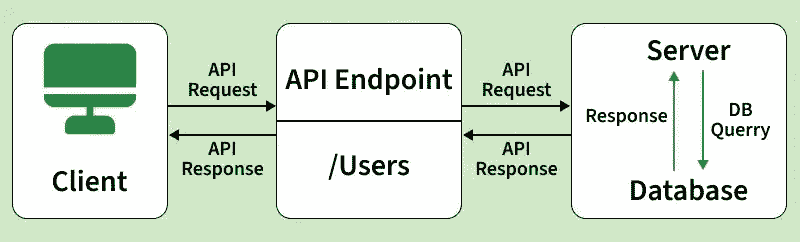
1. Client Sends Request
The client (browser or application) initiates a request to the API to access data or perform an action. This request includes necessary parameters and headers.
- Uses HTTP methods like GET, POST, etc.
- Contains headers, parameters, or body data
- Sent to a specific API endpoint
2. API Endpoint Processing
The API endpoint receives the request and identifies the required operation based on the URL and method. It routes the request to the appropriate handler.
- Endpoint defines the resource (/users, /orders)
- Matches request method (GET/POST)
- Routes to correct service logic
3. Server Logic Execution
The server processes the request by applying business logic, validations, or interacting with the database.
- Performs calculations or validations
- Interacts with database or services
- Applies business rules
4. Response Generation
After processing, the server prepares a structured response with required data and status details.
- Includes status code (200, 404, 500)
- Formats data (JSON/XML)
- Adds response headers
5. Server Sends Response
The server sends the response back to the client over the network.
- Uses HTTP/HTTPS protocol
- Transfers data securely
- Response reaches client system
6. Client Receives Response
The client processes the response and displays or uses the data accordingly.
- Parses JSON/XML data
- Updates UI or triggers action
- Handles success or error messages
API Components
- Endpoints: Specific URLs (e.g., /users, /login) where APIs are accessed to perform operations on resources.
- Methods (HTTP Methods): Define the type of action to perform on an endpoint, such as GET (retrieve), POST (create), PUT/PATCH (update), and DELETE (remove).
- Headers: Provide additional information in a request or response, such as content type, authorization, and caching details.
- Body (Payload): Contains the actual data sent to the server (in POST/PUT requests) or returned by the server, usually in JSON or XML format.
- Status Codes: Indicate the result of an API request, such as 200 (success), 404 (not found), or 500 (server error).
API Testing Process
API Testing Workflow process is a structured process used to verify that APIs function correctly, perform efficiently, and remain secure. It covers all stages from requirement analysis to final reporting.
- Understand Requirements: Review API documentation (e.g., Swagger/Postman), including endpoints, HTTP methods, parameters, authentication, and expected responses.
- Set Up Testing Environment: Prepare the testing setup with required tools (Postman, JMeter, Rest Assured), test data, and authentication credentials.
- Design Test Cases: Create test cases for functional scenarios, positive and negative flows, edge cases, and security validations.
- Execute API Tests: Send API requests (GET, POST, PUT, DELETE, etc.) and record the responses for analysis.
- CI/CD Pipeline Integration: Integrate automated API tests into CI/CD pipelines (such as Jenkins, GitHub Actions, or GitLab CI/CD) to ensure continuous testing during build, deployment, and release processes.
- Validate Responses: Verify status codes, response time, headers, response structure (JSON/XML), and business logic correctness.
- Perform Different Types of Testing: Conduct functional, integration, security, performance, and load testing as required.
- Defect Logging & Retesting: Log defects, communicate them to developers, retest after fixes, and perform regression testing.
- Generate Reports: Prepare test reports including pass/fail status, test coverage, performance metrics, and key observations.
API Testing Types
Here's a breakdown of the main types of API testing:
- Functional Testing: Checks whether the API works correctly according to requirements and returns expected results.
- Integration Testing: Ensures the API works properly when combined with other systems, databases, or services.
- Load Testing: Measures API performance under expected user traffic and workload.
- Stress Testing: Tests the API beyond its limits to identify breaking points and failure behavior.
- Security Testing: Verifies that the API is protected against threats like unauthorized access and data breaches.
- Validation Testing: Confirms the API meets specifications such as data format, schema, and required fields.
- Regression Testing: Ensures recent changes do not break existing API functionality.
- Fuzz Testing: Sends random or invalid inputs to check how the API handles unexpected data.
- Contract Testing: Validates that the API follows the agreed contract between client and server.
- End-to-End Testing: Tests complete workflows involving multiple APIs and systems together.
- Mocking / Simulation Testing: Uses mock APIs or servers to test functionality without relying on real services.
- Rate Limiting Testing: Checks whether API request limits and throttling mechanisms work correctly.
- Authentication Testing: Verifies authentication mechanisms such as API Keys, OAuth, JWT, and Bearer Tokens to ensure secure and authorized API access.
API Testing Tools
There are several tools available to automate and streamline API testing. Here are a few popular ones:
- Postman: A popular tool used to send API requests, test responses, and automate API testing easily.
- SoapUI: A tool mainly used for testing SOAP and REST APIs with advanced functional and security testing features.
- JMeter: An open-source tool used for performance and load testing of APIs and web applications.
- Rest Assured: A Java-based library used for automating REST API testing with simple and readable code.
- Swagger (OpenAPI): Used to design, document, and test APIs directly from the browser interface.
- Karate: An automation tool that combines API testing, performance testing, and UI testing in a single framework.
- Katalon Studio: A complete testing tool that supports API, web, and mobile testing with both manual and automation features.
API Documentation Standards
API documentation standards help developers and testers understand API structure, endpoints, request formats, authentication methods, and responses in a consistent manner.
- OpenAPI (Swagger): A widely used standard for designing, documenting, and testing REST APIs with interactive documentation support.
- RAML (RESTful API Modeling Language): A structured language used to model and document RESTful APIs in a simple and readable format.
- API Blueprint: A markdown-based API documentation standard used for designing and documenting APIs efficiently.
- Benefits of API Documentation Standards: Improve communication between developers and testers, simplify API integration, and ensure consistency in API development and testing.
API Test Case Design
- Writing Effective Test Cases: Create well-structured test cases with clear objectives, inputs, expected outputs, and validation steps to ensure complete coverage.
- Positive Test Cases: Validate that the API behaves correctly with valid inputs and returns the expected response and status codes.
- Negative Test Cases: Verify that the API handles invalid, missing, or incorrect inputs gracefully with proper error codes and messages.
- Boundary Value & Edge Cases: Test the API with minimum, maximum, and extreme input values to ensure stability under unusual conditions.
- Data-Driven Testing: Execute the same test cases with multiple datasets to validate API behavior across different input variations.
HTTP Methods and Status Codes
APIs use HTTP methods to define the actions that a client wants to perform on the server:
| HTTP Method | Description | Use Case |
|---|---|---|
| GET | Retrieves data from the server (e.g., a web page or API data). | Used to fetch resources without making changes to the server. |
| POST | Submits data to the server (e.g., form data, file upload). | Used to create resources or submit data for processing. |
| PUT | Replaces the current resource with the new data provided. | Used to update an existing resource or create it if it doesn't exist. |
| DELETE | Deletes the specified resource from the server. | Used to remove a resource (e.g., deleting a user or record). |
| PATCH | Partially updates the resource with the given data. | Used to apply partial modifications to a resource. |
| HEAD | Retrieves the headers of a resource without the body (like GET but no data). | Used to check metadata about a resource (e.g., to check existence or last-modified date). |
| OPTIONS | Used to determine allowed operations or request methods on a resource. | Describes the communication options for the target resource. |
| CONNECT | Establishes a tunnel to the server, typically used for SSL/TLS connections. | Used for proxying connections, often in HTTPS communications. |
| TRACE | Echoes back the received request for diagnostic purposes. | Used to trace the request path to the server (e.g., debugging). |
HTTP Response Code
| HTTP Response Code Category | Description |
|---|---|
| 1xx: Informational | Communicates transfer protocol-level information. |
| 2xx: Success | Indicates that the REST web-service successfully carried out the requested action. |
| 3xx: Redirection | Indicates that the client must take some additional action to complete their request. |
| 4xx: Client Error | Points to errors caused by the client, such as bad requests or unauthorized access attempts. |
| 5xx: Server Error | Indicates server-side issues where the server takes responsibility for the error. |
| HTTP Response Code | Description |
|---|---|
| 200 | For a successful request. |
| 201 | For a successful request where data was created. |
| 204 | For an empty response. |
| 400 | For a bad request. The request could not be understood or was missing required parameters. |
| 401 | For unauthorized access. Authentication failed, or the user does not have permissions for the requested operation. |
| 403 | For forbidden access. Access is denied. |
| 404 | For data not found. |
| 405 | For a method not allowed or the requested method is not supported. |
| 500 | For an internal server error. |
| 503 | For a service unavailable error. |
Structure of URL in API
In REST architecture, URIs (Uniform Resource Identifiers) are used to identify and access resources. A URL follows a structured format that helps locate and interact with specific API endpoints.
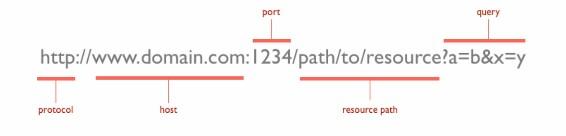
Parts of the URL Explained
- Protocol (http://): Defines how data is transferred between client and server (HTTP/HTTPS).
- Host (www.domain.com): The domain name or server where the resource is located.
- Port (1234): Specifies the communication port on the server (optional).
- Resource Path (/path/to/resource): Indicates the specific API endpoint or resource being accessed.
- Query Parameters (?a=b&x=y): Additional data sent in the request as key-value pairs.
Real-World API Testing Example
Scenario: Weather Data Retrieval
A user requests current weather information for a specific location using a weather application. The API processes the request and returns relevant data.
API Request (Client → Server)
Endpoint: /weather
Method: GET
Request:
GET /weather?location=New+Delhi
API Response (Server → Client)
{
"location": "New Delhi",
"temperature": "28°C",
"condition": "Cloudy"
}
Test Cases
- Response Structure Validation: Ensure the response follows the correct JSON format and contains all required fields.
- Status Code Verification: Verify that the API returns the correct status code (e.g., 200 OK for success).
- Data Accuracy: Check that the returned weather data matches the requested location.
- Response Time: Confirm that the API responds within acceptable limits (e.g., <1 second).
- Negative Testing: Provide invalid input (e.g., incorrect location) and verify proper error handling and messages.
The Test Pyramid
The test pyramid is a general guideline for prioritizing test types, and the percentage distribution may vary depending on project requirements and testing strategy.
- Unit Tests (70%): Validate individual components to ensure core functionality.
- Service/API Tests (25%): Focus on backend operations to test API functionality, speed, and coverage.
- UI Tests (5%): Test end-to-end workflows to minimize maintenance costs.
Types of Bugs that may occur in API Testing
API testing can reveal different types of defects related to functionality, performance, security, reliability, and data handling in APIs.
- Performance Issues - API response Time can be very high, and they may have latency.
- Response data may not structure correctly ( JSON or XML )
- Security Issues
- Incorrect handling of valid argument values
- Improper errors/warning to caller
- Missing or Duplicate Functionality
- Reliability Issues : Difficulty in connecting and getting a response from API
Challenges in API Testing
API testing involves several technical and operational challenges that can affect test accuracy, reliability, and overall software quality.
- Complex Authentication Mechanisms: Testing APIs with OAuth, JWT, tokens, or multi-level authentication can be difficult.
- Frequent API Changes: API endpoints, request formats, or response structures may change frequently during development.
- Third-Party Dependencies: APIs often depend on external services that may be unavailable or unstable during testing.
- Test Data Management: Maintaining valid and consistent test data for different scenarios can be challenging.
- Version Compatibility Issues: Different API versions may behave differently, causing compatibility problems.