
Analyzing IPL 2023 auction data is important for understanding player purchases, team spending and auction trends. In this guide, we’ll use PandasAI an AI-powered data analysis tool to gain insights from the IPL 2024 Auction dataset. Pandas AI enhances traditional Pandas by integrating AI-driven insights making it easier to extract meaningful information from large datasets. Key benefits include:
Step-by-Step IPL Data Analysis Using PandasAI
Step 1: Prerequisites
Before starting ensure that pandasAI and openai libraries are installed. Run the following command in your command prompt:
!pip install -q pandasai openai pandas
Step 2: Import necessary libraries
import pandas as pd
from pandasai import SmartDataframe
from pandasai.llm.openai import OpenAI
Step 3: Initialize instance of OpenAI LLM and pass it's API key
# replace "your_api_key" with your generated key
OPENAI_API_KEY = "your_api_key"

llm = OpenAI(api_token=OPENAI_API_KEY)
Step 4: Importing the IPL 2023 Auction dataset using pandas
We are using the IPL 2023 Auction dataset here. You can download dataset from here.
df = pd.read_csv('IPL_Squad_2023_Auction_Dataset.csv')
print(df.shape)
df.head()
Output:
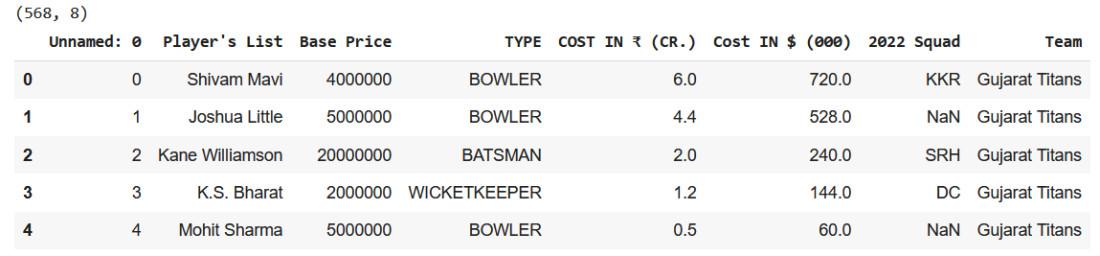
Step 5: Drop the "Unnamed: 0" column from the above dataset
df.drop(['Unnamed: 0'], axis=1, inplace=True)
df.head()
Output:
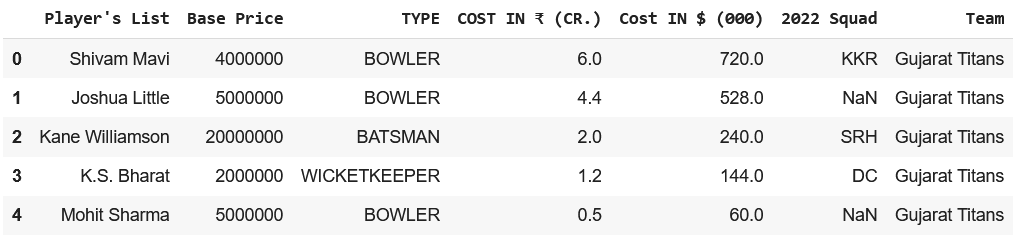
Step 6: Create SmartDataframe Object
sdf = SmartDataframe(df, config={"llm": llm})
Step 7: Data Analysis using PandasAI
Now let's begin our analysis:
Prompt 1:
sdf.chat("Which players were the most expensive buys?")
Output:
['Sam Curran', 'Cameron Green', 'Ben Stokes']
Prompt 2:
sdf.chat("Which players were the cheapest buys this season and which teams bought them?")
Output:
Well, it looks like the cheapest buys this season were Glenn Phillips for Sunrisers Hyderabad,
Raj Angad Bawa and Rishi Dhawan for Punjab Kings, Dhruv Jurel and K.C Cariappa
for Rajasthan Royals and many more. The full list includes 163 players and their respective teams.
Prompt 3:
sdf.chat(
    "Draw a bar graph showing how much money was spent by each team this season overall."
)
Output:
.png)
Prompt 4:
sdf.chat(
    "How many bowlers remained unsold and what were their base prices?"
)
Output:
There were 108 bowlers who remained unsold in the auction.
Their base price ranged from 2 million to 20 million.
Prompt 5:
sdf.chat(
    "How many players remained unsold this season?"
)
Output:
('Number of players remained unsold this season:', 338)
Prompt 6:
sdf.chat(
    "Which category of players had the highest number of unsold players?"
)
Output:
TYPE
ALL-ROUNDER 65
BOWLER 64
BATSMAN 35
WICKETKEEPER 21The majority of unsold players were All-Rounders and Bowlers.
Prompt 7:
sdf.chat(
    "Which three new players were picked by Gujarat Titans?"
)
Output:
0 Shivam Mavi
1 Joshua Little
2 Kane Williamson
Name: Player's List, dtype: object
Prompt 8:
sdf.chat(
    "What was the total amount of money spent by all teams in dollars?"
)
Output:
The total amount of money spent by all teams in the auction is $20,040,000.
Prompt 9:
sdf.chat(
    "Draw a bar plot showing how much money Mumbai Indians spent on each type of player."
)
Output:
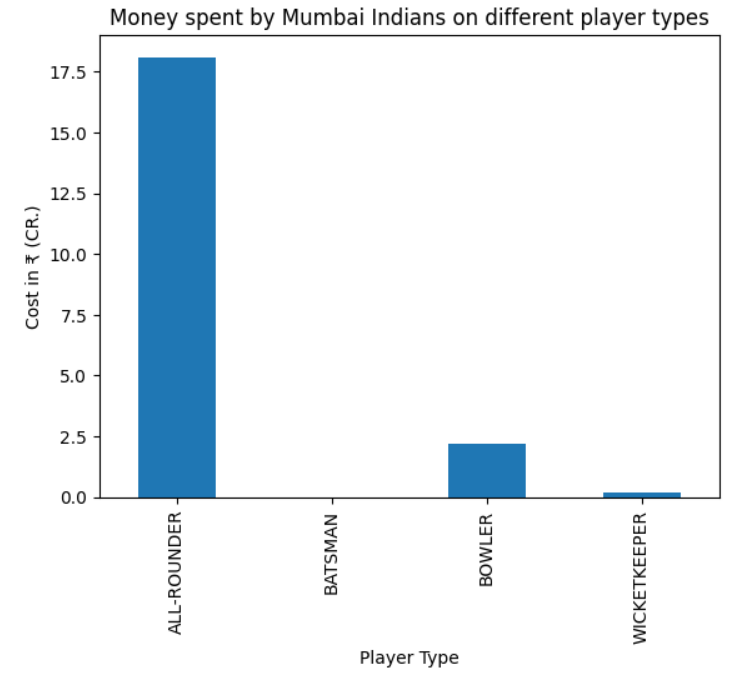
Prompt 10:
sdf.chat(
    "Draw a bar plot showing how much money Gujarat Titans spent on each type of player."
)
Output:
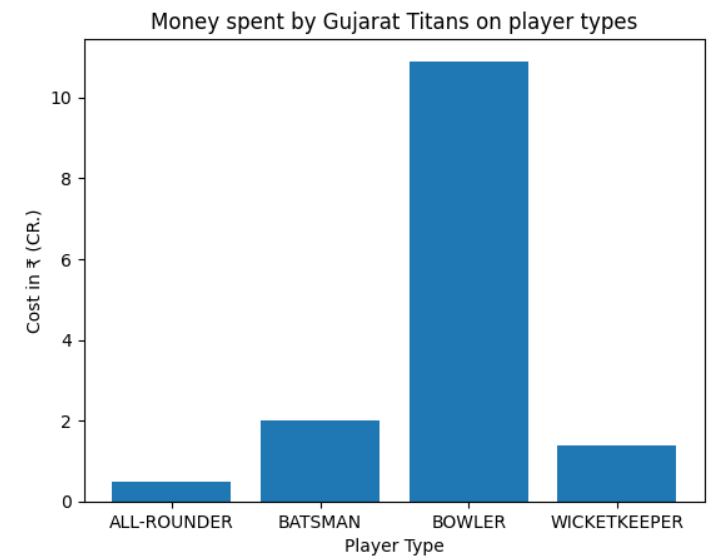
Prompt 11:
sdf.chat(
    "Based on the auction trends, which team might buy Sam Curran in 2024?"
)
Output:
Lucknow Super Giants
Prompt 12:
sdf.chat(
    "Perform univariate analysis on the dataset."
)
Output:
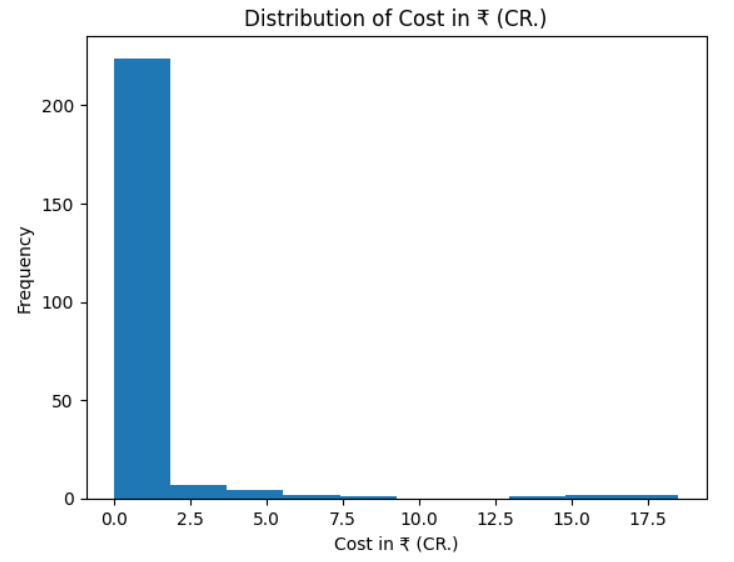
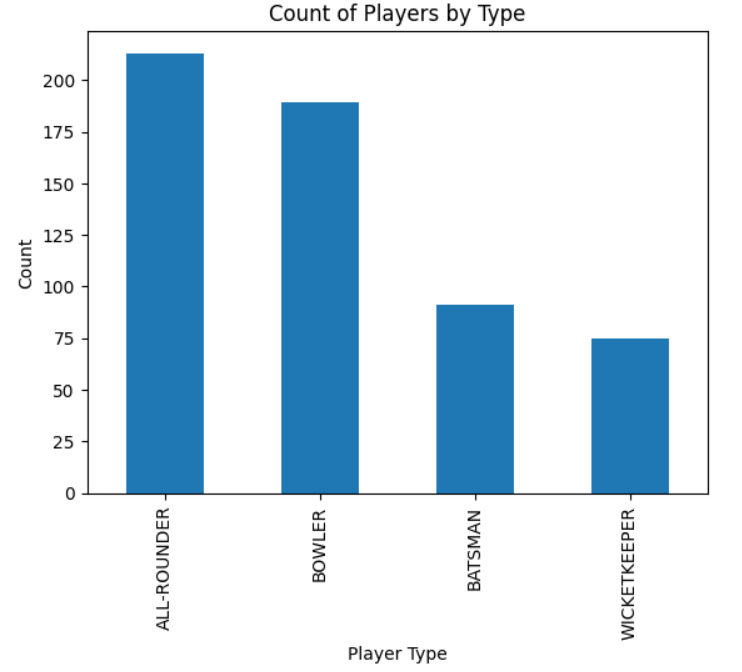
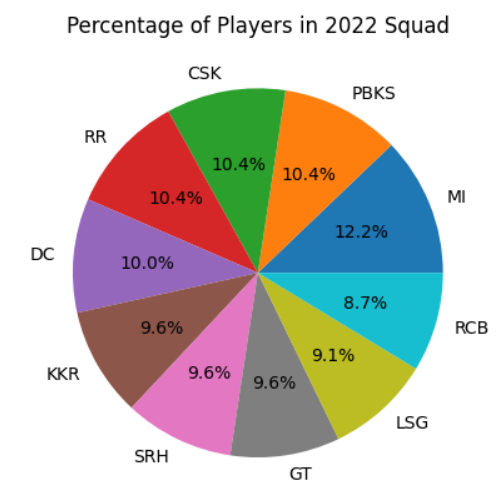
Based on the data provided, the univariate analysis shows that we have seven variables: Player's List, Base Price, TYPE, COST IN ₹ (CR.), Cost IN $ (000), 2022 Squad and Team. The data types for these variables are object, object, object, float64, float64 and object respectively.
Prompt 13:
sdf.chat(
    "Perform multivariate analysis on the dataset."
)
Output:
Unfortunately, I was not able to answer your question. Please try again. If the problem persists try rephrasing your question.
For this input PandasAI seems to have failed as the complexity and ambiguity increased.