
It allows components or modules to be loaded only when they are needed, instead of loading everything during the initial page load. This improves performance by reducing the initial bundle size.
- Loads components asynchronously (on demand) to optimize performance.
- Helps in code splitting, reducing the initial JavaScript bundle size.
- Improves page load speed and user experience by loading resources only when required.
Syntax
import dynamic from 'next/dynamic';

const dynamicComp = dynamic(() => import("path_to_dynamicComponent"));
Set Up Dynamic Imports in Next.js
Before you proceed, there are some things you should be aware of about the dynamic import. Although dynamic import can reduce page load, it is very important to know how the bulk download process behaves in order to avoid negative consequences that may increase page load.
- Dynamic imports are fetched when the component is rendered for the first time.
- Already rendered imports do not trigger an additional re-fetch.
- Each dynamic import will create a newly incremented bundle file. This includes nested dynamic imports.
- Each dynamic import adds a new server request.
Creating Next Application
Step 1: Create a React application using the following command and move to that folder:
npx create-next-app gfg
cd gfg
Step 2: Create components named folder in your root directory. Create a folder named components. Run the command to create a folder
mkdir components Step 3: Inside the folder create two files. Inside the component folder, the two javascript files are named GFG.js and Hello.js with the following code.
// components/GFG.js

import React from "react";

function GFG() {
    return (
        <div>
            <h1>Welcome TO GeeksforGeeks</h1>
        </div>
    );
}

export default GFG;
// Filename - components/Hello.js

import React from "react";

function Hello() {
    return (
        <div>
            <h1>Hello Geeks</h1>
        </div>
    );
}

export default Hello;
Project Structure: Your project directory will look like this:
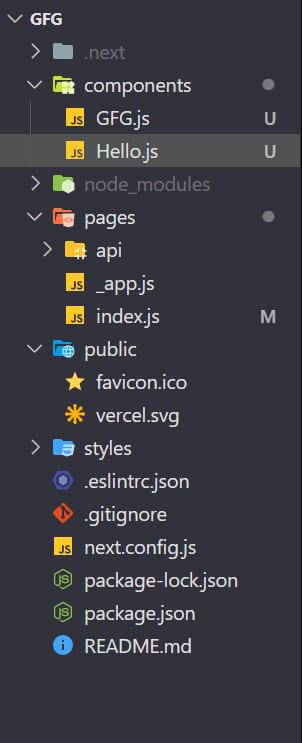
Step 4: Inside index.js we have import dynamic.
In your directory, you can see a pages folder inside that index.js file will be there. import dynamic from 'next/dynamic'. And make state and button to show those two components and working of dynamic as well as benefits.
// Filename - pages/index.js

import dynamic from "next/dynamic";
import { useState } from "react";
import Hello from "../components/Hello";

export default function Home() {
    const [showComp, SetShowComp] = useState(false);
    const GFG = dynamic(() => import("../components/GFG"));

    return (
        <div>
            {showComp ? <GFG /> : <Hello />}
            <button onClick={() => SetShowComp(!showComp)}>
                Toggle Component
            </button>
        </div>
    );
}
Step to run the application: Run the application using the following command:
npm startOutput: