
Client-Side Data Fetching is a technique where data is fetched in the browser after the page loads, enabling dynamic and interactive user experiences. Unlike SSR and SSG, it shifts data handling to the client for better responsiveness.
- Fetches data after page load using React hooks like useEffect or libraries like SWR.
- Improves initial load speed since only basic HTML is loaded first.
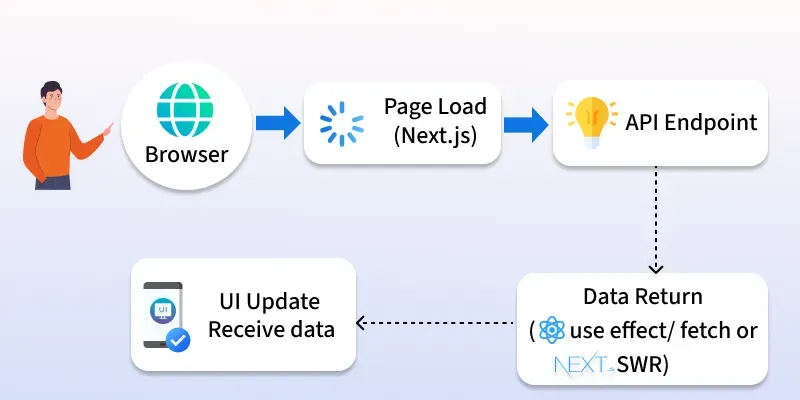
- Enables real-time updates without needing to refresh the page.
- Reduces server load by handling more logic on the client side.
- Ideal for user-specific or frequently changing data (e.g., dashboards, live feeds).
Client-side data fetching with useEffect and Fetch
The simplest way to fetch data on the client side is using React’s useEffect hook.
import { useState, useEffect } from "react";

export default function ClientFetchExample() {
  const [posts, setPosts] = useState([]);
  const [loading, setLoading] = useState(true);

  useEffect(() => {
    fetch("https://jsonplaceholder.typicode.com/posts")
      .then((res) => res.json())
      .then((data) => {
        setPosts(data);
        setLoading(false);
      });
  }, []);

  if (loading) return <p>Loading...</p>;

  return (
    <div>
      <h1>Client-Side Fetched Posts</h1>
      <ul>
        {posts.slice(0, 5).map((post) => (
          <li key={post.id}>{post.title}</li>
        ))}
      </ul>
    </div>
  );
}
- Data is fetched after the page loads.
- The
loadingstate shows feedback until data arrives.
Client-side data fetching with SWR
Next.js recommends using the SWR library for client-side data fetching. It provides features like caching, revalidation, and automatic updates.
- Built-in caching for faster repeated requests
- Automatic revalidation to keep data fresh
- Real-time data updates without extra setup
- Simple and developer-friendly API
Firstly, install the swr in your System
npm install swrimport useSWR from "swr";
const fetcher = (url) => fetch(url).then((res) => res.json());
export default function SWRExample() {
const { data, error, isLoading } = useSWR(
"https://jsonplaceholder.typicode.com/posts",
fetcher
);
if (isLoading) return <p>Loading...</p>;
if (error) return <p>Failed to load data</p>;
return (
<div>
<h1>Posts (using SWR)</h1>
<ul>
{data.slice(0, 5).map((post) => (
<li key={post.id}>{post.title}</li>
))}
</ul>
</div>
);
}
- The
fetcherfunction fetches data from the given API and returns it as JSON. - The
useSWRhook calls this fetcher, manages loading/error states, and provides the API response. - The component shows a loading message first, then displays the first 5 post titles once the data is ready.
Features of Client-Side Data Fetching
- Runs in the Browser – Data is requested after the initial page has loaded.
- Asynchronous Updates – UI updates automatically when new data arrives.
- Loading & Error States – Easy to show feedback (e.g., spinners, error messages) while fetching.
- Supports Real-Time Data – Ideal for live dashboards, chats, or stock updates.
- API Flexibility – Works with REST APIs, GraphQL, or any external service.
- Lightweight on Server – Server delivers static content, while the browser handles data requests.
- Integrates with Libraries – Tools like SWR or React Query add caching, revalidation, and better performance.