
An ImageView as the name suggests is used to display images in Android Applications. In this article, we will be discussing how to create an ImageView programmatically in Kotlin.
Step by Step Implementation
Step 1: Create a new project
To create a new project in Android Studio please refer to How to Create/Start a New Project in Android Studio.
After doing this you will see some directories on the left-hand side after your project/gradle is finished loading. It should look like this:
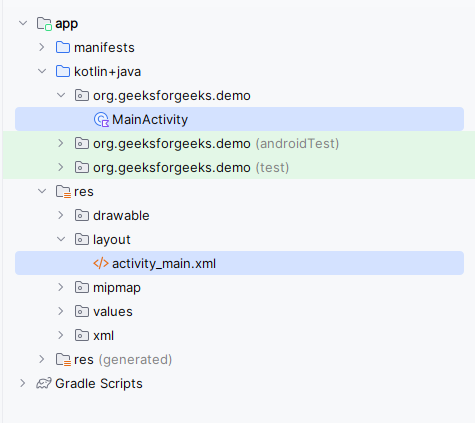
Step 2: Modify activity_main.xml file
After that, we need to design our layout. For that, we need to work with the XML file. Go to app > res > layout > activity_main.xml and paste the following code.
activity_main.xml:
<?xml version="1.0" encoding="utf-8"?>
<LinearLayout
    xmlns:android="http://schemas.android.com/apk/res/android"
    xmlns:tools="http://schemas.android.com/tools"
    android:layout_width="match_parent"
    android:layout_height="match_parent"
    android:id="@+id/main"
    android:gravity="center"
    android:orientation="vertical"
    tools:context=".MainActivity">

    <Button
        android:id="@+id/button"
        android:layout_width="wrap_content"
        android:layout_height="wrap_content"
        android:text="Add Image"/>
</LinearLayout>
Note: We will be needing an image to be used in the application. You can use the images that you like but the images must be pasted in app > res > drawable folder.
Step 3: Create ImageView in MainActivity.kt file
Navigate to app > src > main > java > {package-name} > MainActivity.kt and do the following changes:
Create ImageView widget like this:
val imageView = ImageView(this)
imageView.layoutParams= LinearLayout.LayoutParams(400, 400)
imageView.x = 20F
imageView.y = 20F
then add the widget in layout using this
val layout: LinearLayout = findViewById(R.id.main)
layout.addView(imageView)
MainActivity.kt
package org.geeksforgeeks.demo

import android.os.Bundle
import android.widget.Button
import android.widget.ImageView
import android.widget.LinearLayout
import androidx.appcompat.app.AppCompatActivity

class MainActivity : AppCompatActivity() {

    override fun onCreate(savedInstanceState: Bundle?) {
        super.onCreate(savedInstanceState)
        setContentView(R.layout.activity_main)

        val imageView = ImageView(this)
        // setting height and width of imageview
        imageView.layoutParams= LinearLayout.LayoutParams(400, 400)
        imageView.x = 20F // setting margin from left
        imageView.y = 20F // setting margin from top

        val button: Button = findViewById(R.id.button)
        button.setOnClickListener{
            imageView.setImageResource(R.drawable.gfg_logo)
        }

        val layout: LinearLayout = findViewById(R.id.main)

        // adding image to the layout
        layout.addView(imageView)
    }
}