
Open Database Connectivity is an important technology in the database to access and managing databases. It enables a developer to cover and effectively work with many database systems, whereby for relational databases, it enables a developer to make connections with tabular data in an ODBC server.
- It is an open standard Application Programming Interface, also known as API, which is used for accessing a database.
- With the help of an ODBC statement in a program and access different files in a number of different or common databases.
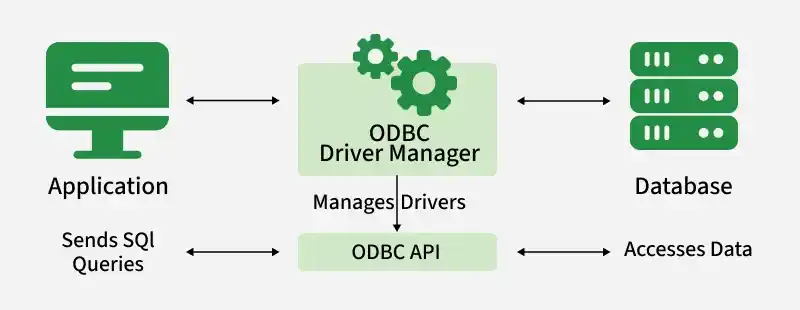
Components of ODBC
There are 4 main components of ODBC, these are as follows :
- Application: This component basically calls the ODBC function and submits SQL statements.
- Driver Manager: The role of this component is to load the driver for each application.
- Driver: The role of this component is to handle all function calls and then submit each SQL request to a data source.
- Data Source: Role of this component to access data.
Features of ODBC
Error Codes: ODBC basically supports error code mechanism to show issues which caused error to occur while processing SQL statements.
Attributes: Beside Error Code feature it also provides different types of functions to get details of attributes and functions that are used in drivers.
Rich Metadata: ODBC also provides huge support to data about data also known as metadata. ODBC also provides different functions to get data about both functions and data types used.
Inter-Operability: The most important feature of ODBC is its interoperability that means using ODBC driver we can develop different applications that can communicate with different DB also known as Database Management System and switching our application from one database to another will not create any problem.
SQL Syntax: ODBC basically implements SQL syntax for easy understanding of user because SQL syntax are easily understood by end-user. Whenever an SQL statement is passed by user to ODBC driver it matches given statement to SQL 92 standard and converts it into respective SQL statement that is accepted by an underlying database. It interfaces easily into a variety of “data-bound” components in different development environments such as PowerBuilder, Delphi, Visual Basic and Java etc.
Advantages
- Cross-Platform Compatibility: Another advantage of ODBC is its universality as mentioned above ODBC operates equally well in any platform.
- Wide Database Support: It supports large numbers of SQL databases to which the developers can opt to use to fit their requirements.
- Standardization: This is due to the fact that ODBC is an open standard this has the effect of defining standard ways of data access across the systems.
- Ease of Integration: Another advantage of ODBC is that it can be incorporated on to various development environments and RAD tools.
- Flexibility: There is database flexibility meaning that developers can consider different databases without altering the application code highly.
Disadvantages
- Slow with Large Databases: As the size of databases increase speed of ODBC reduces.
- Servers Not Standardized: In ODBC since most of work is done by clients or User, it is very difficult to scale and also these ODBC drivers are also not standardized. Because of which clients maintain their own driver, naming tables which creates a problem for management of large sites.
- Complicated to Build: These ODBC drivers are complicated to build and also complicated to maintain.
- Depends on Framework: As ODBC specification specifies only application protocol so it basically inherits features of framework in which it is used on. Thus we can say that reliability depends on implementation of request/response protocol of underlying framework that is being used.
Practical Examples and Queries
To illustrate how ODBC works, let's consider some practical examples using SQL queries and ODBC connections.
Example 1: Connecting to a Database using ODBC in Python
import pyodbc

# Define the connection string
conn_str = (
    'DRIVER={ODBC Driver 17 for SQL Server};'
    'SERVER=your_server_name;'
    'DATABASE=your_database_name;'
    'UID=your_username;'
    'PWD=your_password'
)

# Establish the connection
conn = pyodbc.connect(conn_str)

# Create a cursor object
cursor = conn.cursor()

# Execute a simple SQL query
cursor.execute("SELECT * FROM Employees")

# Fetch and display the results
for row in cursor.fetchall():
    print(row)

# Close the connection
conn.close()
Example 2: Creating an ODBC Data Source Name (DSN)
To create a DSN on a Windows machine:
- Thus, it is necessary to launch the Open ODBC Data Source Administrator from the Control Panel.
- Procedure: Click on the second tab labeled System DSN.
- Click Add and select the right driver of the database that you wish to connect to.
- Some fields that should be filled are Data Source Name, Server, Database, User ID and Password.
- Check the connection to make sure that it is properly configured.
Example 3: Executing an SQL Statement via ODBC
-- SQL Statement to Create a New Table
CREATE TABLE Customers (
CustomerID INT PRIMARY KEY,
FirstName VARCHAR(50),
LastName VARCHAR(50),
Email VARCHAR(100)
);
-- SQL Statement to Insert Data
INSERT INTO Customers (CustomerID, FirstName, LastName, Email)
VALUES (1, 'John', 'Doe', 'john.doe@example.com');
-- SQL Statement to Retrieve Data
SELECT * FROM Customers;