
The Relational Model is a way of structuring data using relations, which are a collection of tuples that have the same attributes. Relational Algebra is a procedural query language that takes relations as input and returns relations as output.
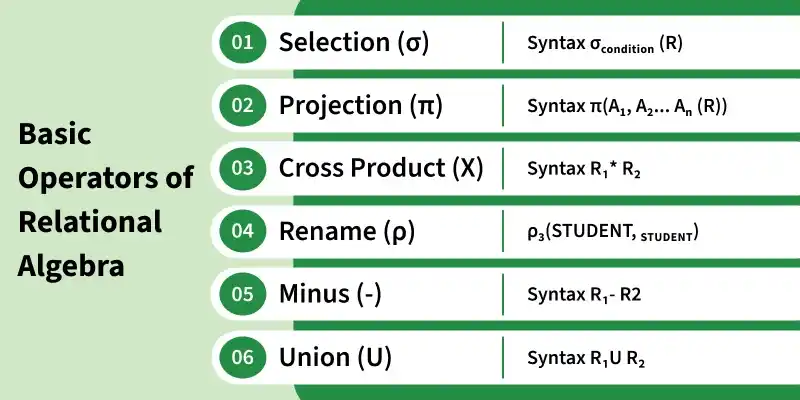
Here, we'll explore the basic operators of Relational Algebra using the tables below.
Table 1: STUDENT_SPORTS
| ROLL_NO | SPORTS |
|---|---|
| 1 | Tennis |
| 2 | Soccer |
| 2 | Tennis |
| 4 | Basketball |
Table 2: EMPLOYEE
| EMP_NO | NAME | ADDRESS | PHONE | AGE |
|---|---|---|---|---|
| 1 | John Smith | New York | 9123456780 | 28 |
| 5 | Michael Brown | Chicago | 9234567891 | 32 |
| 6 | Emma Davis | Boston | 9345678912 | 27 |
| 4 | David Wilson | New York | 9456789123 | 30 |
Table 3: STUDENT
| ROLL_NO | NAME | ADDRESS | PHONE | AGE |
|---|---|---|---|---|
| 1 | John Smith | New York | 9123456780 | 28 |
| 2 | Robert Johnson | Los Angeles | 9234512345 | 18 |
| 3 | Daniel Lee | Houston | 9345612345 | 20 |
| 4 | David Wilson | New York | 9456789123 | 30 |
1. Selection operator (σ)
Selection operator is used to selecting tuples from a relation based on some condition.
Syntax:
σ(Condition)(Relation Name)
Note: SELECT operation directly returns filtered tuples. Projection is only used to select specific columns. So, the correct syntax to generate the result is:
\pi (NAME,AGE) (σ(AGE>18) (STUDENT))
Extract students whose age is greater than 18 from STUDENT relation given in Table 3
σ (AGE>18)(STUDENT)
Result:
| ROLL_NO | NAME | ADDRESS | PHONE | AGE |
|---|---|---|---|---|
| 1 | John Smith | New York | 9123456780 | 28 |
| 3 | Daniel Lee | Houston | 9345612345 | 20 |
| 4 | David Wilson | New York | 9456789123 | 30 |
2. Projection Operator (\pi )
Projection operator is used to project particular columns from a relation.
Syntax:
\pi (Column 1,Column 2….Column n)(Relation Name)
Extract ROLL_NO and NAME from STUDENT relation given in Table 3
\pi (ROLL_NO,NAME)(STUDENT)
Result:
| ROLL_NO | NAME |
|---|---|
| 1 | John Smith |
| 2 | Robert Johnson |
| 3 | Daniel Lee |
| 4 | David Wilson |
Note: If the resultant relation after projection has duplicate rows, it will be removed. For Example ∏(ADDRESS)(STUDENT) will remove one duplicate row with the value DELHI and return three rows.
3. Cross Product(X)
It is the base operation used before join. For every row of Relation1, each row of Relation2 is concatenated. If Relation1 has m tuples and and Relation2 has n tuples, cross product of Relation1 and Relation2 will have m x n tuples.
Syntax:
Relation1 X Relation2
To apply Cross Product on STUDENT relation given in Table 3 and STUDENT_SPORTS relation given in Table 1,
STUDENT X STUDENT_SPORTS
Result:
| ROLL_NO (S) | NAME | ADDRESS | PHONE | AGE | ROLL_NO (SS) | SPORTS |
|---|---|---|---|---|---|---|
| 1 | John Smith | New York | 9123456780 | 28 | 1 | Tennis |
| 1 | John Smith | New York | 9123456780 | 28 | 2 | Soccer |
| 1 | John Smith | New York | 9123456780 | 28 | 2 | Tennis |
| 1 | John Smith | New York | 9123456780 | 28 | 4 | Basketball |
| 2 | Robert Johnson | Los Angeles | 9234512345 | 18 | 1 | Tennis |
| 2 | Robert Johnson | Los Angeles | 9234512345 | 18 | 2 | Soccer |
| 2 | Robert Johnson | Los Angeles | 9234512345 | 18 | 2 | Tennis |
| 2 | Robert Johnson | Los Angeles | 9234512345 | 18 | 4 | Basketball |
| 3 | Daniel Lee | Houston | 9345612345 | 20 | 1 | Tennis |
| 3 | Daniel Lee | Houston | 9345612345 | 20 | 2 | Soccer |
| 3 | Daniel Lee | Houston | 9345612345 | 20 | 2 | Tennis |
| 3 | Daniel Lee | Houston | 9345612345 | 20 | 4 | Basketball |
| 4 | David Wilson | New York | 9456789123 | 30 | 1 | Tennis |
| 4 | David Wilson | New York | 9456789123 | 30 | 2 | Soccer |
| 4 | David Wilson | New York | 9456789123 | 30 | 2 | Tennis |
| 4 | David Wilson | New York | 9456789123 | 30 | 4 | Basketball |
4. Union (U)
Union on two relations R1 and R2 can only be computed if R1 and R2 are union compatible (These two relations should have the same number of attributes and corresponding attributes in two relations have the same domain). Union operator when applied on two relations R1 and R2 will give a relation with tuples that are either in R1 or in R2. The tuples which are in both R1 and R2 will appear only once in the result relation.
Syntax:
Relation1 U Relation2
Find the person who is either student or employees, we can use Union operators like:
STUDENT∪ ρ(ROLL_NO,EMP_NO)(EMPLOYEE)
Result:
| ROLL_NO | NAME | ADDRESS | PHONE | AGE |
|---|---|---|---|---|
| 1 | John Smith | New York | 9123456780 | 28 |
| 2 | Robert Johnson | Los Angeles | 9234512345 | 18 |
| 3 | Daniel Lee | Houston | 9345612345 | 20 |
| 4 | David Wilson | New York | 9456789123 | 30 |
| 5 | Michael Brown | Chicago | 9234567891 | 32 |
| 6 | Emma Davis | Boston | 9345678912 | 27 |
5. Minus (-) or Set Difference
Minus on two relations R1 and R2 can only be computed if R1 and R2 are union compatible. Minus operator when applied on two relations as R1-R2 will give a relation with tuples that are in R1 but not in R2. Syntax:
Relation1 - Relation2
Find the person who is a student but not an employee, we can use minus operator like:
STUDENT−ρ(ROLL_NO,EMP_NO)(EMPLOYEE)
Result:
| ROLL_NO | NAME | ADDRESS | PHONE | AGE |
|---|---|---|---|---|
| 2 | Robert Johnson | Los Angeles | 9234512345 | 18 |
| 3 | Daniel Lee | Houston | 9345612345 | 20 |
6. Rename(ρ)
Rename operator is used to rename a relation or its attributes for clarity or further operations.
Syntax:
ρ(new_relation_name, original_relation)
To rename STUDENT relation to STUDENT1, we can use rename operator like:
ρ(STUDENT1, STUDENT)
If you want to create a relation STUDENT_NAMES with ROLL_NO and NAME from STUDENT, it can be done using rename operator as:
ρ(STUDENT_NAMES,
\pi (ROLL_NO, NAME)(STUDENT))
Extended Relational Algebra Operators
- Intersection (∩)
- Division (÷)
- Join Operations (⋈)
- Natural Join
- Theta Join
- Equi Join
These operators provide more functionality for complex queries in relational databases.