
Weather and climate change are critical issues that affect weather patterns worldwide. Visualizing climate data helps to understand these changes and their impacts. Here we show how to visualize climate change trends using a weather dataset in R Programming Language. The dataset contains daily weather data for the year 2020, with various columns providing detailed weather information.
Dataset Overview of Weather and Climate Change Trends
This dataset has daily weather information for 2020.
- Where the weather data was recorded (country and region).
- When the data was recorded (specific times like sunrise and sunset).
- What the weather was like (a brief description).
- Detailed weather measurements (like temperature, humidity, wind speed, and precipitation).
- Other details like cloud cover, UV index, and visibility.
- The exact location (latitude and longitude).
Dataset Link: Climate Change Trends
Step 1: Load the required Libaries and Dataset
First, install and load the necessary packages.
install.packages("tidyverse")
install.packages("lubridate")
library(tidyverse)
library(lubridate)
weather_data <- read_csv("C:\\Users\\Tonmoy\\Downloads\\Dataset\\daily_weather_2020.csv")

head(weather_data)
Output:
  X Country.Region Province.State       time
1 0    Afghanistan                2019-12-31
2 1    Afghanistan                2020-01-01
3 2    Afghanistan                2020-01-02
4 3    Afghanistan                2020-01-03
5 4    Afghanistan                2020-01-04
6 5    Afghanistan                2020-01-05
                                                                                summary
1 Rain (with a chance of 1–3 in. of snow) until night, starting again in the afternoon.
2                                                        Light rain throughout the day.
3                                                             Clear throughout the day.
4                                                     Partly cloudy throughout the day.
5                                                        Light rain throughout the day.
6                                                           Light rain until afternoon.
               icon sunriseTime sunsetTime moonPhase precipIntensity precipIntensityMax
1              rain  1577846640 1577882700      0.20          0.0156             0.1515
2              rain  1577933040 1577969160      0.23          0.0235             0.0985
3              rain  1578019440 1578055560      0.26          0.0016             0.0062
4 partly-cloudy-day  1578105900 1578142020      0.30          0.0003             0.0012
5              rain  1578192300 1578228480      0.33          0.0145             0.0310
6              rain  1578278700 1578314940      0.36          0.0196             0.0442
  precipIntensityMaxTime precipProbability precipType temperatureHigh
1             1577902320              0.71       rain           48.36
2             1577907000              0.95       rain           40.42
3             1578009780              0.25       rain           46.53
4             1578157740              0.14       rain           45.77
5             1578200340              0.83       rain           40.84
6             1578260520              0.91       rain           44.54
  temperatureHighTime temperatureLow temperatureLowTime apparentTemperatureHigh
1          1577864700          32.13         1577922180                   47.86
2          1577951460          28.90         1578020400                   40.08
3          1578038340          28.80         1578106320                   46.03
4          1578124500          32.84         1578193080                   45.35
5          1578222000          37.25         1578279840                   40.34
6          1578297660          28.10         1578366180                   44.07
  apparentTemperatureHighTime apparentTemperatureLow apparentTemperatureLowTime dewPoint
1                  1577864700                  29.04                 1577921940    23.88
2                  1577951220                  26.27                 1578020400    33.61
3                  1578038340                  26.96                 1578093240    29.86
4                  1578124260                  33.33                 1578193080    26.61
5                  1578222000                  37.74                 1578279840    33.14
6                  1578297360                  22.90                 1578366240    34.56
  humidity pressure windSpeed windGust windGustTime windBearing cloudCover uvIndex
1     0.60   1019.1      2.56     6.60   1577891880          39       0.99       2
2     0.90   1021.2      2.06     7.08   1577961240         163       0.99       2
3     0.76   1022.7      2.45     4.78   1578042840          20       0.22       3
4     0.69   1021.9      2.95     5.83   1578139740          19       0.32       3
5     0.88   1016.1      1.98     6.14   1578226200          75       1.00       2
6     0.85   1016.7      2.60     7.68   1578309480         105       0.74       3
  uvIndexTime visibility ozone temperatureMin temperatureMinTime temperatureMax
1  1577864880      5.534 372.6          32.96         1577827140          48.36
2  1577951280      1.192 330.2          32.33         1577918820          40.42
3  1578037860      9.957 320.3          28.90         1578020400          46.53
4  1578122520     10.000 309.6          28.80         1578106320          45.77
5  1578210360      4.142 308.2          32.84         1578193080          40.84
6  1578297960      5.383 323.1          34.89         1578335400          44.54
  temperatureMaxTime apparentTemperatureMin apparentTemperatureMinTime
1         1577864700                  30.51                 1577835720
2         1577951460                  29.84                 1577919420
3         1578038340                  26.27                 1578020400
4         1578124500                  26.96                 1578093240
5         1578222000                  33.33                 1578193080
6         1578297660                  32.83                 1578335400
  apparentTemperatureMax apparentTemperatureMaxTime Lat Long precipAccumulation
1                  47.86                 1577864700  33   65                 NA
2                  40.08                 1577951220  33   65                 NA
3                  46.03                 1578038340  33   65                 NA
4                  45.35                 1578124260  33   65                 NA
5                  40.34                 1578222000  33   65                 NA
6                  44.07                 1578297360  33   65                 NA
Step 2: Data Exploration and Visualization
Exploring climate data using visualizations helps uncover underlying patterns and trends.
Temperature Trends of the data
Notice the peaks and troughs in the temperature lines. Peaks typically correspond to summer months, while troughs correspond to winter months.
ggplot(weather_data, aes(x = time)) +
  geom_line(aes(y = temperatureHigh, color = "High Temperature")) +
  geom_line(aes(y = temperatureLow, color = "Low Temperature")) +
  labs(title = "Daily High and Low Temperatures in 2020",
       x = "Date",
       y = "Temperature (°F)",
       color = "Legend") +
  theme_minimal()
Output:

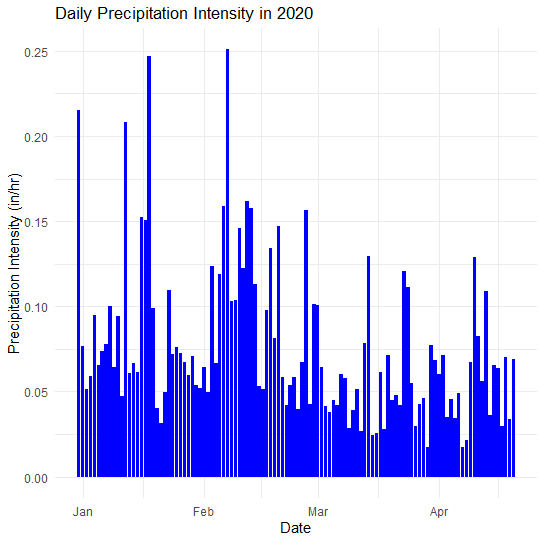
Consistent high precipitation values indicate prolonged rainy periods, while low values indicate dry spells. Sudden high peaks in precipitation intensity can highlight days with heavy rain or storms.
Visualizing Precipitation Trends
Bar charts are useful for showing the amount of precipitation over time.
ggplot(weather_data, aes(x = time, y = precipIntensity)) +
  geom_bar(stat = "identity", fill = "blue") +
  labs(title = "Daily Precipitation Intensity in 2020",
       x = "Date",
       y = "Precipitation Intensity (in/hr)") +
  theme_minimal()
Output:
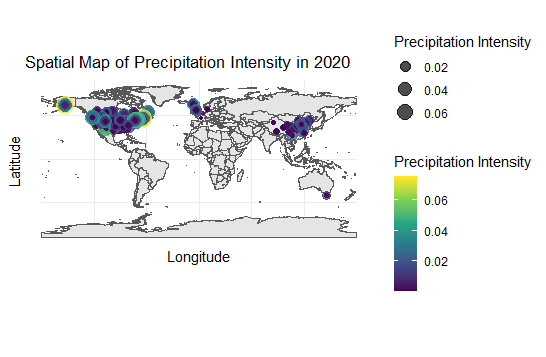
Spatial Map for Country.Region
Used sf and ggplot2 to create a spatial map of precipitation intensity without requiring a Google Maps API key. Creates a spatial map visualizing precipitation intensity.
# Install and load required packages
install.packages("sf")
install.packages("rnaturalearth")
install.packages("rnaturalearthdata")

library(sf)
library(rnaturalearth)
library(rnaturalearthdata)

# Convert the data to an sf object
weather_data_sf <- st_as_sf(weather_data, coords = c("Long", "Lat"), crs = 4326)

# Get the world map data
world <- ne_countries(scale = "medium", returnclass = "sf")

# Plot the spatial data
ggplot(data = world) +
  geom_sf() +
  geom_sf(data = weather_data_sf, aes(color = precipIntensity,
                                      size = precipIntensity), alpha = 0.7) +
  scale_color_viridis_c() +
  labs(title = "Spatial Map of Precipitation Intensity in 2020",
       x = "Longitude",
       y = "Latitude",
       color = "Precipitation Intensity",
       size = "Precipitation Intensity") +
  theme_minimal()
Output:
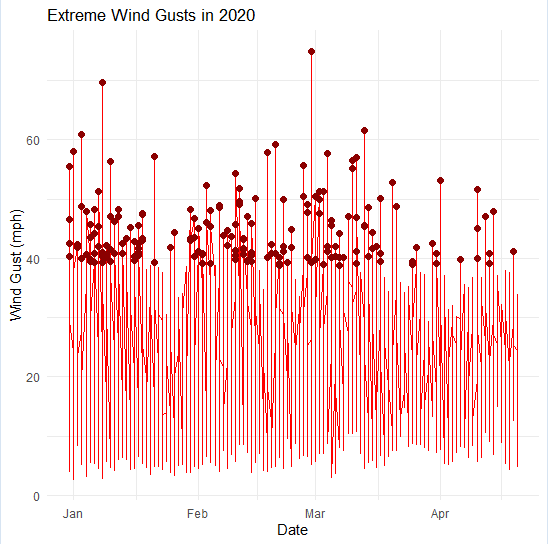
Extreme Weather Events
Highlighting extreme weather events such as hurricanes, droughts, and floods demonstrates the impacts of climate change.
# Example: Highlighting days with extreme wind gusts
ggplot(weather_data, aes(x = time, y = windGust)) +
  geom_line(color = "red") +
  geom_point(data = weather_data %>% filter(windGust > quantile(windGust, 0.95)), color = "darkred", size = 2) +
  labs(title = "Extreme Wind Gusts in 2020",
       x = "Date",
       y = "Wind Gust (mph)") +
  theme_minimal()
Output:
Histogram of Temperature Distribution
Understanding data distribution and relationships between variables.
ggplot(weather_data, aes(x = temperatureHigh)) +
  geom_histogram(binwidth = 2, fill = "orange", color = "black") +
  labs(title = "Distribution of High Temperatures in 2020",
       x = "Temperature (°F)",
       y = "Frequency") +
  theme_minimal()
Output:

Scatter Plot of Temperature vs. Humidity
Creating a scatter plot is a fundamental way to visualize the relationship between two continuous variables. In this case, we'll focus on visualizing the relationship between temperature and humidity using R.
ggplot(weather_data, aes(x = temperatureHigh, y = humidity)) +
  geom_point(alpha = 0.5, color = "blue") +
  labs(title = "Temperature vs. Humidity",
       x = "High Temperature (°F)",
       y = "Humidity (%)") +
  theme_minimal()
Output:

Conclusion
By visualizing the weather data for 2020, we can see how different climate elements change over time. These visualizations show seasonal patterns, extreme weather events, and trends essential for addressing climate change. Understanding these trends helps policymakers, researchers, and the public make informed decisions and take actions to reduce the impacts of climate change, ultimately protecting our environment for future generations.