
Semantic search allows computers to understand the meaning behind user queries rather than relying only on exact keyword matching. Using FAISS (Facebook AI Similarity Search), we can build a high-performance system that searches through hundreds or even thousands of documents by meaning and not just by text overlap. This approach enables smarter, faster and more context-aware information retrieval.
Implementation
Let's see how the model will work:
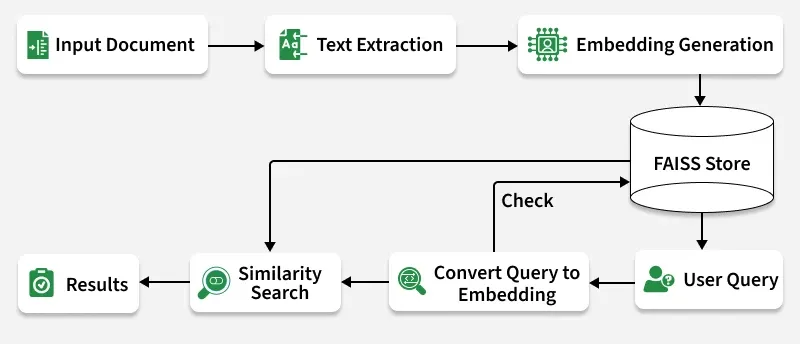
- Document Ingestion: PDF, DOCX and TXT files are read and converted into text.
- Chunking: Each document is split into smaller, meaningful parts.
- Embedding Generation: Text chunks are converted into dense vector representations.
- FAISS Indexing: Embeddings are stored in FAISS for efficient similarity search.
- Query Encoding: A user query is embedded into the same vector space.
- Similarity Search: FAISS finds top matches based on cosine similarity.
- Results Display: The most relevant document snippets are shown.
Let's implement this model,
Used samples can be downloaded from here.
Step 1: Install Dependencies
We need to install the required dependencies such as faiss-cpu, sentence-transformers, python-docx.
!pip install faiss-cpu sentence-transformers python-docx PyMuPDF
Step 2: Import Libraries
We will import the necessary libraires such as os, docx, numpy, SentenceTransformers, faiss.
import os
import numpy as np
import faiss
from sentence_transformers import SentenceTransformer
from PyPDF2 import PdfReader
from docx import Document
Step 3: Extract Text from Documents
We need to define the function for document loading,
- Reads different file formats like .pdf, .docx and .txt.
- Ensures content is extracted as plain text for embedding generation.
def extract_text_from_file(file_path):

    text = ""
    if file_path.endswith(".pdf"):
        reader = PdfReader(file_path)
        for page in reader.pages:
            text += page.extract_text() + "\n"
    elif file_path.endswith(".docx"):
        doc = Document(file_path)
        for para in doc.paragraphs:
            text += para.text + "\n"
    elif file_path.endswith(".txt"):
        with open(file_path, 'r', encoding='utf-8') as f:
            text = f.read()
    return text.strip()
Step 4: Split Text into Chunks
- Divides long documents into smaller segments (chunks).
- Improves search accuracy and performance by focusing on smaller text units.
def chunk_text(text, chunk_size=300):

    words = text.split()
    return [' '.join(words[i:i + chunk_size]) for i in range(0, len(words), chunk_size)]
Step 5: Load and Process Documents
Here:
- Reads all files in the documents/ folder.
- Splits them into manageable text chunks and stores the source file name for each.
folder_path = "documents/"
documents = []
doc_sources = []

for file in os.listdir(folder_path):
    if file.endswith((".pdf", ".docx", ".txt")):
        path = os.path.join(folder_path, file)
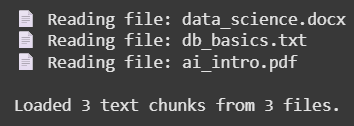
        print(f"Reading file: {file}")
        content = extract_text_from_file(path)
        chunks = chunk_text(content)
        documents.extend(chunks)
        doc_sources.extend([file] * len(chunks))

print(
    f"\nLoaded {len(documents)} text chunks from {len(os.listdir(folder_path))} files.")
Output:
Step 6: Generate Text Embeddings
Here we will:
- Converts text chunks into vector representations using SentenceTransformer.
- Normalizes vectors for cosine similarity in FAISS.
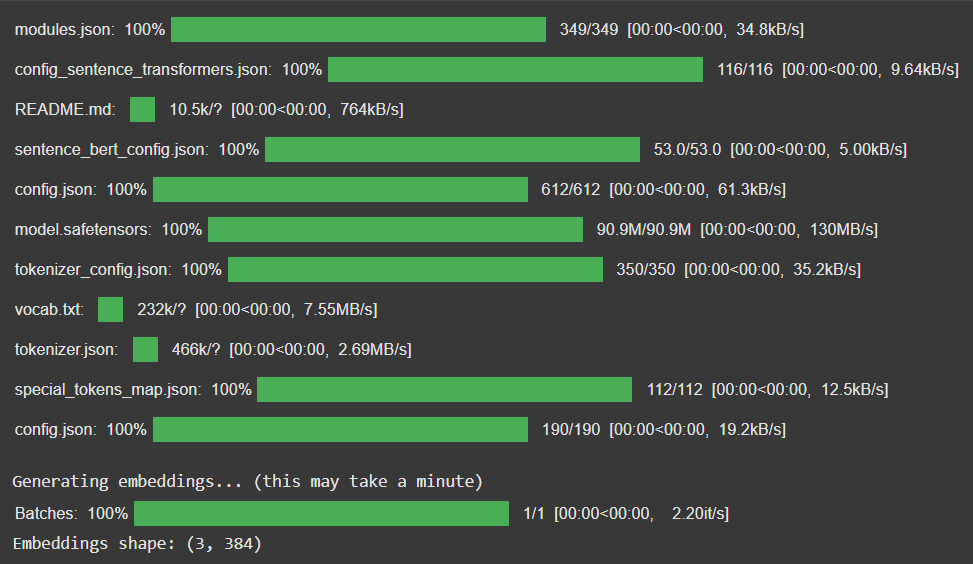
- Shows embedding progress for transparency.
model = SentenceTransformer('all-MiniLM-L6-v2')
print("\nGenerating embeddings... (this may take a minute)")

embeddings = model.encode(
    documents, convert_to_numpy=True, show_progress_bar=True)
embeddings = embeddings.astype('float32')
faiss.normalize_L2(embeddings)
print(f"Embeddings shape: {embeddings.shape}")
Output:
Step 7: Create FAISS Index
- Initializes a FAISS IndexFlatIP index (for cosine similarity).
- Adds all text embeddings into the FAISS index for fast retrieval.
dimension = embeddings.shape[1]
index = faiss.IndexFlatIP(dimension)
index.add(embeddings)
print(f"FAISS index created with {index.ntotal} vectors.")
Output:
FAISS index created with 3 vectors.
Step 8: Define Cleaning and Search Functions
1. clean_text(): Removes unwanted formatting and extra spaces.
2. semantic_search_best():
- Converts the query into a vector.
- Searches the FAISS index for similar embeddings.
- Displays the best matches with readable snippets.
import re
import textwrap


def clean_text(text):

    text = re.sub(r'[#=*`~_-]+', '', text)
    text = re.sub(r'\*\*(.*?)\*\*', r'\1', text)
    text = re.sub(r'\s+', ' ', text).strip()
    return text


def semantic_search_best(query, top_k=1, wrap_width=100, similarity_threshold=0.35, snippet_length=300):

    query_embedding = model.encode([query]).astype('float32')
    faiss.normalize_L2(query_embedding)

    D, I = index.search(query_embedding, top_k)

    print("\nTop Semantic Search Result(s):")
    print("=" * 120)

    results_shown = 0

    for rank, idx in enumerate(I[0]):
        score = D[0][rank]
        if score < similarity_threshold:
            continue

        snippet = clean_text(documents[idx])[:snippet_length]
        wrapped_snippet = textwrap.fill(snippet, width=wrap_width)

        print(f"\nRank {rank + 1}")
        print(f"Source File     : {doc_sources[idx]}")
        print(f"Similarity Score: {score:.4f}")
        print("-" * 120)
        print(f"Preview Snippet:\n{wrapped_snippet}")
        print("=" * 120)
        results_shown += 1

    if results_shown == 0:
        print("No strong semantic matches found for your query.")
Step 9: Run Semantic Search
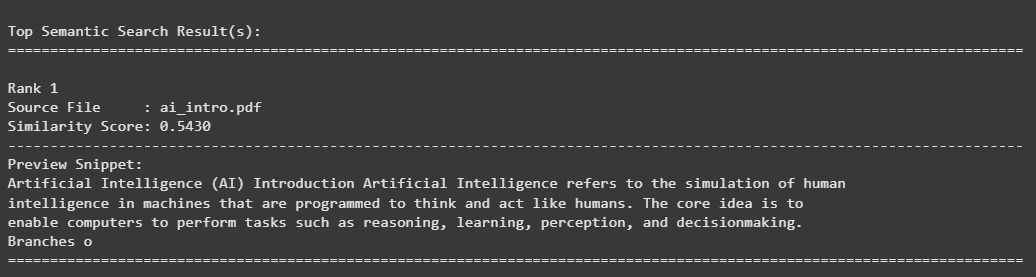
- Retrieves top semantically relevant chunks for each query.
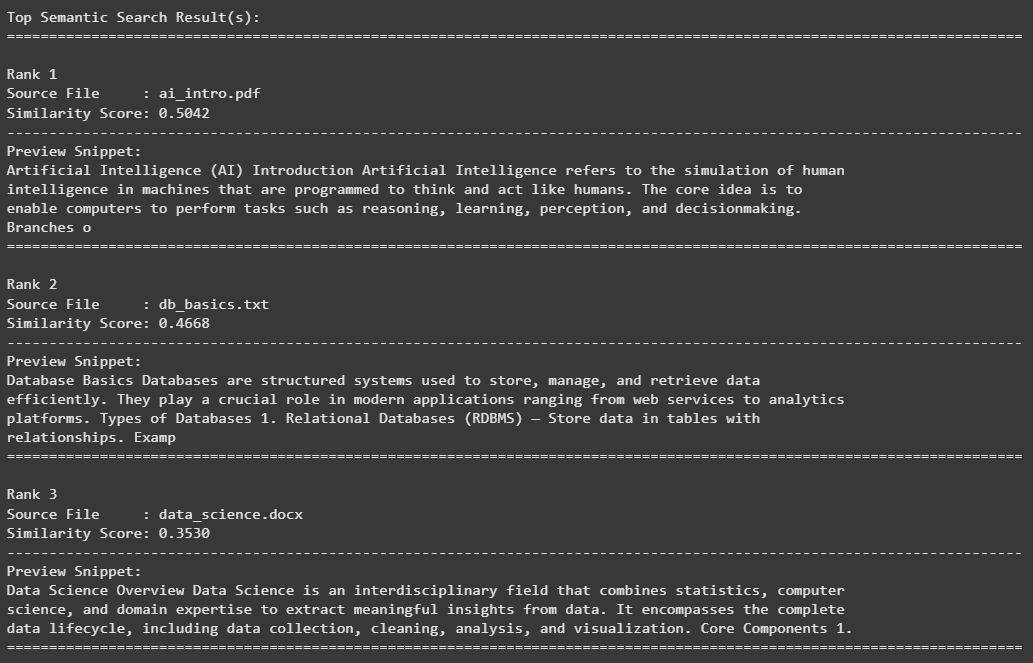
- Displays source document name, similarity score and wrapped text preview.
semantic_search_best("applications of artificial intelligence")
Output:
semantic_search_best("database systems and AI", top_k=3)
Output:
The source code can be downloaded from here.
Advantages
- High Performance: FAISS enables instant retrieval even across thousands of vectors.
- Semantic Understanding: Captures meaning beyond keywords.
- Multi-format Support: Works with PDF, DOCX and TXT files.
- Scalable: Easily extensible to large datasets.