(Cascading Style Sheets) is a stylesheet language used to design a webpage to make it attractive. The reason for using this is to simplify the process of making web pages presentable. It allows you to apply styles on web pages. More importantly, it enables you to do this independent of the HTML that makes up each web page.
The box-sizing property in CSS controls how an element's width and height are calculated. The two main values, content-box and border-box, determine whether padding and borders are included in the specified dimensions.
- content-box: Width and height apply only to the content area.
- border-box: Width and height include the content, padding, and border.
Example:
<!--Driver Code Starts-->
<html>
<!--Driver Code Ends-->

    <head>
        <style>
            .box {
                    width: 300px;
                    height: 200px;
                    padding: 15px;
                    border: 10px solid black;
                    box-sizing: content-box;
                    background: green;
                    display: inline-block;
                }
        </style>
    </head>

<!--Driver Code Starts-->
    <body>
        <h1 class="box">GeeksForGeeks</h1>
    </body>
</html>
<!--Driver Code Ends-->
 |  |
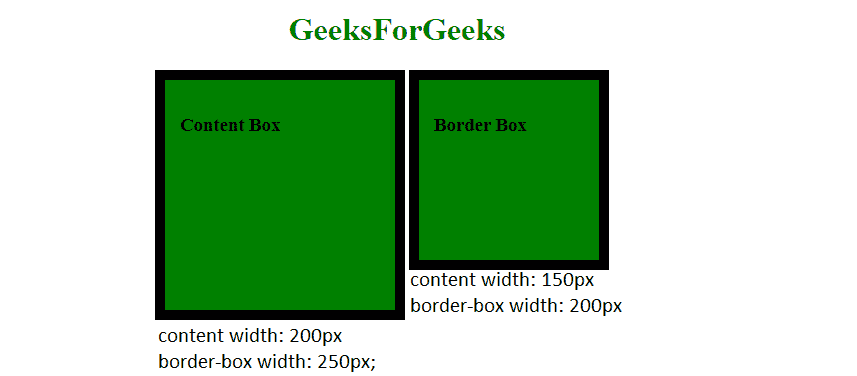
In border-box, the specified width includes the content, padding, and border, whereas in content-box, the specified width applies only to the content area.
Syntax: box-sizing: content-box;- border-box: In this value, not only width and height properties are included but you will find padding and border inside of the box for example .box {width: 200px; border: 10px solid black;} renders a box that is 200px wide.
Example:
<!--Driver Code Starts-->
<html>
<!--Driver Code Ends-->

<head>
<style>
.box {
    width: 300px;
    height: 200px;
    padding: 15px;
    border: 10px solid black;
    box-sizing: border-box;
    background: green;
    display: inline-block;
}
</style>
</head>

<!--Driver Code Starts-->
<body>
    <h1 class="box">GeeksForGeeks</h1>
</body>
</html>
<!--Driver Code Ends-->
 |  |
Note: With content-box, the content size stays fixed and the total (border-box) size increases as padding and borders grow. With border-box, the total size stays fixed and the content area shrinks as padding and borders increase.
Syntax: box-sizing: border-box;Example: Difference between the width when content-box and border-box properties are applied.
<!--Driver Code Starts-->
<!DOCTYPE html>
<html lang="en">
<head>
    <meta charset="UTF-8"/>
    <meta http-equiv="X-UA-Compatible"
        content="IE=edge"/>
    <meta name="viewport"
        content="width=device-width, initial-scale=1.0"/>
    <title>GeeksForGeeks</title>
<!--Driver Code Ends-->

    <style>
        h1 {
            color: green;
            text-align: center;
        }
        div {
            width: 200px;
            height: 200px;
            padding: 15px;
            border: 10px solid black;
            background: green;
            display: inline-block;
        }
        .content-box {
            box-sizing: content-box;
        }
        .border-box {
            box-sizing: border-box;
        }
    </style>

<!--Driver Code Starts-->
</head>
<body>
    <h1>GeeksForGeeks</h1>
    <div class="content-box">
        <h3>Content Box</h3>
    </div>
    <div class="border-box">
        <h3>Border Box</h3>
    </div>
</body>
</html>
<!--Driver Code Ends-->
Output: