The font-family property in CSS is used to define the font style of text in an element. It helps improve the design and readability of webpage content.
- Multiple fonts can be listed as fallback options.
- If one font is unavailable, the browser uses the next available font.
- It supports specific fonts like Arial and generic families like serif or sans-serif.
Types of Font Family
Font families in CSS define the style and appearance of text on a webpage. They are mainly divided into two types.
- family-name: Specific names of font families, such as "Times", "Courier", "Arial", etc.
- generic-family: Names of generic font families, such as "serif", "sans-serif", "cursive", "fantasy", "monospace".
Syntax:
element_selector {
    font-family: family-name | generic-family | initial | inherit;
}
Property values
- fonts-name: Specifies the name of the font in quotes, separated by commas.
- generic-family: generic-family sets the font of text in an HTML document from the list of available fonts from the font pool.
- initial: initial sets an element’s CSS property to its default value.
- Inherit: inherits a property to an element from its parent element's property value.
Notes :
- The family-name should be enclosed in quotes when it contains white space or special characters.
- When using the style attribute in HTML, the font name should be enclosed in single quotes.
Example 1: Basic Usage of font-family
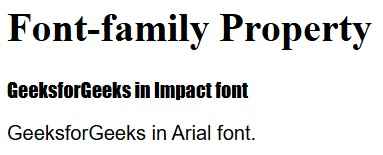
Here, we demonstrates the use of the font-family CSS property to style paragraphs (<p>). It applies different fonts such as "Impact", "Arial", with fallbacks for cross-platform consistency in web typography.
<!DOCTYPE html>
<html>

<head>
    <title> CSS font-family Property </title>
    <style>
        .para1 {
            font-family: Impact, Times, serif;
        }

        .para2 {
            font-family: Arial, Helvetica, sans-serif;
        }
    </style>
</head>

<body>
    <h1>Font-family Property</h1>
    <p class="para1">
        GeeksforGeeks in Impact font
    </p>

    <p class="para2">
        GeeksforGeeks in Arial font.
    </p>

</body>

</html>
Output:
Example 2: Multiple Font-Family Values
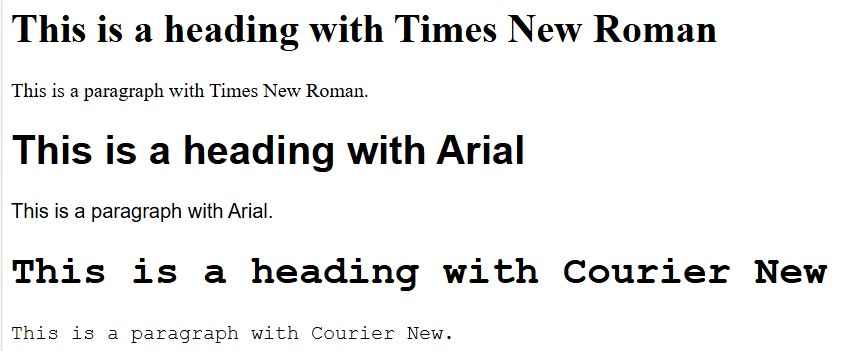
Here, we demonstrates the use of the font-family property to style text with different fonts: Times New Roman, Arial, and Courier New.
<!DOCTYPE html>
<html lang="en">

<head>
    <meta charset="UTF-8">
    <meta name="viewport"
          content="width=device-width,
                   initial-scale=1.0">
    <title>Font Family Example</title>
    <style>
        .example1 {
            font-family: "Times New Roman", Times, serif;
        }

        .example2 {
            font-family: "Arial", Helvetica, sans-serif;
        }

        .example3 {
            font-family: "Courier New", Courier, monospace;
        }
    </style>
</head>

<body>
    <h1 class="example1">
        This is a heading with Times New Roman
    </h1>
    <p class="example1">
        This is a paragraph with Times New Roman.
    </p>

    <h1 class="example2">
        This is a heading with Arial
    </h1>
    <p class="example2">
        This is a paragraph with Arial.
    </p>

    <h1 class="example3">
        This is a heading with Courier New
    </h1>
    <p class="example3">
        This is a paragraph with Courier New.
    </p>
</body>

</html>
Output: