
Image blurring is a fundamental concept in image processing used to smooth images, reduce noise, and remove fine details. It is often applied as a preprocessing step before tasks such as edge detection, segmentation and feature extraction.
Convolution in 2D: In a computer, an image is represented as a 2D matrix of pixel values (or a 3D matrix in the case of color images). These pixel values carry visual information such as edges, contrast and textures. To analyze or modify these features, image processing operations are applied and convolution is one of the most important among them.
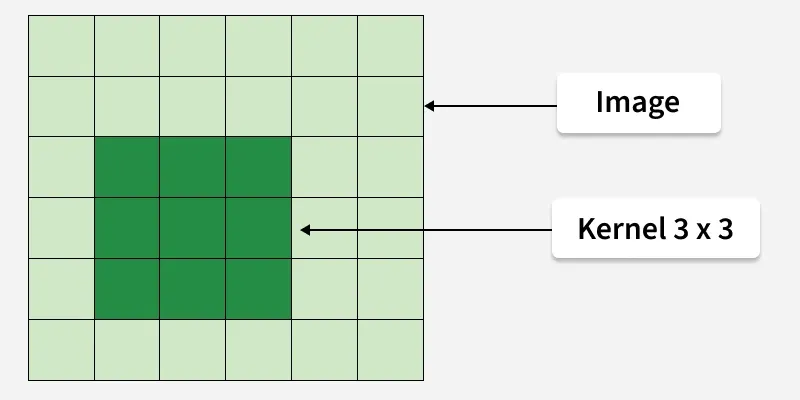
Convolution is a mathematical operation where a small matrix, called a kernel (or filter), is slid over the image. At each pixel location:
- The kernel is placed over the image region.
- Corresponding pixel and kernel values are multiplied.
- All the products are summed.
- The result replaces the original pixel value.
The output of this process is known as a filtered image.
What is Blurring
Blurring is a convolution-based technique that makes an image appear smooth and less sharp. When you observe a blurred image, edges are less distinct and sudden intensity changes are reduced.
Why Does Blurring Work
Edges in an image correspond to high-frequency components, where pixel values change rapidly. Blurring removes these rapid changes by averaging pixel values with their neighbors. For this reason, blur filters are also known as:
Low-pass filters: They allow low-frequency information (smooth regions) to pass through while suppressing high-frequency information (edges and noise).
Averaging (Box) Filter for Blurring
A common blur filter is the averaging filter, where all kernel values are equal (typically 1). To prevent the pixel intensity from increasing, the kernel is normalized by dividing by the total number of elements.
Example: 3 × 3 Averaging Kernel
\frac{1}{9} \begin{bmatrix} 1 & 1 & 1 \\ 1 & 1 & 1 \\ 1 & 1 & 1 \end{bmatrix}
This ensures the new pixel value is the average of its neighbors, producing a smooth effect.
Effect of Kernel Size on Blurring
The size of the kernel directly controls the amount of blurring:
- Small kernel (3×3): Light smoothing, edges still visible
- Medium kernel (5×5): Moderate smoothing
- Large kernel (7×7 or more): Strong smoothing, loss of details
Larger kernels average over a wider neighborhood, increasing the blur effect.
Image Blurring Using Python (OpenCV)
Below is an example demonstrating image blurring using different averaging kernels.
You can download the geek.png file from here.
import cv2
import numpy as np
from google.colab.patches import cv2_imshow

image = cv2.imread('geek.png')

blur_filter1 = np.ones((3,3),dtype=np.float32)/9.0
blur_filter2 = np.ones((5,5),dtype=np.float32)/25.0
blur_filter3 = np.ones((7,7),dtype=np.float32)/49.0

image_blur1 = cv2.filter2D(image,-1,blur_filter1)
image_blur2 = cv2.filter2D(image,-1,blur_filter2)
image_blur3 = cv2.filter2D(image,-1,blur_filter3)

cv2_imshow(image)
cv2_imshow(image_blur1)
cv2_imshow(image_blur2)
cv2_imshow(image_blur3)
Output:
Original image

Blurred with filter of 3 x 3

Blurred with filter of 5 x 5

Blurred with filter of 7 x 7

Explanation
- Original Image: Contains sharp edges and fine details
- 3 × 3 Blur: Slight smoothing, minimal loss of detail
- 5 × 5 Blur: Noticeable smoothing, reduced edges
- 7 × 7 Blur: Strong smoothing, significant loss of sharpness