
Computers are amazing electronic devices that help us learn, play, work, and connect with the world. They store information, process data, and produce results based on our instructions. With artificial intelligence (AI), some computers can even learn from data! Computers come in different types based on their size and data-handling capabilities. This guide explains these types in a way that’s easy to understand, with examples relevant to students.
Why Learn About Computers?
Learning computers is important as they’re part of everyday life, offer career opportunities, improve problem-solving skills, and boost efficiency. In a digital world, computer knowledge is essential for staying productive and informed.
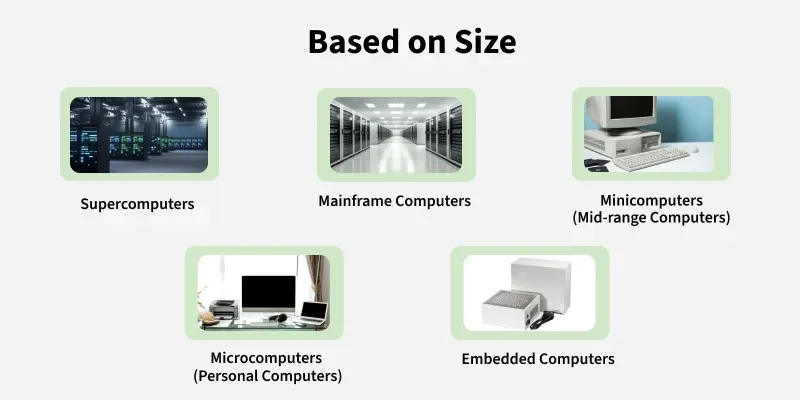
Types of Computer By Size
Computers vary in size, from huge machines to pocket-sized devices. Here are the main types:
1. Supercomputers
Supercomputers are the speed demons of the computer world, performing billions of calculations per second. They’re like the Hulk of tech, tackling huge tasks like predicting weather or designing spacecraft.
Features:
- Lightning-fast, thanks to thousands of processors teaming up.
- Super expensive and massive, often taking up entire rooms.
- Used for big-deal research, like studying stars or curing diseases.
Examples: Frontier (helps with climate research), Fugaku (aids medical breakthroughs).
For Students: Supercomputers power the weather apps you check to see if you need an umbrella for recess.
Fun Fact: The world’s fastest supercomputer, Frontier, can do a quintillion calculations per second—that’s a 1 with 18 zeros!
- Mainframe Computers
Mainframes are big machines that juggle tons of tasks and users at once. Think of them as a school librarian helping hundreds of kids find books at the same time.
- Features:
- Handles thousands of users and programs simultaneously.
- Huge storage and speedy processing for massive data.
- Used by banks, airlines, and big companies to manage records.
- Examples: IBM zSeries (keeps bank transactions secure).
- For Students: When you buy a game online, mainframes make sure your payment goes through safely.
- Fun Fact: Mainframes can run for years without shutting down, like a teacher who never takes a day off!
- Minicomputers
Minicomputers are mid-sized machines that support multiple users (4–200) for tasks like accounting or billing. They’re smaller than mainframes but bigger than your laptop.
- Features:
- More portable than mainframes but still hefty.
- Reliable for medium-sized jobs.
- Used in schools, businesses, or labs for specific tasks.
- Examples: PDP-11 (an older model used in universities).
- For Students: Minicomputers might track your school’s attendance or grades.
- Fun Fact: Minicomputers were nicknamed “minis” in the 1960s, like the mini skirts of that era!
- Workstation Computers
Workstations are high-powered computers for one user, built for heavy-duty tasks like creating animations or designing buildings. They’re like a turbo-charged art studio for tech work.
- Features:
- Fast processors, tons of memory, and awesome graphics.
- Perfect for video editing, 3D modeling, or simulations.
- Stronger than a regular PC but smaller than a mainframe.
- Examples: HP Z Workstations (used by engineers or animators).
- For Students: Workstations create the special effects in your favorite movies or video games.
- Fun Fact: Pixar uses workstations to render animated films like Toy Story, frame by frame!
- Personal Computers (PCs)
PCs are built for one person to use at home, school, or work. This includes desktops, laptops, tablets, and smartphones—stuff you probably use all the time.
- Features:
- Small, affordable, and easy to use.
- Great for homework, gaming, browsing, or video calls.
- Comes with a CPU, memory, and input/output devices like keyboards and screens.
- Examples: Dell laptops, Apple iMac, iPads, Samsung Galaxy phones.
- For Students: You use PCs for writing essays, playing Minecraft, or watching YouTube tutorials.
- Fun Fact: The first “personal computer,” the Altair 8800, came as a kit you had to build yourself in 1975!
- Server Computers
Servers store and share data or programs over a network. They’re like a school cafeteria serving up data to lots of devices at once.
- Features:
- Run 24/7 to deliver services like websites or email.
- Built to share resources with many пользователей.
- Manage data for multiple devices or users.
- Examples: Web servers (host sites like Google), database servers (store school records).
- For Students: When you pull up a website for a school project, servers send that webpage to your device.
- Fun Fact: Servers “talk” to each other so fast that a website can load in milliseconds, quicker than you can blink!
- Supercomputers
- Mainframe Computers
- Minicomputers
- Microcomputers (PCs)
Now, we are going to discuss each of them in detail.
1. Supercomputer
When we talk about speed, then the first name that comes to mind when thinking of computers is supercomputers. They are the biggest and fastest computers (in terms of speed of processing data). Supercomputers are designed such that they can process a huge amount of data, like processing trillions of instructions or data just in a second. This is because of the thousands of interconnected processors in supercomputers. It is basically used in scientific and engineering applications such as weather forecasting, scientific simulations, and nuclear energy research. It was first developed by Roger Cray in 1976.
Characteristics of Supercomputers
- Supercomputers are the computers that are the fastest and they are also very expensive.
- It can calculate up to ten trillion individual calculations per second, this is also the reason which makes it even faster.
- It is used in the stock market or big organizations for managing the online currency world such as Bitcoin etc.
- It is used in scientific research areas for analyzing data obtained from exploring the solar system, satellites, etc.
Mainframe computer
Mainframe computers are designed in such a way that they can support hundreds or thousands of users at the same time. It also supports multiple programs simultaneously. So, they can execute different processes simultaneously. All these features make the mainframe computer ideal for big organizations like banking, telecom sectors, etc., which process a high volume of data in general.
Characteristics of Mainframe Computers
- It is also an expensive or costly computer.
- It has high storage capacity and great performance.
- It can process a huge amount of data (like data involved in the banking sector) very quickly.
- It runs smoothly for a long time and has a long life.
Minicomputer
Minicomputer is a medium size multiprocessing computer. In this type of computer, there are two or more processors, and it supports 4 to 200 users at one time. Minicomputer is similar to Microcontroller. Minicomputers are used in places like institutes or departments for different work like billing, accounting, inventory management, etc. It is smaller than a mainframe computer but larger in comparison to the microcomputer.
Characteristics of Minicomputer
- Its weight is low.
- Because of its low weight, it is easy to carry anywhere.
- less expensive than a mainframe computer.
- It is fast.
Workstation Computer
A workstation computer is designed for technical or scientific applications. It consists of a fast microprocessor, with a large amount of RAM and a high-speed graphic adapter. It is a single-user computer. It is generally used to perform a specific task with great accuracy.
Characteristics of Workstation Computer
- It is expensive or high in cost.
- They are exclusively made for complex work purposes.
- It provides large storage capacity, better graphics, and a more powerful CPU when compared to a PC.
- It is also used to handle animation, data analysis, CAD, audio and video creation, and editing.
Personal Computer (PC)
Personal Computers is also known as a microcomputer. It is basically a general-purpose computer designed for individual use. It consists of a microprocessor as a central processing unit(CPU), memory, input unit, and output unit. This kind of computer is suitable for personal work such as making an assignment, watching a movie, or at the office for office work, etc. For example, Laptops and desktop computers.

Characteristics of Personal Computer (PC)
- In this limited number of software can be used.
- It is the smallest in size.
- It is designed for personal use.
- It is easy to use.
Server Computer
Server Computers are computers that are combined data and programs. Electronic data and applications are stored and shared in the server computer. The working of a server computer is that it does not solve a bigger problem like a supercomputer but it solves many smaller similar ones. Examples of server computer are like Wikipedia, as when users put a request for any page, it finds what the user is looking for and sends it to the user.
Characteristics:
- Handles data and applications for multiple clients or users.
- Centralized management of resources (e.g., databases, websites).
- Designed to run 24/7 without interruption.
- More powerful than a typical PC and optimized for networking and data management.
Examples:
- Web servers (e.g., Apache HTTP Server)
- Database servers (e.g., SQL Server, Oracle)
Based on Data-Handling Capabilites
Analog Computer
Analog Computers are particularly designed to process analog data. Continuous data that changes continuously and cannot have discrete values are called analog data. So, an analog computer is used where we don't need exact values or need approximate values such as speed, temperature, pressure, etc. It can directly accept the data from the measuring device without first converting it into numbers and codes. It measures the continuous changes in physical quantity. It gives output as a reading on a dial or scale. For example speedometer, mercury thermometer, etc.
Characteristics:
- Handles continuous data.
- Real-time data processing without needing to convert it into digital form.
- Used in applications where approximate values are sufficient.
Examples:
- Speedometer (for measuring vehicle speed)
- Thermometers (mercury thermometer)
Digital Computer
Digital computers are designed in such a way that they can easily perform calculations and logical operations at high speed. It takes raw data as input and processes it with programs stored in its memory to produce the final output. It only understands the binary input 0 and 1, so the raw input data is converted to 0 and 1 by the computer and then it is processed by the computer to produce the result or final output. All modern computers, like laptops, desktops including smartphones are digital computers.
Characteristics:
- Processes data in the form of binary digits (0s and 1s).
- Handles precise, accurate data and complex operations, including calculations, logical operations, and storage.
- Fast data processing and capable of running various applications from entertainment to business management.
Examples:
- Laptops
- Desktops
- Smartphones
Hybrid Computer
As the name suggests hybrid, which means made by combining two different things. Similarly, the hybrid computer is a combination of both analog and digital computers. Hybrid computers are fast like analog computers and have memory and accuracy like digital computers. So, it has the ability to process both continuous and discrete data. For working when it accepts analog signals as input then it converts them into digital form before processing the input data. So, it is widely used in specialized applications where both analog and digital data are required to be processed. A processor which is used in petrol pumps that converts the measurements of fuel flow into quantity and price is an example of a hybrid computer.
Characteristics:
- Can handle both analog and digital data.
- Real-time processing with high accuracy.
- Often used in applications where both types of data are needed.
Examples:
- Petrol pump processors that convert fuel flow measurements into digital format (quantity and price).
- Medical equipment like ECG (Electrocardiogram) machines
Tablet and Smartphones
Tablets and Smartphones are the types of computers that are pocket friendly and easy to carry is these are handy. This is one of the best use of modern technology. These devices have better hardware capabilities, extensive operating systems, and better multimedia functionality. smartphones and tablets contain a number of sensors and are also able to provide wireless communication protocols.

Characteristics:
- Portable and compact in size.
- Touch-screen interface and multiple sensors.
- Wireless communication protocols (Wi-Fi, Bluetooth, etc.).
- Capable of running a wide variety of apps for productivity, entertainment, and communication.
Examples:
- Smartphones – iPhone, Samsung Galaxy
- Tablets – iPad, Samsung Galaxy Tab
We generally classify computers on the basis of size, functionality, and data handling capabilities. For more, you can refer to Classification of Computers.