
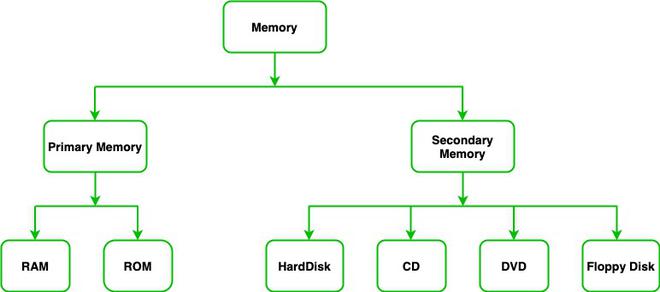
Computer memory plays a crucial role in storing and managing data required for system operations. It is broadly classified into temporary and permanent storage, commonly known as RAM and ROM, each serving different purposes in ensuring efficient performance.
Random Access Memory
Temporary memory is used to store programs and data that the CPU is actively working on in real time. This type of memory allows data to be read, written, and erased multiple times and is known for its fast access speed. It is volatile in nature, meaning the data is lost when the power is turned off. This memory is commonly referred to as Random Access Memory (RAM), also known as main or primary memory. When software or files stored on secondary storage (like a hard disk) are opened, they are loaded into this memory for processing. It temporarily holds data until it is saved back to a storage device.
Types of RAM
- Static RAM: Static RAM or SRAM stores a bit of data using the state of a six-transistor memory cell.
- Dynamic RAM: Dynamic RAM or DRAM stores a bit of data using a pair of transistors and capacitors, which constitute a DRAM memory cell.
Advantages of RAM
- Speed: RAM is much faster than other types of memory, such as hard disk drives, making it ideal for storing and accessing data that needs to be accessed quickly.
- Volatility: RAM is volatile memory, which means that it loses its contents when power is turned off. This property allows RAM to be easily reprogrammed and reused.
- Flexibility: RAM can be easily upgraded and expanded, allowing for more memory to be added as needed.
Disadvantages of RAM
- Limited capacity: RAM has a limited capacity, which can limit the amount of data that can be stored and accessed at any given time.
- Volatility: The volatile nature of RAM means that data must be saved to a more permanent form of storage, such as a hard drive or SSD, to prevent data loss.
- Cost: RAM can be relatively expensive, particularly for high-capacity modules, which can make it difficult to scale memory as needed.
Read Only Memory
Read Only Memory (ROM) is a type of memory where the data has been pre-recorded. Data stored in ROM is retained even after the computer is turned off i.e., non-volatile. ROM is primary non-volatile memory. It is generally used in Embedded Parts, where the programming requires almost no changes. It is a permanent CNO4 erasable memory gets initiated when the power is supplied to the computer ROM is a memory chip fixed on the motherboard at the time of manufacturing. It stores a program called BIOS (Basic Input/Output System). This program checks the status of all the devices attached to the computer.
Types of ROM
- Programmable ROM: It is a type of ROM where the data is written after the memory chip has been created. It is non-volatile.
- Erasable Programmable ROM: It is a type of ROM where the data on this non-volatile memory chip can be erased by exposing it to high-intensity UV light.
- Electrically Erasable Programmable ROM: It is a type of ROM where the data on this non-volatile memory chip can be electrically erased using field electron emission.
- Mask ROM: It is a type of ROM in which the data is written during the manufacturing of the memory chip.
Advantages of ROM
- Non-volatile: ROM is non-volatile memory, which means that it retains its contents even when power is turned off. This property makes ROM ideal for storing permanent data, such as firmware and system software.
- Stability: ROM is stable and reliable, which makes it a good choice for critical systems and applications.
- Security: ROM cannot be easily modified, which makes it less susceptible to malicious attacks, such as viruses and malware.
Disadvantages of ROM
- Limited flexibility: ROM cannot be easily reprogrammed or updated, which makes it difficult to modify or customize the contents of ROM.
- Limited capacity: ROM has a limited capacity, which can limit the amount of data that can be stored and accessed at any given time.
- Cost: ROM can be relatively expensive to produce, particularly for custom or specialized applications, which can make it less cost-effective than other types of memory.
RAM vs ROM
| Random Access Memory (RAM) | Read Only Memory (ROM) |
|---|---|
Volatile memory – data is lost when power is off | Non-volatile memory – data is retained even when power is off |
| Supports both read and write operations | Supports only read operations (writing is limited/special) |
| Used to store data currently being processed by the CPU | Used to store firmware, BIOS, and system instructions |
| High-speed memory | Slower than RAM |
| CPU can easily and quickly access data | CPU access is slower compared to RAM |
| Larger size and higher capacity | Smaller size and lower capacity |
| Used as primary memory and cache | Used in firmware and microcontrollers |
| Data is easily accessible and frequently used | Data is less frequently accessed |
| More expensive compared to ROM | Cheaper than RAM |
| Typically stores data in gigabytes (GB) | Typically stores data in megabytes (MB) |
| Used for temporary storage during processing | Used for permanent storage of essential data |