
A WLAN (Wireless Local Area Network) is a network that allows devices to connect and communicate wirelessly within a limited area, providing mobility and multiple device connectivity without cables.
- An Access Point (AP) connects the WLAN to the wired network, allowing clients to communicate through wireless adapters.
- The coverage of an AP typically spans a building, campus, or tech park, providing high-speed communication for desktops, laptops, mobile devices, and IoT devices.
- Most modern WLANs use IEEE 802.11 (Wi‑Fi) standards or HiperLAN for connectivity.
- Setting up an AP is affordable and quick, and users can move freely within its coverage area without losing connectivity.
WLAN Architecture
WLAN architecture defines how wireless devices connect, communicate, and interact with the wired network. It provides organized coverage, seamless connectivity, and mobility for wireless clients. The design is standardized by IEEE 802.11, which defines components, communication structures, and modes.
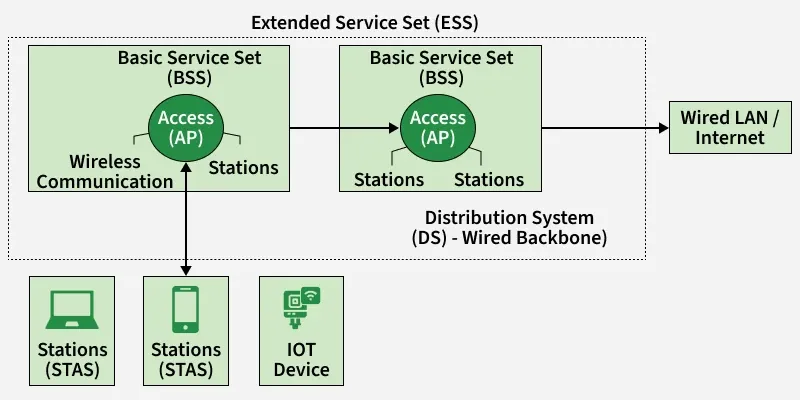
1. Stations (STA):
- Devices like laptops, smartphones, and IoT devices.
- Equipped with a wireless network adapter/controller to communicate with the WLAN.
2. Access Point (AP):
- Acts as a bridge between wireless clients and the wired network.
- Manages traffic and ensures devices can communicate within its coverage area.
3. Base Service Set (BSS):
- A group of stations connected under a single AP.
- Represents the smallest operational unit of a WLAN.
4. Extended Service Set (ESS):
- Multiple BSSs connected via a Distribution System (DS).
- Provides broader network coverage, allowing mobility across areas.
5. Distribution System (DS):
- The wired backbone linking multiple BSSs in an ESS.
- Enables data to travel between APs and across the network efficiently.
Types of WLANs
As per IEEE standard WLAN is categorized into two basic modes, which are as follows:
1. Infrastructure Mode: Infrastructure mode is a WLAN operating mode in which wireless devices communicate through a centralized device called an Access Point (AP). The AP controls wireless communication and provides connectivity between wireless stations and the wired network.
- Wireless stations must associate with an Access Point to communicate.
- The Access Point manages authentication, association, and frame forwarding.
- Enables access to the wired LAN and Internet.
- Supports roaming, allowing devices to move between access points without disconnection.
- Provides better security, scalability, and network management.
- Commonly used in homes, offices, campuses, and public WLANs.
2. Ad-hoc Mode: Ad-hoc mode is a WLAN operating mode in which wireless devices communicate directly with each other without using an Access Point. The network is formed dynamically, and each device participates equally in communication.
- No centralized control; communication is peer-to-peer.
- Each device acts as both sender and receiver of data.
- Suitable for small, temporary, or emergency networks.
- Easy to set up since no infrastructure is required.
- Limited in scalability, security, and network management.
- Does not provide direct access to a wired LAN or Internet.
Standards of WLAN
WLAN standards define the rules, frequencies, data rates, and communication methods used by wireless devices to transmit data reliably. These standards are specified by the IEEE 802.11 family to ensure interoperability between devices from different vendors.
1. IEEE 802.11 (Wi-Fi)
- It is the primary global standard for WLAN communication.
- Specifies the operations of the physical layer (PHY) and MAC layer.
- Ensures devices from different vendors can communicate seamlessly.
- Provides the foundation for all subsequent 802.11 variants.
2. 802.11a
- Operates in the 5 GHz frequency band.
- Supports higher data rates compared to older standards.
- Experiences lower interference due to less crowded frequency.
- Suitable for high-speed wireless communication in smaller areas.
3. 802.11b
- Operates in the 2.4 GHz frequency band.
- Offers longer range but lower maximum data speed..
- Compatible with many older devices.
- Often used in homes and small offices.
4. 802.11g
- Uses the 2.4 GHz band like 802.11b.
- Provides higher speed than 802.11b.
- Maintains backward compatibility with 802.11b devices.
- Commonly used in small networks requiring moderate speed.
5. 802.11n
- Operates on both 2.4 GHz and 5 GHz bands.
- Introduces MIMO (Multiple Input Multiple Output) technology for better speed and reliability.
- Improves coverage and range compared to previous standards.
- Widely used in modern home and office WLANs.
6. 802.11ac
- Operates in the 5 GHz band.
- Supports very high data rates using wider channels.
- Introduces advanced modulation techniques for better efficiency.
- Ideal for high-speed applications like video streaming and gaming.
7. 802.11ax (Wi-Fi 6)
- Operates on 2.4 GHz and 5 GHz, with newer versions also using 6 GHz.
- Improves efficiency, capacity, and performance in dense networks.
- Uses technologies like OFDMA and MU-MIMO for better multi-user handling.
- Designed for modern environments with many connected devices, like offices and smart homes.
Working of WLAN
The working of a WLAN explains how wireless devices communicate with each other and access the network using radio signals. WLAN operates based on IEEE 802.11 standards, where data is transmitted wirelessly between stations and access points within a defined coverage area.
- A wireless device (station) sends data as radio signals using its wireless network adapter.
- The device first associates and authenticates with an Access Point (AP).
- The Access Point receives the wireless signal and converts it into wired Ethernet frames.
- Data is then forwarded to the wired LAN or Internet through the distribution system.
- For incoming data, the AP transmits frames wirelessly to the intended device.
- WLAN uses CSMA/CA (Carrier Sense Multiple Access with Collision Avoidance) to reduce data collisions.
- Encryption mechanisms like WPA2/WPA3 ensure secure data transmission.
Advantages
1. Easy Installation and Expansion
- No physical cabling is required.
- New devices can be added easily without changing network infrastructure.
2. Mobility within Coverage Area
- Users can move freely within the WLAN range while remaining connected.
- Supports seamless access in offices, campuses, and public spaces.
3. Cost-Effective
- Reduces cabling and maintenance costs compared to wired networks.
- Suitable for environments where wiring is difficult or expensive.
4. Supports Multiple Device Connectivity
- Allows multiple devices such as laptops, smartphones, and IoT devices to connect simultaneously.
- Efficient resource sharing through a single network.
Limitations
- Interference: Performance can be affected by other wireless devices, microwaves, or physical obstacles.
- Security Vulnerabilities: Weak configurations or outdated encryption can expose the network to unauthorized access.
- Limited Range: Coverage is restricted compared to wired LAN; signal strength decreases with distance and obstacles.
- Performance Variability: Speed and reliability depend on the WLAN standard (e.g., 802.11b/g/n/ac) and environmental conditions.
Applications
1. Home and Office Networks
- Provides Wi-Fi for laptops, smartphones, printers, and IoT devices.
- Supports work-from-home setups and office networking without extensive wiring.
2. Public Hotspots
- Cafes, airports, hotels, and libraries use WLAN to offer Internet access to visitors.
- Facilitates mobile connectivity in public areas.
3. Educational Institutions and Campuses
- Enables wireless access in classrooms, labs, libraries, and dorms.
- Supports e-learning, online exams, and campus-wide connectivity.
4. Industrial IoT and Smart Buildings
- Connects sensors, controllers, and smart devices in factories or smart buildings.
- Facilitates real-time monitoring, automation, and efficient resource management.
Security Considerations
WLAN security ensures that wireless communication remains private, authenticated, and protected from unauthorized access or attacks. Since wireless networks transmit data over the air, they are more vulnerable than wired networks, making proper security measures essential.
1. Encryption
- Use WPA2 or WPA3 to encrypt data transmitted over the WLAN.
- Protects against eavesdropping and unauthorized access.
2. Strong Authentication
- Avoid default passwords on Access Points.
- Use complex passwords and, if possible, RADIUS or enterprise authentication.
3. Firmware and Security Updates
- Regularly update AP firmware and network devices to patch vulnerabilities.
4. Network Segmentation
- Separate guest networks from internal networks to limit exposure.
5. Monitoring and Logging
- Monitor connected devices and traffic for unusual activity.
- Helps detect and respond to security threats quickly.