
A port is a logical identifier used to distinguish different applications or services on a device, allowing network traffic to reach the correct program.
- Ports work at the Transport layer, using TCP and UDP to send and receive data between devices.
- They enable multiple applications to use the network simultaneously without interference.
- Ports help the operating system route incoming data to the appropriate application.
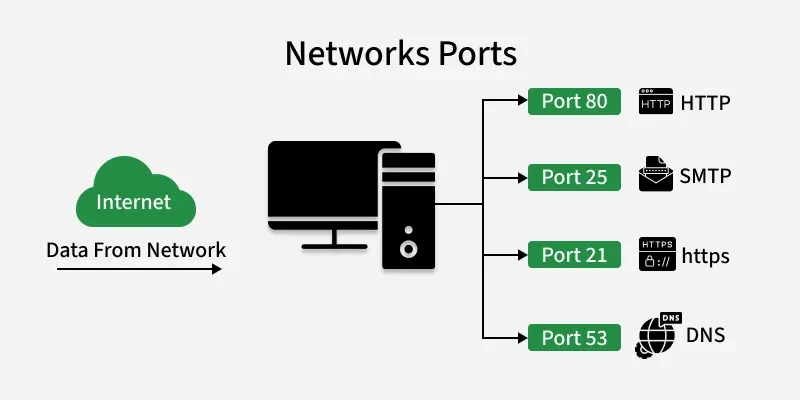
How Ports Work
When a device communicates over a network, data packets are sent to its IP address. Each packet also includes a port number, which tells the operating system which application or service should receive that data.
- Port numbers identify services: Each application listens on a specific port, so incoming data reaches the correct program.
- IP + Port + Protocol = Socket: This combination ensures that network traffic is delivered precisely to the right process on the right device.
- TCP and UDP protocols use ports differently: TCP ensures reliable delivery, while UDP is faster but without guaranteed delivery.
Ports act like entry doors for data — the IP brings the data to the device, and the port directs it to the correct application.
Port Number Range
A port number is a 16-bit number used to identify network services on a device. Since it is 16 bits, it can have values from 0 to 65535, giving enough unique numbers to support many applications running simultaneously.
- 0–65535: Total possible port numbers.
- Lower numbers are usually reserved for standard services (like HTTP, FTP, SSH).
- Higher numbers are often used temporarily for client connections or custom applications.
- Port numbers help organize and manage network traffic efficiently, preventing conflicts between different services.
Types of Ports
Ports are mainly classified into the following types:
1. Physical Ports
- These are actual hardware connectors on devices.
- Examples include USB for keyboards and storage devices, Ethernet (RJ-45) for network connections, HDMI for video, and audio ports for sound.
- These are any connector you can plug a device into.
2. Logical/Network Ports
- These are software-based endpoints that let programs communicate over a network.
- Each port is numbered from 0 to 65535 and is divided into different groups.
- Well-known Ports (0–1023): Reserved for standard services like HTTP (80), HTTPS (443), FTP (21), SSH (22).
- Registered Ports (1024–49151): Used by specific applications like databases (MySQL 3306, SQL Server 1433).
- Dynamic/Private Ports (49152–65535): Temporarily assigned for client connections, like when your browser opens a port to connect to a website.
- Internal Ports only used inside your private network (LAN) for local communication between devices.
- External Ports are open to the internet, routers map them to internal ports so external users can access services safely.
3. Serial and Parallel Ports
- Older hardware ports mostly used before USB became standard.
- Serial Ports (COM) transmits data one bit at a time, often used in industrial equipment.
- Parallel Ports (LPT) send multiple bits at once, historically used for printers.
4. Virtual Ports
- Software-defined ports used in virtual machines, containers, or applications to communicate internally without physical hardware.
- Useful for running multiple services on one device or isolating network traffic.
For a detailed explanation of all port types, see our article on Types of Ports.
Common Port Numbers
Many network services use default port numbers so that communication between clients and servers is standardized and predictable. These commonly used ports allow applications to identify services easily without requiring additional configuration.
| Port Number | Application / Service |
|---|---|
| 20, 21 | FTP (File Transfer Protocol) |
| 22 | SSH (Secure Shell) |
| 23 | Telnet (Terminal Network) |
| 25 | SMTP (Simple Mail Transfer Protocol) |
| 53 | DNS (Domain Name System) |
| 67 / 68 | DHCP (Dynamic Host Configuration Protocol) |
| 80 | HTTP (Hypertext Transfer Protocol) |
| 110 | POP3 (Post Office Protocol version 3) |
| 143 | IMAP (Internet Message Access Protocol) |
| 443 | HTTPS (Hypertext Transfer Protocol Secure) |
| 3306 | MySQL (My Structured Query Language) |
| 3389 | RDP (Remote Desktop Protocol) |
Importance of Ports
- Service Identification: Multiple applications running on the same device are distinguished using port numbers. For example, HTTP (port 80) and SMTP (port 25) can operate simultaneously on a single computer because each service listens on a different port, ensuring data reaches the correct service.
- Efficient Data Routing: When a device receives data from the network, port numbers help the operating system direct incoming packets to the appropriate application efficiently.
- Traffic Control and Security: Firewalls use port numbers to allow or block traffic for specific applications or services. Blocking traffic to certain ports helps prevent access to services that may pose security risks.
- Service Scalability: Port numbers enable a single device to support many services at the same time. By assigning different ports to different services, the system can scale and handle multiple network applications concurrently.