
A botnet is a network of compromised computers or devices infected with malware and remotely controlled by an attacker (botmaster) through a Command and Control (C&C) system. These infected devices are called bots or zombies.
- Botnets are created using malware such as trojans, worms, or spyware.
- Each infected device becomes part of a remotely controlled network.
- Bots operate in the background without user knowledge.
- Common programming languages used include C, C++, Python, and Assembly.
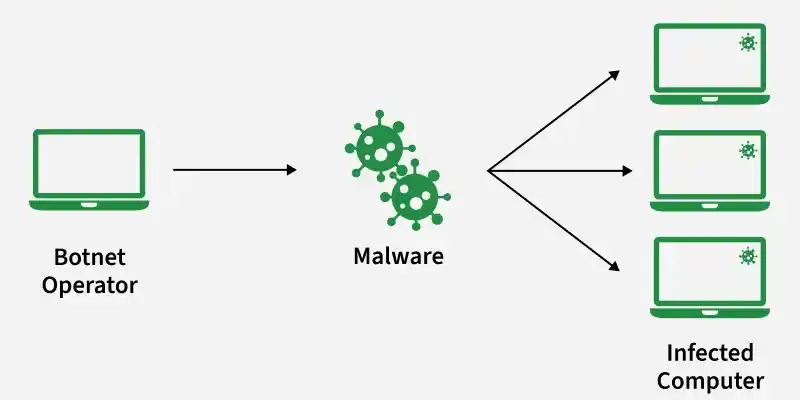
Botnet Working and Communication
A botnet is a network of infected devices (bots) controlled remotely by an attacker (botmaster) through a Command and Control (C&C) system. The process involves infection, connection, communication, execution of commands, and expansion of the botnet.
Step 1: Identifying Vulnerable Systems
The attacker first scans and identifies devices that can be easily compromised. These systems usually have weak security or outdated protection, making them easy entry points for malware infection.
- Outdated operating systems or unpatched software
- Weak or default passwords
- Poorly configured security settings
- Users who frequently click unknown links or download unsafe files
- Automated scanning tools used to find large numbers of targets quickly
Step 2: Malware Infection
The attacker spreads malicious software to the identified systems using different delivery methods. Once executed, the malware installs itself silently and turns the device into a bot without the user noticing.
- Phishing emails with malicious attachments or links
- Fake software updates or cracked software downloads
- Infected websites (drive-by downloads)
- Malicious links shared via social media or messaging apps
- Malware runs in the background without user awareness
Step 3: Connection to Command and Control (C&C) Server
After infection, the device connects to a Command and Control server. This server acts as the control center where the attacker manages all infected devices remotely.
- Bot registers itself with the C&C server
- Sends device information like IP address and system details
- Waits for instructions from the botmaster
- Enables remote control of infected systems
Step 4: Communication Using Common Protocols
Botnets communicate using standard internet protocols to avoid detection. The traffic is designed to look normal so that it blends with regular network activity.
- IRC (Internet Relay Chat) used in older botnets
- HTTP/HTTPS traffic to mimic normal web browsing
- Peer-to-Peer (P2P) communication without central server dependency
- Use of encryption to hide command data
- Obfuscation techniques to disguise malicious traffic
Step 5: Execution of Commands
The botmaster sends instructions through the C&C system, and infected devices carry out tasks automatically. These actions are often large-scale and coordinated.
- Sending spam emails in bulk
- Launching Distributed Denial-of-Service (DDoS) attacks
- Stealing personal or financial data
- Redirecting users to phishing or malicious websites
- Downloading and installing additional malware
Step 6: Botnet Expansion (Self-Propagation)
The botnet continues to grow by infecting more vulnerable systems. Each newly infected device becomes part of the network, increasing its strength and reach.
- Scanning for additional vulnerable devices
- Infecting new systems using similar attack methods
- Adding new bots to the existing network automatically
- Increasing overall size and attack capability of the botnet
Types of Botnets
Botnets can be classified based on the communication channel used between the bots and the Command and Control (C&C) server. Different communication methods affect how easily the botnet can be detected, controlled, or taken down.
1. IRC Botnet
This botnet uses Internet Relay Chat (IRC) servers as the Command and Control (C&C) channel through which the botmaster sends instructions to infected devices. Bots join a specific IRC channel and receive commands in the form of chat messages.
- Uses centralized communication structure.
- Bots connect to an IRC server to receive instructions.
- Commands are transmitted as normal chat messages.
- Easy to manage and control from a single server.
2. Peer-to-Peer (P2P) Botnet
This operates using a decentralized network structure where each infected device communicates directly with other bots instead of relying on a central server. This makes the botnet more resilient against shutdown attempts.
- Does not depend on a central Command and Control server.
- Each bot acts as both client and server.
- Bots share commands with each other across the network.
- More difficult to detect and take down.
3. HTTP/HTTPS Botnet
This uses web-based protocols such as HTTP or HTTPS to communicate with the Command and Control server. Bots periodically connect to specific URLs to receive instructions, making the traffic appear similar to normal web browsing activity.
- Uses web protocols for communication.
- Bots connect to web servers at regular intervals.
- Communication blends with normal internet traffic.
- Harder to detect using basic network monitoring.
Types of Botnet Attacks
1. Phishing Attack
This attack uses botnets to send fraudulent messages that trick users into revealing sensitive information such as passwords, credit card details, or login credentials.
- Botnets send a large number of fake emails or messages.
- Messages appear to come from trusted sources.
- Users are redirected to fake websites.
- Used to steal personal or financial information.
2. Distributed Denial of Service (DDoS) Attack
Occurs when multiple bots send a large amount of traffic to a target server, making the website or service slow or unavailable to legitimate users.
- Multiple infected devices send requests simultaneously.
- Overloads server bandwidth or system resources.
- Prevents normal users from accessing services.
- Common techniques include SYN Flood, UDP Flood and HTTP Flood
3. Spamming
Attack in which botnets send a large number of unwanted emails or messages automatically.
- Used for advertising fake products or services.
- May contain malicious links or attachments.
- Helps spread malware to more devices.
- Consumes network and email server resources.
4. Data Theft
This involves stealing confidential or sensitive information using botnets.
- Bots collect login credentials and personal information.
- May capture banking details or stored passwords.
- Information can be misused or sold illegally.
- Often performed without user knowledge.
5. Targeted Intrusion
This attack focuses on a specific organization or individual to gain unauthorized access to valuable data or systems.
- Attackers select a particular target.
- Used to steal confidential or business information.
- May involve long-term unauthorized access.
- Can cause financial and reputational damage.
Botnet Prevention Methods
- Keep operating system and software updated with latest security patches.
- Avoid clicking suspicious links, emails, or unknown attachments.
- Use strong and unique passwords for different accounts.
- Enable two-factor authentication (2FA) for additional security.
- Install trusted antivirus or endpoint security software.
- Use firewall to monitor and control incoming and outgoing network traffic.
- Download software only from trusted and official sources.
- Regularly scan the system to detect malware.
- Avoid using pirated or cracked software.
- Educate users about common cyber threats and safe browsing practices.
Botnet Lifecycle
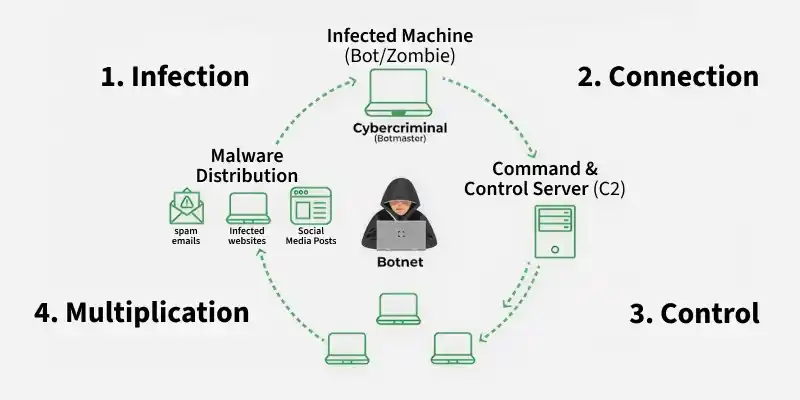
Lifecycle describes the sequence of stages through which a device becomes infected with malware, connects to the botnet network, performs malicious activities, and continues operating under the control of the botmaster.
Stage 1: Infection
- Malware enters the system through phishing emails, malicious links or attachments and compromised websites
- Device becomes infected without user knowledge.
- The system becomes a bot (zombie).
Stage 2: Communication
- Infected device connects to the Command and Control (C&C) server.
- Bot registers itself to receive instructions.
- Communication usually occurs through common internet protocols.
- Traffic often appears normal to avoid detection.
Stage 3: Execution
- Bot receives commands from the botmaster.
- Bots perform automated malicious activities such as sending spam emails stealing sensitive data and participating in DDoS attacks
- Tasks are executed without informing the user.
Stage 4: Maintenance
- Botnet is updated regularly to maintain control.
- Malware may modify itself to avoid detection.
- Botnet continues to operate and may infect new devices.
- Network size may increase over time.