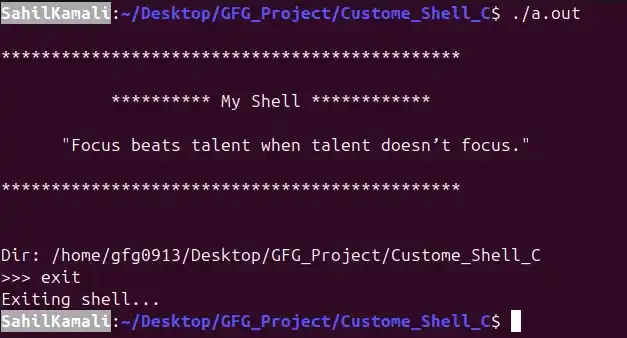
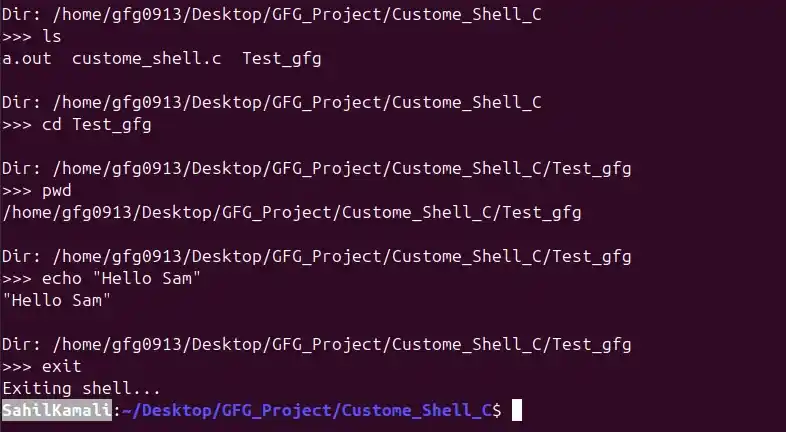
A shell acts as an interface between the user and the operating system, translating user commands into actions the system can perform. Tools like Bash do much more than just run commands, they manage processes, handle input/output redirection and support advanced features like piping. To better understand these internals, we’ll build a minimal Linux shell in C, focusing on how commands are interpreted and executed at a low level.
- Parses raw user input into commands and arguments
- Differentiates between built-in functions and external programs
- Uses system calls like fork(), exec() and wait() for process control
- Implements inter-process communication through pipes (|)
- Integrates command history and line editing via GNU Readline
Working of Shell (Step-by-Step)
When a user enters a command, the shell performs the following operations:
1. Input Handling
- The shell first reads the user’s input using functions like readline().
- If the input is not empty, it is stored in the command history so it can be reused later (e.g., using arrow keys).
2. Parsing
- The entered command is broken into smaller components called tokens.
- This helps the shell understand the command and its arguments.
- Example: ls -l becomes ["ls", "-l"].
3. Pipe Detection
- The shell checks whether the command contains a pipe (|).
- If a pipe is found, the command is split into multiple parts so that the output of one command can be passed as input to another.
4. Built-in Command Check
- The shell checks if the command is a built-in function like cd, exit or echo.
- If it matches a built-in command, it is executed directly by the shell without creating a new process.
5. Execution
- If it is not a built-in command, the shell creates a new child process using fork().
- The child process replaces itself with the required program using execvp(), which runs the actual command.
6. Waiting
- The parent process waits for the child process to complete using wait().
- This ensures the shell does not move to the next command until the current one finishes execution.
7. Loop Continuation
- After the command execution finishes, the shell refreshes the interface by displaying the current working directory and showing the prompt again.
8. Ready for Next Command
- The shell returns to an idle state, waiting for the user to enter the next command and the cycle repeats continuously.
Implementation
1. Installing Required Library
To enable input handling features like command history and line editing, install the GNU Readline library:
Command:
sudo apt-get install libreadline-devNote: Enter your system password when prompted and confirm the installation by pressing y.
2. Displaying System Information
- The current working directory is displayed using getcwd().
- The username of the logged-in user is retrieved using getenv("USER").
3. Input Parsing
User input is processed using strsep(), which splits the command into tokens based on spaces. Empty tokens are ignored to avoid storing unnecessary spaces and ensure clean parsing.
4. Built-in Command Handling
- Built-in commands are stored in an array of strings.
- Each input command is compared using strcmp().
- If a match is found, the shell executes it internally.
Special Case:
- The cd command cannot be executed using execvp().
- It is handled separately using the chdir() system call.
5. Executing System Commands
If the command is not built-in:
- A child process is created using fork().
- The command is executed using execvp() inside the child process.
- The parent process waits for completion using wait() before continuing.
6. Pipe Handling
Pipes (|) are detected using strsep("|"), which splits the command into two parts:
- Left side command
- Right side command
Each part is parsed separately and executed using two different child processes. A pipe allows the output of the first command to become the input of the second command.
7. Pipe Implementation (Low-Level Details)
File Descriptors: An integer array of size 2 is used to store file descriptors
- fd[0]: Read end
- fd[1]: Write end
Creating Pipe
- The pipe() system call is used to create communication between processes.
8. Process Execution in Pipes
Child 1 (First Command)
- Output is redirected to the pipe.
- stdout is replaced with the write end of the pipe.
- Read end is closed.
- First command is executed using execvp().
Child 2 (Second Command)
- Input is taken from the pipe.
- stdin is replaced with the read end of the pipe.
- Write end is closed.
- Second command is executed using execvp().
9. Parent Process
- The parent process waits for both child processes to finish execution.
- After completion, control returns to the shell for the next command.
Linux/Unix Shell Implementation in C
The following is the complete implementation of the simple shell in C, which supports built-in commands, external commands and pipe handling.
#include <stdio.h>
#include <stdlib.h>
#include <string.h>
#include <unistd.h>
#include <sys/wait.h>

#define MAX_INPUT 1024   // Maximum length of user input
#define MAX_ARGS 64      // Maximum number of arguments

// Function to print banner
void printBanner() {
    printf("\n**********************************************\n\n");
    printf("           ********** My Shell ************\n\n");
    printf("      \"Focus beats talent when talent doesn’t focus.\"  \n\n");
    printf("**********************************************\n\n");
}

// Function to print the current working directory
void printDir() {
    char cwd[1024];

    // Get current working directory
    // If it fails, print error and return
    if (getcwd(cwd, sizeof(cwd)) == NULL) {
        perror("getcwd failed");  // Print system error message
        return;                    // Exit function safely
    }

    // Display current directory path
    printf("\nDir: %s", cwd);
}

// Function to take input from the user
void takeInput(char *input) {
    printf("\n>>> ");  // Prompt
    if (fgets(input, MAX_INPUT, stdin) == NULL) {
        // If input fails (e.g., Ctrl+D), exit shell
        printf("\nExiting...\n");
        exit(0);
    }
    // Remove trailing newline character
    input[strcspn(input, "\n")] = 0;
}

// Function to split input into command + arguments
void parseInput(char *input, char **args) {
    int i = 0;

    // Tokenize input based on space
    args[i] = strtok(input, " ");

    // Continue splitting until NULL or max args reached
    while (args[i] != NULL && i < MAX_ARGS - 1) {
        i++;
        args[i] = strtok(NULL, " ");
    }
}

// Function to handle built-in shell commands
int handleBuiltIn(char **args) {
    if (args[0] == NULL) return 1;  // Empty command

    // Exit command
    if (strcmp(args[0], "exit") == 0) {
        printf("Exiting shell...\n");
        exit(0);
    }

    // Change directory command
    if (strcmp(args[0], "cd") == 0) {
        if (args[1] == NULL) {
            printf("Expected argument to \"cd\"\n");
        } else {
            // Change directory and handle error
            if (chdir(args[1]) != 0) {
                perror("cd failed");
            }
        }
        return 1;
    }

    // Help command
    if (strcmp(args[0], "help") == 0) {
        printf("\nSimple Shell Help\n");
        printf("Built-in commands:\n");
        printf("  cd <dir>\n  exit\n  help\n");
        printf("Supports pipes: ls | grep txt\n");
        return 1;
    }

    return 0; // Not a built-in command
}

// Function to execute a normal (non-piped) command
void executeCommand(char **args) {
    pid_t pid = fork();  // Create a child process

    if (pid == 0) {
        // Child process executes command
        if (execvp(args[0], args) < 0) {
            perror("Command failed"); // If execution fails
        }
        exit(1);
    } else {
        // Parent process waits for child to finish
        wait(NULL);
    }
}

// Function to execute two commands connected by a pipe
void executePiped(char **args1, char **args2) {
    int pipefd[2];
    pipe(pipefd);  // Create pipe

    pid_t p1 = fork();

    if (p1 == 0) {
        // First child process (left command)
        dup2(pipefd[1], STDOUT_FILENO); // Redirect stdout to pipe write end
        close(pipefd[0]); // Close unused read end
        close(pipefd[1]);

        execvp(args1[0], args1); // Execute first command
        perror("Pipe cmd1 failed");
        exit(1);
    }

    pid_t p2 = fork();

    if (p2 == 0) {
        // Second child process (right command)
        dup2(pipefd[0], STDIN_FILENO); // Redirect stdin to pipe read end
        close(pipefd[1]); // Close unused write end
        close(pipefd[0]);

        execvp(args2[0], args2); // Execute second command
        perror("Pipe cmd2 failed");
        exit(1);
    }

    // Parent process closes both ends of pipe
    close(pipefd[0]);
    close(pipefd[1]);

    // Wait for both child processes to complete
    wait(NULL);
    wait(NULL);
}

// Function to detect and split input around a pipe '|'
int parsePipe(char *input, char **left, char **right) {
    char *pipePos = strchr(input, '|'); // Find pipe symbol

    if (!pipePos) return 0; // No pipe found

    *pipePos = '\0'; // Split string at pipe
    pipePos++;       // Move to right side

    // Skip leading spaces in right command
    while (*pipePos == ' ') pipePos++;

    *left = input;    // Left command
    *right = pipePos; // Right command

    return 1; // Pipe exists
}

int main() {
    char input[MAX_INPUT];
    char *args1[MAX_ARGS], *args2[MAX_ARGS];

        printBanner();  // Added banner here (runs once)

    while (1) {
        printDir();        // Show current directory
        takeInput(input);  // Get user input

        if (strlen(input) == 0) continue; // Ignore empty input

        char *left, *right;

        // Check if input contains a pipe
        if (parsePipe(input, &left, &right)) {
            parseInput(left, args1);   // Parse left command
            parseInput(right, args2);  // Parse right command

            executePiped(args1, args2); // Execute piped commands
        } else {
            parseInput(input, args1); // Parse normal command

            // Handle built-in commands first
            if (handleBuiltIn(args1)) continue;

            executeCommand(args1); // Execute external command
        }
    }

    return 0;
}
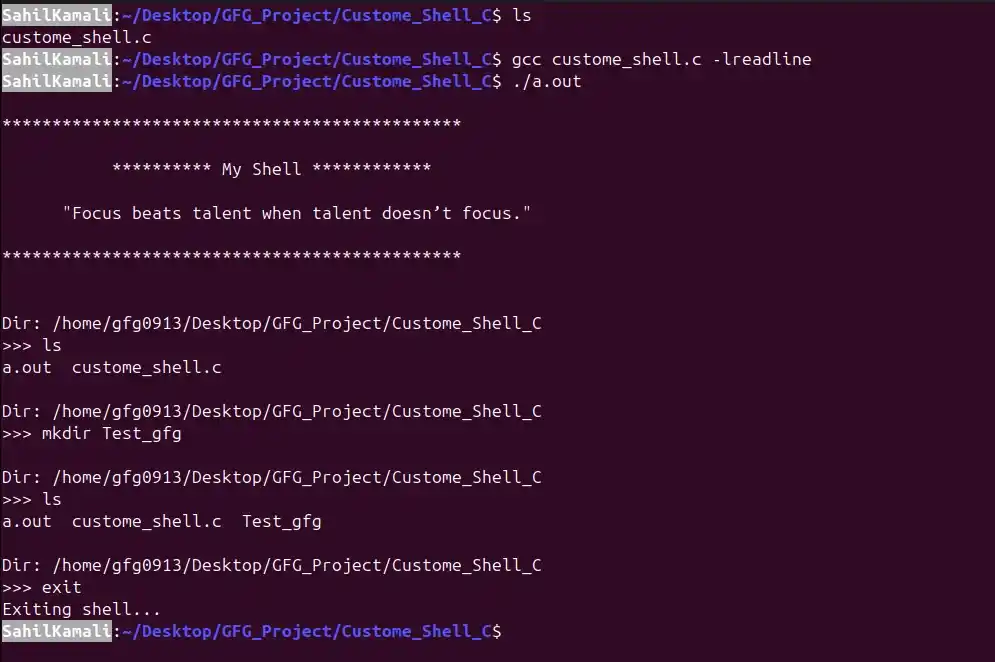
Compilation:
gcc custome_shell.c -lreadlineExecution:
./a.outOutput: