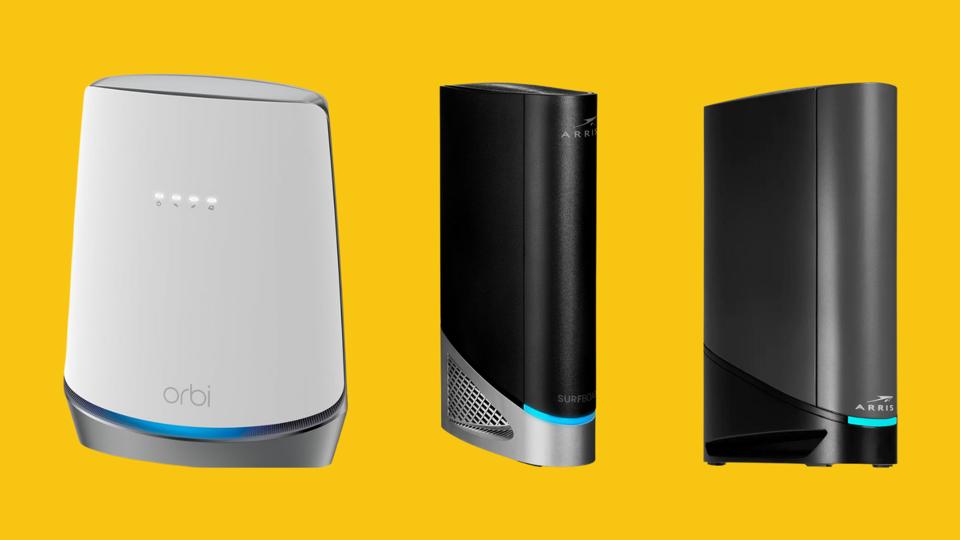
A modem-router combo merges two essential components of your home’s internet connectivity: the modem, which establishes your connection to the internet; and the router, which distributes that connection wirelessly throughout your home. The best modem-router combos, such as our top pick, the Arris Surfboard G54, offer reliable dual-band networks for smooth gaming sessions and streaming without pesky interruptions like lags or stuttering.
After researching countless options, we found the best modem-router combos that offer a fast and efficient connection.
ILLUSTRATION: FORBES / PHOTO: RETAILERS
The good news: Most modem-router combos are easy to install and manage, but choosing the best one for your home may be a little tricky. You’ll want to consider your ideal coverage area, usage plans, speed and software requirements, and price. If your home is large, the Netgear Orbi CBR750, while relatively costly, is worth your consideration. Heavy streamers or gamers need look no further than the Netgear Nighthawk CAX30S, but there are other options, too. Here are the best modem-router combos you can get today.
Best Modem-Router Combo Overall
Supports Wi-Fi 7 For Extra Security Protections
Amazon
Arris Surfboard G54
Bands: 2.4GHz, 5GHz, 6GHz | Speed: 10Gbps | LAN ports: 1 x 10Gbps, 4 x 1Gbps | Standard: Wi-Fi 7
Pros:
Wi-Fi 7 offers the latest security features
Good port selection allows you to hook up all your devices
Cons:
Expensive
The Arris Surfboard G54 is a great all-in-one modem-router combo with a lot going for it. The device offers strong download speeds with support for up to 10Gbps with qualifying internet plans, and its sleek design makes it a great choice to stick in any space. More importantly, it supports Wi-Fi 7, the newest technology for Wi-Fi speeds and security at this time, and only supported by a select few modem-router combos on the market. It also sports tri-band networking for 2.4GHz, 5GHz and 6GHz.
On the back of the Arris Surfboard G54, there’s a port that supports up to 10Gbps, plus four 1Gbps ports. You’ll want to double-check that this modem-router combo is compatible with your ISP, but based on our research it works with a majority of services, including Spectrum, Comcast and more. While the cost is a little high relative to other products we recommended here, it’s still much more affordable than buying a modem and router separately.
Band: 2.4GHz | Speed: 800Mbps | LAN ports: 4 x 1Gbps | Standard: Wi-Fi 5
Pros:
A cost-effective device, especially compared to our other picks
Four LAN ports make it easy to connect your PC and other gaming peripherals
Cons:
Limited to Wi-Fi 5, which is borderline outdated software
No dual-band support
For those that don’t want to spend a fortune on a modem-router combo, the Arris Surfboard SBG7600AC2 offers decent upload speeds of 800Mbps. The good news: Most streaming speeds cap out at around 25Mbps for ultra-high definition. For casual streaming and internet browsing, 200Mbps suffices, giving you plenty of extra bandwidth when using this device for your connectivity needs. That said, if you’re a gamer, you may want to look at one of the picks above for faster speeds.
It’s also important to note that the Arris Surfboard SBG7600AC2 only supports Wi-Fi 5, and currently, the standard in the networking industry is Wi-Fi 6 or 6E. If you’re looking for something that supports Wi-Fi 6 and above, you should consider another option on this list. But for casual users, this device will suit just fine.
Best Mesh Modem-Router Combo
Add More Nodes To Include Your Whole Home
Amazon
Netgear Orbi CBR750
Range: 2,500 square feet per node | Band: 2.4GHz, 5GHz | Speed: 4Gbps | LAN ports: 4 x 1Gbps | Standard: Wi-Fi 6
Pros:
Wi-Fi 6 is still fast and secure for most needs
Modern design looks blends in with any space
Can double as a mesh system for larger homes
Cons:
Multiple nodes will be overkill for smaller homes
The Netgear Orbi CBR750 offers a similar scope of features as the Arris Surfboard G54, but it also adds a must-have for larger homes: mesh networking. If you have a large space and are experiencing a spotty connection, a second node can boost your router’s network and stabilize it for gaming, streaming and more. By adding a second node, you can cover 5,000 square feet, effectively connecting every corner of your large space.
The router supports Wi-Fi 6—not Wi-Fi 6E—but with 4Gbps as the top speed, it’s still sufficient for most needs. The main downside? It can get very, very pricey, and the cost can keep adding up, too, if you plan to add additional nodes. But if you have a large home and need a fast connection throughout, this setup is worth every penny.
Best Modem-Router Combo For Gamers
Set This Slick Design On Your Desk
Amazon
Netgear Nighthawk CAX3OS
Band: 2.4GHz, 5GHz | Speed: 4Gbps | LAN ports: 4 x 1Gbps | Standard: Wi-Fi 6
Pros:
Supports Wi-Fi 6
10Gbps download speeds more than enough for gaming
One node covers a large range
Cons:
Expensive
10GB speed may be overkill for the most casual users
The Netgear Nighthawk CAX3OS is similar to the Netgear Orbi CBR750 in that it can cover a massive amount of space—2,700 square feet on one node, to be precise. The Nighthawk also sports Wi-Fi 6 and its dual-band router can handle 2.7Gbps data transfer speeds for its dual-band network, 900Mbps and 1,800Mbps, respectively, though it can download up to 10Gbps if you absolutely need it to. But as we’ve noted in our research, not all ISPs will offer that high speed, so be sure to double-check before you add this to your cart.
In terms of ports, the Nighthawk comes with four ethernet ports with 1Gbps speeds and one USB 3.0 port. It offers backward compatibility with Wi-Fi 5, and also tosses in a Netgear Armor software subscription to help keep your devices safe and secure from hackers and other malware. You can add a secure VPN, too, if you choose. “With Netgear Armor Plus, you also get a reliable and unlimited VPN, with Adblocking and Anti Tracking technology which helps protect you at home and on unfamiliar networks, keeping your online activity, identity and location more private,” explains Sandeep Harpalani, vice president, product management at Netgear. After the 90-day complimentary subscription expires, Netgear Armor Plus is $100 per year. But no matter what decide to add to your setup, you’ll have to stomach the base $380 price tag for the modem-router. If you’re willing to pay that for your gaming, it’s worth your consideration.
Best Midrange Modem-Router Combo
Speedy With A Reasonable Price Tag
Amazon
Arris Surfboard G36
Band: 2.4GHz, 5GHz | Speed: 3Gbps | LAN ports: 1 x 2.5Gbps, 4 x 1Gbps | Standard: Wi-Fi 6
Pros:
Wi-Fi 6 is fast and secure for most needs
3Gbps data speeds are enough for gamers
Cons:
Some users report that the setup process may be a bit difficult
The Arris Surfboard G36 is a little more expensive than our best value pick, but it comes with the more-capable Wi-Fi 6 for faster speeds—a solid improvement over the Wi-Fi 5 that the Surfboard SBG7600AC2 offers. For gamers who don’t want to drop a fortune, this model is a good choice for balance between price and performance. It has five LAN ports, one of which supports up to 2.5Gbps.
It has dual-band connectivity for gamers, and like the rest of the Arris lineup, the app is seamless and easy to use. If you use Amazon Alexa, you can connect this modem-router combo to your smart home system, too. It’s also compatible with most major ISPs, including Cox, Spectrum, Xfinity and more.
Why Trust Forbes Vetted
The Forbes Vetted tech team is well-versed in all things digital. Our editors and writers have spent years testing all sorts of consumer tech and electronics, including a plethora of smart home devices–from the best modem-router combos to the products that rely on their connection.
Forbes Vetted tech and electronics editor, Rebecca Isaacs, is a gamer and home networking expert who has been covering the category for more than six years. Before moving to New York, she tested a slew of routers and Wi-Fi extenders in her 100-year-old, three-story Illinois home. When she isn’t testing the latest networking gear, she’s evaluating the best consumer tech products like the gaming TVs and writing tablets.
In addition to Isaacs’s research and testing experience, we spoke with Sandeep Harpalani, vice president, product management at Netgear, to discuss the security measures on the Netgear Nighthawk.
The tech world moves fast, and we do our best to keep up with it. This article is regularly checked and reviewed to make sure we continue to provide the most up-to-date advice. It was last updated in June 2025 by tech updates writer Alex Garrett.
How We Chose The Best Modem-Router Combos
To recommend the best modem-router combos, we focused on options that cater to different needs and households. Our selections are backed by extensive research and real consumer feedback.
We examined offerings from top brands, narrowing our choices down from trusted companies.
We compared key features like maximum supported download speeds, the number of ports and overall performance.
We considered models across various price points to make sure different users with varying budgets could find a pick that suits their needs.
To validate our picks, we combed through user reviews to confirm real-world performance and reliability. Every modem-router combo included had to maintain overwhelmingly positive feedback from real users, with a minimum rating of 4 out of 5 stars.
What To Consider When Picking The Best Modem-Router Combo For You
A modem-router combo, also known as a gateway, combines your modem and Wi-Fi router into a single device. “Your internet provider usually equips you with a gateway device, but it’s important to know that it may not be the latest technology and you could be paying a rental fee for it each month,” says Harpalani. To help you find the right modem-router combo for your home, consider the following factors:
Coverage
Coverage, also called range, refers to how much space a modem-router combo can cover without dead zones. To determine the amount of coverage you need, consider the square footage of your space. For two- to three-bedroom homes and apartments, a modem-router combo with a 1,500 square foot range is ideal. If you have a larger home, you’ll likely require more coverage, making a 4,000 to 5,000 square foot range a better fit.
Speed
If you already have internet set up in your home through a provider like Spectrum, Xfinity, Frontier or Verizon, you need a modem-router combo that can support the internet speed featured in your plan. Internet speed is measured in megabits per second (Mbps), and generally 100 Mbps is sufficient for most households to browse the web, stream videos, share files and game online.
Security Features
To ensure your modem-router combo is secure, look for features like WPA3 encryption, which provides stronger protection against unauthorized access. Automatic firmware updates can keep your device safeguarded against the latest threats, so make sure you enable those if your modem-router combo supports them. If you have young kids, you may also want to review your parental controls to restrict content and manage internet access across users. Some higher-end models, like the Netgear Nighthawk CAX30S, also offer advanced threat protection and VPN support for encrypted browsing, too.
Frequently Asked Questions (FAQs)
Based on our team’s research, the Arris Surfboard G54 is the best modem-router combo for most people. It supports internet speeds up to 10Gbps and Wi-Fi 7 (the newest Wi-Fi technology), and is designed to provide fast and reliable internet.
A modem-router combo is generally a better option because it simplifies setup and reduces the number of devices taking up space in your home. “Two devices occupy more space. Also, setting up more than one device may be intimidating,” Harpalani explains. Additionally, some modem-router combos offer a more seamless integration between the modem and router, which can improve your network’s performance and reliability.
Keeping your modem-router combo secure requires regular maintenance. When you have finished setup, make sure the combo’s default username and password is strong and unique to make it hard to hack. Enable automatic firmware updates if your modem-router combo supports them; if it doesn’t, be sure to check periodically for updates. The good news: Usually, the app the modem-router comb is connected to will alert you when there is one available. We also recommend using WPA3 encryption (or WPA2 if WPA3 isn’t available), which ensures your Wi-Fi network is protected from unauthorized access.