New User Checklist
- Go and check out the home page. It contains some useful info.
- Go to the releases page and download the latest release
- Select a game

- Create a new collection
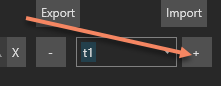
- Enter a collection name

- Select mods from the Installed Mods area

- Note that they are visible on the right hand side now under Collection Mods

-
Perform any sorting you deem necessary
-
OPTIONAL: Run conflict solver (if available)
-
OPTIONAL: Merge any conflicts that you may find (You can learn more under the Conflict Solver section on this wiki)
-
Press apply button to apply the collection mod ordering to the game