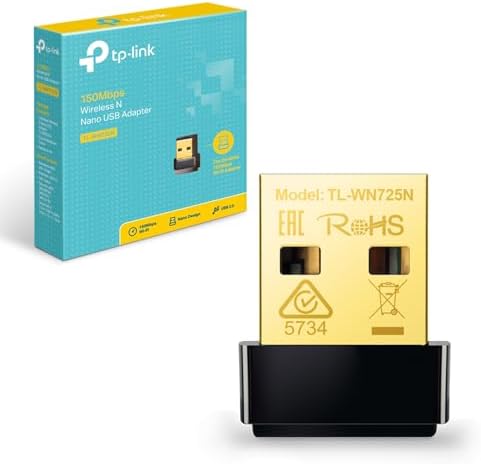
| Brand | TP-Link |
| Hardware interface | USB |
| Colour | Grey |
| Compatible devices | PC&Notebook |
| Product dimensions | 19L x 15W x 7H millimetres |
| Data link protocol | USB |
| Data transfer rate | 150 Megabits Per Second |
| Item weight | 0.04 Ounces |
| Number of Packs | 1 |
| Unit count | 1.0 count |
Top Brand
TP-Link
91% positive ratings from 10K+ customers
100K+ recent orders from this brand


TP-Link is the World's No. 1 Wi-Fi Products Provider*
* Source: IDC Worldwide Quarterly Wireless LAN Tracker, CY2023 (claim based on worldwide shipments).
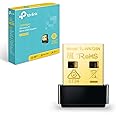
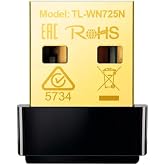
As a Wireless N Nano USB adapter, TL-WN725N allows users to connect a desktop or notebook computer to a wireless network at speed of up to 150Mbps, which is ideal for smooth video streaming, voice streaming and online gaming. This miniature adapter is designed to be as convenient as possible and once connected to a computer’s USB port, can be left there, whether traveling or at home. It also features enhanced wireless encryption and easy installation.

Turn a wired internet connection to a PC or Laptop into a Wi-Fi hotspot

TL-WN725N is designed to be as convenient as possible. With its miniature size and sleek design, users can connect the nano adapter to any USB port and leave it there, no matter when they are traveling or at home.

A friendly user interface Utility on a CD for simple installation.
Operating System
Supports Windows, Mac OS, Linux
![]()
Archer T4U
|
![]()
Archer T3U
|
![]()
Archer T2U Plus
|
![]()
Archer T2U Nano
|
![]()
TL-WN823N
|
![]()
TL-WN725N
|
|
|---|---|---|---|---|---|---|
|
Add To Basket
|
Add To Basket
|
Add To Basket
|
Add To Basket
|
Add To Basket
|
Add To Basket
|
|
| Customer Reviews |
4.3 out of 5 stars 900
|
4.3 out of 5 stars 22,741
|
4.4 out of 5 stars 30,448
|
4.3 out of 5 stars 24,280
|
4.2 out of 5 stars 68,743
|
4.3 out of 5 stars 117,394
|
| Price | EUR 38.25EUR38.25 | EUR 16.31EUR16.31 | EUR 12.81EUR12.81 | EUR 8.74EUR8.74 | EUR 8.16EUR8.16 | EUR 6.98EUR6.98 |
| Wireless Standard | AC1300 Mbps | AC1300 Mbps | AC600 Mbps | AC600 Mbps | N300 Mbps | N150 Mbps |
| Maximum Wireless Speed | 867Mbps on 5GHz, 400Mbps on 2.4GHz | 867Mbps on 5GHz, 400Mbps on 2.4GHz | 433Mbps on 5GHz, 200Mbps on 2.4GHz | 433Mbps on 5GHz, 200Mbps on 2.4GHz | 300Mbps on 2.4GHz | 150Mbps on 2.4GHz |
| USB Standard | USB 3.0 | USB 3.0 | USB 2.0 | USB 2.0 | USB 2.0 | USB 2.0 |
| Range | Best | Best | Better | Better | Good | Good |
| Easy connect at a push of WPS button | ✓ | no data | no data | no data | ✓ | no data |
| Easy management with bundled utility | ✓ | ✓ | ✓ | ✓ | ✓ | ✓ |
| High Gain | ✓ | no data | ✓ | no data | no data | no data |
| MU-MIMO | ✓ | ✓ | no data | no data | no data | no data |
| Hardware Interface | USB |
|---|---|
| Compatible Devices | PC&Notebook |
| Data Link Protocol | USB |
| Data Transfer Rate | 150 Megabits Per Second |
| Compatible Operating System Family | Linux, MacOS, Windows |
| Minimum Required Operating System Version | Windows 11 |
| Item Dimensions L x W x H | 19L x 15W x 7H millimetres |
|---|---|
| Item Weight | 0.04 Ounces |
| Color | Grey |
|---|
| Brand Name | TP-Link |
|---|---|
| Unit Count | 1.0 count |
| UPC | 840460604468 |
| Manufacturer | TP-Link |
| Country of Origin | China |
| External Testing Certification | 3649-12-3177 |
| Box Contents | Wireless N Nano Usb Adapter |
| Item Part Number | 6935364050719, TL-WN725N |
| Model Number | TL-WN725N |
| Manufacturer Part Number | TL-WN725N |
| Best Sellers Rank |
|
| ASIN | B008IFXQFU |
| Customer Reviews |
4.3 out of 5 stars |
Customer Reviews, including Product Star Ratings, help customers to learn more about the product and decide whether it is the right product for them.
To calculate the overall star rating and percentage breakdown by star, we don’t use a simple average. Instead, our system considers things like how recent a review is and if the reviewer bought the item on Amazon. It also analyses reviews to verify trustworthiness.
Learn more how customers reviews work on Amazon
Generated from the text of customer reviewsPurchased to provide more stable WiFi on a HP laptop. The built in WiFi was showing signs of age with loss of signal several times a day. It appears this is not unusual for HP laptops.
Set up of the dongle was easy. Simply plugged into a spare USB port (in our case we plugged into a USB splitter hub). Windows detected the on board software for the driver immediately and it was installed in a couple of minutes. I used windows 11 device manager to deactivate the on board adapter to ensure Windows would always use the new dongle.
We’ve used the dongle for over 24 hours with no WiFi drop out which was happening several times a day. A speed check test showed 280 mb/s which was slightly better than previous.
This morning Windows 11 update automatically installed an update for the driver successfully.
Overall a good solution to loss of WiFi on a HP laptop.
This product has been a game changer for me! I have super fast BT fiber optic broadband in the house but my laptop never got any where near the high speeds it should. I work from home and make calls through my laptop and always had issues with calls dropping out or a really bad line, my CRM system was always slow. I found this product after doing a lot of research on increasing my internet - I did all the things suggested on my laptop but nothing worked until I bought this. It's brilliant my speed has gone from around 26 to nearly 200!! My phone calls are crystal clear, no drop outs no bad lines and my laptop is now super quick on all applications using internet. It's a game changer would definitely recommend. I did have an issue setting it up as it was not recognising the device. I contacted TP and was advised to put my laptop next to the modem and try again and it worked. Their Customer Service via chat was very good as well This was worth every penny and made my working day that much better!!
Nice speeds from the USB wifi dongle. Sometimes it disconnects and that can be fixed with downloading the drivers from the TP LINK Official site.
I have downloaded and installed one of the 3 that are on the site and so far it stays connected and has good speed.
It is a lot better than he other usb wifi that i have.
I bought the TP-LINK TL-WN725N Nano adapter for its wireless N capability as my Asus EeePC 1001P only has wireless b/g built-in and I recently bought a TP-Link TL-WDR3600 N600 Wireless Dual Band Gigabit CABLE Router (2 UBS Ports for Storage Sharing, Media/Print Server, IPv6). My EeePC runs Windows XP and Debian 7.
It turns out that the TP-LINK TL-WN725N comes in two versions, V1 and V2. They look identical but use different wireless chips. If you get a V1 it will work out of the box in any typical Linux based operating system. If you get V2 you will need to build and install a driver module. Luckily this is very easy. You can find some information on the V2 at wikidevi.com/wiki/TP-LINK_TL-WN725N_v2 and download a driver and see install instructions at github.com/lwfinger/rtl8188eu.
Building and installing the driver just takes a couple of commands and a few minutes. You need kernel headers installed and make and gcc (and optionally checkinstall). Unpack the driver archive, cd into the directory and run `make all`, then as root or using sudo run 'checkinstall --pkgname=rtl8188eu --pkgversion="1:$(date +%Y%m%d)-git"` if you like checkinstall and `make install` if you prefer not to use it. If using checkinstall that should build a versioned, dated package and install the driver, copy the firmware to the right place and do so such that your OS package manager knows about it so you can uninstall it cleanly, upgrade without issues, or use the driver and firmware package on other computers running the same OS and hardware.
Even on my low power EeePC this only took a couple of minutes. Once it was done I reconnected the TP-LINK Nano to a USB port and immediately the device became available in Network Manager and I connected to my N network without any issue.
My next task was to try the Nano in Windows XP. The Nano comes with a mini-CD containing Windows drivers and utilities but the EeePC doesn't have a CD drive so I downloaded the same driver pack from the manufacturer's web site and unzipped it. On connecting the Nano to a USB port Windows detects the device and offers to check Windows Update, search for a driver and install one automatically if found. I was interested to see if this convenient feature would succeed so went ahead. It couldn't find a driver but instead hardware wizard hung and had to be force closed via Task manager. Doh! I restarted the "Found New Hardware Wizard" and this time specified where to look. It failed again and again had to be forced closed. Next I used TP-Link's setup utility and selected to install only the driver (no extra software). This worked fine, at which point Windows' "Found New Hardware Wizard" launched itself and got in the bl***y way. Anyway the driver installed successfully and the wireless interface appeared in the system tray and I connected to my N router. Success!
It's been a very long time since I connected anything to a Debian PC and found there wasn't a driver or firmware automatically loaded or easily available so at first I was a bit worried I might run into problems. Actually the driver build and install is really easy and quick and didn't take any longer than faffing around with XP's hit and miss new hardware wizard. If you run Windows XP just use the TP-Link setup application and save yourself a few minutes of aggravation or tedium. I believe Windows 7 will manage this all much more competently but haven't tried it myself.
The Nano seems fine to me. I like that TP-Link's set up utility allows you to install either the driver only or the driver with TP-Link's utilities. The Nano is very good value and tiny enough that it can stay permanently in place even while my EeePC is in a snug case, and I can now set my wireless router to use N instead of B/G and get better speeds on all clients.
edit: I just tried it with a clean install of Windows 7 64-bit. I downloaded the driver from TP-Link, ran the setup and the Nano works perfectly. Whichever operating system I use the Nano reliably connects to my N network at a nominal 150 mbps. I get very good speeds, almost as good as using a wired 100 mbps LAN, so this is great for file transfers and streaming 720p video and similar tasks which had sometimes been slow and frustrating with wireless g.
Easy to install following the simple instructions. Works perfect well with no buffering on video, so seems just as good as the ethernet cable. So glad to unplug an unnecessary cable. Great product.
I bought this to avoid having a long USB cable running under my carpet (I am about to replace the carpet in question). It was easy to set up and it works really well. I get the same upload and download speeds as I did with the cable (Tested with Ookla). Recommended product!
I bought TP-link as they're a trusted, established brand expecting no false over bloated claims and nice straightforward usage: but no luck!
For reference I'm very capable technically speaking. I've been building, configuring PCs since before Windows 95. We have 5 PCs and 3 laptops in my house. So I generally know what I'm doing.
I could not get this to work. The supplied driver CD is of little use to 99% of users.
However Windows does automatically recognise and install a driver for it (dated 2016 I believe) and it seems to work except it couldn't see my WiFi network. Every other device does including phones and tablets in this part of the house (which is close to the router, next room same floor).
There's no specific link to this exact product on their website, it's just a general link to their homepage.
Still it's not that hard to locate the drivers in the UK section even though they seemed pretty old (2018, 7 years old). Installed and it saw the WiFi but refused to connect. First time it said "cannot connect" and 2nd attempt crashed the computer.
Then tried the US version of the drivers, newer, dated 2020 I believe. The installer locked up at 90%, just sat there even after 20 minutes it wouldn't proceed. Still you can easily point Windows to the driver files and it happily installs them. This saw the network, allowed me to connect but then reported there wasn't any internet available.
Then I tried the International drivers which were newer, 2021 I believe. These saw the WiFi but refused to connect; the same issue as the UK driver.
After more than an hour of faffing around (maybe 2 hours) it was all completely pointless.
Why would they supply a CD in 2025? Why not a USB stick or memory card? Why a link to the homepage of their website and not this specific product? What was the point in sticking to a brand name if it's this much hassle?
In addition the version number (critical for driver downloads) is not written on the device itself. There's lots of information printed on there but not this crucially important part! Thankfully it's on the sticker on the box so DO NOT THROW THIS AWAY! For reference this is Version 3 (V3.0) of the TL-WN725N(EU).

I bought TP-link as they're a trusted, established brand expecting no false over bloated claims and nice straightforward usage: but no luck!
For reference I'm very capable technically speaking. I've been building, configuring PCs since before Windows 95. We have 5 PCs and 3 laptops in my house. So I generally know what I'm doing.
I could not get this to work. The supplied driver CD is of little use to 99% of users.
However Windows does automatically recognise and install a driver for it (dated 2016 I believe) and it seems to work except it couldn't see my WiFi network. Every other device does including phones and tablets in this part of the house (which is close to the router, next room same floor).
There's no specific link to this exact product on their website, it's just a general link to their homepage.
Still it's not that hard to locate the drivers in the UK section even though they seemed pretty old (2018, 7 years old). Installed and it saw the WiFi but refused to connect. First time it said "cannot connect" and 2nd attempt crashed the computer.
Then tried the US version of the drivers, newer, dated 2020 I believe. The installer locked up at 90%, just sat there even after 20 minutes it wouldn't proceed. Still you can easily point Windows to the driver files and it happily installs them. This saw the network, allowed me to connect but then reported there wasn't any internet available.
Then I tried the International drivers which were newer, 2021 I believe. These saw the WiFi but refused to connect; the same issue as the UK driver.
After more than an hour of faffing around (maybe 2 hours) it was all completely pointless.
Why would they supply a CD in 2025? Why not a USB stick or memory card? Why a link to the homepage of their website and not this specific product? What was the point in sticking to a brand name if it's this much hassle?
In addition the version number (critical for driver downloads) is not written on the device itself. There's lots of information printed on there but not this crucially important part! Thankfully it's on the sticker on the box so DO NOT THROW THIS AWAY! For reference this is Version 3 (V3.0) of the TL-WN725N(EU).
Absolutely solid, save for the times it decides to reboot itself out of nowhere and forcibly halt all that I'm working on. No amount of troubleshooting stops it from doing that. I've ticked the little box that stops my PC from being able to turn it off, I have all my drivers fully updated, my power supply works fine, it just likes to reboot itself. Don't use if you have a need of long online sessions.
Worked with my linux machine. No setup or packages required. Just plug in.
Very happy that this works with linux kernel out of the box, unfortunately internet speeds aren't great, but perhaps that is understandable for the small size.
Works as advertised, perfect for the Rigol DH0804 oscilloscope.
Be aware, you can't just plug it into the USB and expect it to work, you need to follow the youtube videos to make it work. You need an USB hub and a keyboard (you can use your touch screen as a mouse), you need to access the settings, use the youtube videos if unsure how to do this, but if you do it right, it's done within 1-5 minutes.
Works as a charm.
Perfect for an old computer that has no WiFi capabilities. Had an old computer that had no more windows support since Windows 7. Installed Linux, put this adapter into the USB A port and saved the computer from the landfill. It runs very well on the internet with this USB WiFi adapter. The adapter works on Linux, Windows and Mac. It comes with a CD driver in case you can't get one before an internet connection. It is not super fast because it is USB 2.0 but its quick enough to do anything except maybe on-line gaming. Easier than running Ethernet cables if there is no wall jack close by. you don't need to disassemble your computer to install a WIFI card, just plug and play. Good price. Would buy again.
C'est réellement plug and play:
à peine insérée dans un port USB2 sur un vieil ordi sous Lubuntu, la clé est reconnue et fonctionne sans délai et sans rien installer (du moins en apparence).
On voit directement les réseaux disponibles; plus qu'à se connecter !
From TP-Link
One-time purchase: EUR 6.98 25% Savings
List Price: EUR 9.32
Deal ends:
All prices include VAT.
, 4.3 out of 5 stars, 149 ratings
This item cannot be dispatched to your selected delivery location. Please choose a different delivery location.
A+_TO_E
1 Kilowatt Hours Per Year per year, based on the power consumption of the television operating 4 hours per day for 365 days. The actual energy consumption will depend on how the television is used.
Did you find this product summary feature useful?
![]() |