Showing posts with label Photos. Show all posts

Monday, February 9, 2009

Challenge 38 - Photo collage

Okay ladies - don't let the title scare you. Even if your not good with computers or photo editing you can still make this work - I will explain later. But first - let me explain how this came to me. I am very challenged when it comes to 2 page layouts and i like the extra space on my layout and being able to include more than 1 or 2 photos. SO that is where this comes in to play........I want you to create a photo collage for your layout. For mine, I just created a new document and changed the size to a 4x6 - Then i slid the photos i wanted on the project one at a time and resized them so it created a grid. You can use the white lines or not and have all of the photo edges touching. If you don't have the ability to do this on the computer just cut and paste your photo's so they are in a collage of some sort - with the edges touching.

So lets see what you can create with this photo challenge!! Post your layouts in a gallery or on your blog and link them here so we can check them out! Thanks for your participation and let me just tell you the prize for whoever wins the challenge is fantabulous - maybe I will tempt you later this week with a picture!!
My Layout (brenda)Deborah's layout

Pam's layout

Jennifer's Layout:

Monday, January 26, 2009

Challenge 37: Journaling ON the photos

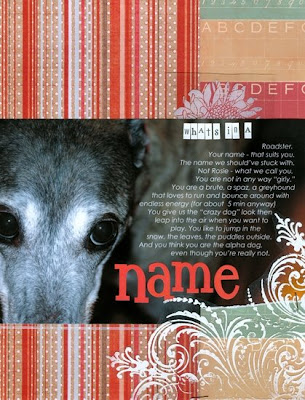
Journaling is an essential part of a layout. Usually, you put it around your pics: on the top, on the bottom, on the right or on the left, anywhere. This time I challenge you to write the journaling ON your photo(s)! Yep! That's it! It’s easy, it’s fun and you have a lot of possibilities. You don’t believe me? Look at what the DT members have done for you:

Jen: Instead of writing on the photo, she enlarged and printed the photo and then she used a set of those tiny stamps on wood blocks: one by one! It didn’t take more than 20 minutes. No Photoshop needed for that one. Pretty simple, isn’t it?


Brenda: She wrote her thoughts in a bubble and stuck it on the photo! She added additional lines on a tag outside of the photo.


Pam: The text was written on the photo first, then she stamped it on the paper... Actually, the photo was printed on that paper right in the middle, and she simply added everything to the photo paper! Easy as pie!!


Deb: this layout has a large photo but she journaled on it via PS before printing it out.


Paloma: She simply applied some rubons on the photo because her hand-writing is so awful. That’s just too easy, don’t you think?


Now is your turn! How do you manage to write your journaling ON the photo? Leave your link in your comment. Deadline: February 8th at 12 p.m. Thanks a lot!

Monday, July 14, 2008

Challenge 23 - Black, White, Color

I don't know about you, but I love black and white photos. I love the artistic flair they give and I love the simplicity as well. But then again, I also love color. Photos of bright orange pumpkins or my kids' blue eyes.

Luckily, we do not have to pick just one. Mixing color and B&W on a page is A-OK, and sometimes the mix can give you some real benefit. Try it when:
(1) You want to use several photos but want one to really "pop" off the page. Make one color.
(2) You have some photos that just don't look "right" in color. Change some to B&W.
(3) You want to use bright/bold patterned papers on part of your layout and your photos will clash - make them B&W.
(4) You just want to mix it up a bit. :)

So this week, my challenge to you is an easy one... simply combine both color and black and white photos on a layout. At least one of each.

For some great tutorials on converting photos to B&W on the computer, check out these tutorials: http://jessicabell-tutorials.blogspot.com/ http://www.photoshopessentials.com/photo-effects/color-black-and-white.php http://digital-photography-school.com/blog/digital-black-and-white/

Link us up here or send us an email with an attachment. As always, there will be a RAK involved. Deadline is midnight on July 27. Have fun everyone!

Alicia's digital layout:


Becky's layout:
Deb's layout:

My (Jen's) layout:

Sunday, January 27, 2008

Challenge 11: After all, sometimes it is all about the PHOTOS

This technique challenge will get your creativity sparked by using your traditional scrapbook supplies or a Digital element to make those photos stand out!

Your Assignment: Create a layout of any size using one of the following techniques to your main photo! Post a link in the comments with your layout and indicated what technique you used. One winner will be chosen on February 10th for a $15 Gift Certificate to Two Peas in A Bucket.


Thanks for joining us at the Playground!

Here are your techniques to choose from:

Option 1 Create a Storyboard with your photos
#1. Is a digital option using Photoshop to create
#2. Same concept using traditional paper supplies


Option 2 Add text or a title to your photo
#1. The digital option uses Photoshop Elements to add several png elements - the "winter" and snowflake" as well as text. Elements are from the Winter Snowflakes kit by Amy Hummel.
#2. Using traditional paper supplies - stickers and rub-ons - the same elements were added to the photo

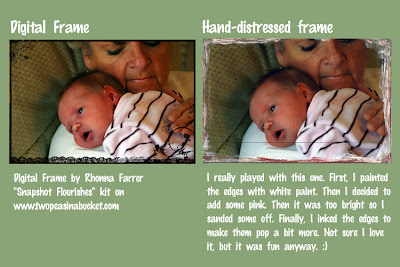
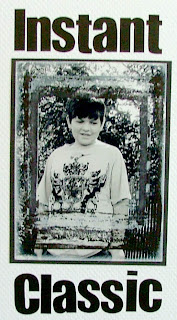
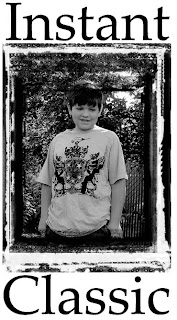
Option 3 Distress or add a frame to your photo's edges

Option 4 Create a Polaroid picture using digital brushes or traditional stamps.
Option #1: Using a picture that is already printed, use stamps and or paper to create an image that appears to look like an old polaroid image.

Option #2: Using digital images in your image editing program create an image that appears to look like an old polaroid image.

I liked these digital brushes and stamps because they had that old emulsified appearance.

Digital stamp and rubber stamps are by Lazar StudioWERX