Recent Discussions

Factory Reset Windows 10 without user intervention
I've looked for this answer online and have come across the "systemreset -factoryreset" command which works, but it comes up with the prompt asking if I want to keep my files or remove everything, I want to remove everything, but without the prompt. We are not doing this from any pre-exiting images, and our laptops are running the pre-loaded Windows 10 Pro install, we are just using the in-built Windows 10 "reset this PC" feature as we have no MDM configured. We just want the laptops to be totally reset so they don't contain any company information, we're not bothered about completing the OOBE once they are wiped. We are trying to accomplish this remotely as our users are all at home, so I need to automate it and have no user involvement in the process, I just want it to factory reset, and bring the laptop up to the off-the-shelf state configuration. We have the facility to push commands and scripts to the laptops so was hoping to do this via powershell. Does anyone know if this is possible? Thanks252KViews2likes27CommentsHow to Use Resource Monitor and Performance Monitor in Windows 11: A Complete Guide
A slow computer can be frustrating, especially when you are working, gaming, studying, or running important applications. Many Windows 11 users notice problems like high CPU usage, low memory, slow startup times, or applications freezing but do not know where to find the cause. https://dellenny.com/how-to-use-resource-monitor-and-performance-monitor-in-windows-11-a-complete-guide/6Views0likes0CommentsWindows 10 Extended Security Updates: A Bridge to Your Windows 11 Experience
Technology changes quickly, but upgrading your computer does not always happen overnight. Whether you are waiting for the right time to buy a new PC, preparing your files, checking hardware compatibility, or simply adjusting to a new operating system, moving from one Windows version to another takes planning. To make this transition easier, Microsoft introduced the Windows 10 Extended Security Updates (ESU) program a way to help keep eligible Windows 10 devices protected while users move toward the Windows 11 experience. https://dellenny.com/windows-10-extended-security-updates-a-bridge-to-your-windows-11-experience/9Views0likes0CommentsPersistent File Explorer Crashes When Navigating Specific Network Locations on Windows PC
Whenever I try to navigate to certain network locations on my Windows PC, which interrupts my ability to access shared files smoothly. The crashes happen consistently when accessing specific network folders, causing the application to close unexpectedly and making it difficult to work efficiently with network resources.18Views1like1CommentHow to Remove These Annoying Category Folders in the Windows 11 Start Menu?
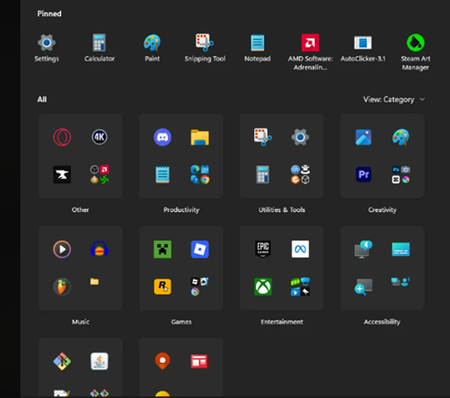
Need help! Many category folders (such as "Productivity tools," "Creativity," "Games," etc.) have automatically appeared in my Start Menu, grouping the application icons that were previously displayed directly. I simply want the apps to be shown directly in the Start Menu as they used to be, rather than being categorized into these folders. How can I turn off or remove these automatically categorized folders?14KViews5likes30Comments
Why do you permit unverified emails?
Microsoft, why do you permit unverified emails to come to our inboxes and junk boxes? I tried to create a rule that would automatically delete any unverified emails but it isn't working. (Likewise, I created a rule to automatically delete any email with the word "p*nis" in the subject line, but that isn't working, either.) If they are unverified, why do you allow them?10Views0likes0Comments
Windows 11 license transfer problem on a Virtual Machine
Hi everyone, I'm stuck with a Windows 11 Pro activation issue after a VM crash and could use some advice. Context: > Years ago, I got a Windows 10 Pro digital license through the Windows Insider Program and used it on bare metal. Fast forward to about two years ago, I successfully migrated that license over to a Windows 11 Pro VM inside a virtual machine. What went wrong: > The virtual machine glitched out, forcing me to completely wipe that VM and spin up a brand new one. Now, when I try to activate the new VM using the Activation Troubleshooter and selecting “I changed hardware on this device recentlyâ€, it won't let me transfer the license. The system says there are no usable licenses linked to my Microsoft Account for this machine. I assume Microsoft's activation servers are treating the new VM as an entirely different motherboard/hardware configuration, while the old "hardware" profile is still holding onto the license. Since the old VM is deleted, I can't log into it to unbind it. Has anyone dealt with this specific Insider license migration issue on VMs? Is there any way to clear the old VM instance from my MSA (Microsoft Account) devices to free up the license, or am I forced to contact MS support? Thanks!26Views0likes1CommentIs Enabling Secure Boot Mandatory for Windows 11 Installation?
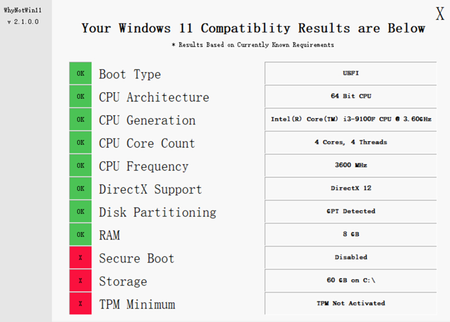
The device supports TPM 2.0 but it is not enabled. Configuring Secure Boot poses challenges as it requires completely disabling CSM compatibility mode in the BIOS. Attempting to boot in UEFI-only mode results in a black screen issue with the graphics card. Please clarify: 1. Is Secure Boot an absolute requirement for installing Windows 11? 2. How can the black screen issue with the graphics card in UEFI mode and the difficulties in configuring Secure Boot be resolved?535Views0likes4CommentsHow can I wipe an ssd but keep Windows os installed on it?
The old SSD on my laptop is to small (256 GB) and I am going to replace it with a new SSD 1 TB. Is there any safe way to wipe an SSD while keeping the operating system intact. The goal is to remove all personal files, apps, and leftover data, but not reinstall Windows or delete the system itself. Not sure if resetting the PC is the best option to wipe ssd but keep os or if there is a more secure method that keeps the OS activated and working. The computer runs Windows 10 on a single SSD. Is there a built-in feature that only removes user data, or does this require manual partition management? Also wondering about the safest way to prevent file recovery while avoiding damage to the system partition.1.3KViews0likes10Comments 13Views0likes0Comments
Why My Favorites Icons Disappeared?
I am having a strange issue on my computer where all the icons for my favorites or bookmarks have suddenly disappeared. When I open my browser, I can still see the names of my saved websites, but the little favicons or website logos that used to appear next to each bookmark are now gone, replaced by blank white pages or generic globe icons. This happened out of nowhere after a recent Windows update, and I have already tried clearing my browser cache and restarting my computer, but nothing brings them back. Has anyone else experienced this, and is there a safe way to restore those missing icons without reinstalling my browser or losing my saved favorites? Thank you so much for any help you can offer.806Views2likes4Comments
My last W11 update was in Oct-24. The trouble shooter wrongly says 'fixed'
I navigated to: Settings > System > Troubleshoot > Other troubleshooters After the troubleshooter said "fixed" I ran the Windows Update tool. I then checked for Windows update history and got the confusing message "You're up to date/Your device is missing important updates. Make sure to keep your device on and plugged in so updates can complete" which I always do anyway. I've run the process several times and always get the same result.12Views0likes0CommentsWindows 10 Freezing After Latest Security Update
After the most recent Windows 10 security update, my computer started experiencing constant freezing issues. Before this update, the system was working normally without any performance problems. The freezing happens during simple tasks, such as typing text, copying and pasting, or opening applications like Word and Chrome. When it occurs, the system becomes completely unresponsive for several seconds. Sometimes the entire interface freezes, and I have to wait for the system to respond again. This behavior started immediately after the latest security update was installed. It feels as if the system is constantly struggling to process basic actions, which makes normal use of the computer very difficult. Because of these freezes, even basic tasks such as writing documents or browsing the internet have become frustrating and unreliable. I suspect the issue may be related to the recent security update, since the problem did not exist before it was installed. I would like to know if other users are experiencing the same issue after the latest Windows 10 security update, or if there are any known solutions or fixes available.2.9KViews1like7Comments
My power plan is only showing the balanced option in control panel, no drop down for other choices
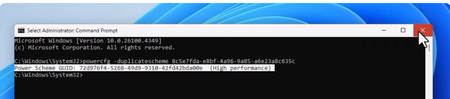
Good morning. I just received my new HP Omen yesterday and I am running Windows 11. When I open the control panel under power options I am only receiving the choice for balanced plan. Even if I try to create or change plan settings I am not offered another choice besides balanced. I called customer support and they were no help at all. In fact the representative said that since this is a desktop and not a laptop the option is not available. I know this is not true as I was able to change this on previous PCs I have owned. I found a suggestion online that mentioned working with the command prompt as an administrator, Here is what I put in: But when I opened power options again nothing has changed. I also tried powercfg /restoredefaultschemes with no luck. Any help would be appreciate. Thank you in advance.9Views0likes0CommentsWhat's the best rar password recovery tool for Windows 11
Hello everyone, when I was sorting out data recently, I found a .rar file that I compressed many years ago, and I found that it had a password... The key is that I completely forgot the password I set at the beginning. I tried several common ones but couldn't open it. I was completely devastated 😠I use Windows 11 system, and I usually use WinRAR for compression, but I have never encountered such a thing as forgetting the password. I searched the Internet and found a lot of so-called "RAR password recovery tools", some of which are too slow, and some of which look like viruses when downloaded, so I dare not use them at all. I want to ask everyone, is there any RAR password recovery tool that is more reliable and easy to use? It is best to support Windows 11, not too complicated, and can automatically run passwords or dictionaries. Free or trial is also fine.6.9KViews1like9Comments- 24Views0likes1Comment
Rare issues with hardware encryption modules (TPMs) leading to boot or security problems
specifically the TPM, which occasionally cause problems during system boot or affect security functions. These intermittent issues seem to be related to the TPM's communication or configuration, leading to potential boot failures or vulnerabilities that compromise the system’s security integrity.19Views0likes0Comments









Events
in 2 days
Join Microsoft engineers for a live Ask Microsoft Anything (AMA) focused on Secure Boot certificate updates in Windows Server environments. We’ll answer your questions about deployment planning, firm...
Wednesday, Jul 01, 2026, 08:00 AM PDTOnline
1like
9Attendees
2Comments
Navigating Secure Boot certificate updates in virtualized environments? Drop in to Secure Boot Office Hours and ask your questions live in the comments. For one hour, experts will be available to dis...
Wednesday, Jul 08, 2026, 08:00 AM PDTOnline
0likes
5Attendees
0Comments
Recent Blogs
- Stay the course: However close you are, use proven practices and resources for remaining steps.Jun 23, 20267.6KViews2likes1Comment
- Restore devices to an earlier state in minutes to keep users productive.Jun 23, 202620KViews3likes6Comments